Industry · Nonprofits
Get donor updates, grant reports, and campaign drafts done with a small staff
Nonprofits can use AI agents to draft donor thank-yous, prepare grant report sections from your own notes, plan fundraising campaigns, and keep supporter records tidy. In Brainwrite, a small team of bots handles first drafts and admin, and staff approve every message before it reaches a donor. Data stays on your machine, apart from what goes to the AI provider you choose.
Nonprofits · example team
 NovaChief of Staff
 AtlasCRM auditor
 SageInbox checker
- NovaChief of Staff
 DashDelivery tracker
Brief your Chief of Staff. It picks the specialists and runs the team.


Donor thank-you drafts: ready for you. Nothing sent.
- 1Grant report sections
- 2Campaign plans
- 3Impact stories


 Nonprofits team4 bots
Where the week goes
The work that eats your time.
Grant reporting
Each funder wants a different format, built from the same program notes and numbers.
Donor thank-yous
Every gift deserves a personal thank-you. When staff are stretched, they go out late or generic.
Campaign content
Appeals need emails, posts, and stories, written by people who also run programs.
Messy supporter records
Duplicates, missing tags, and old addresses build up in the CRM until a mailing goes wrong.
Start here
The first job to hand off.
Donor thank-you drafts
Each week a bot reads new gifts from your CRM or spreadsheet and drafts a personal thank-you for each, based on the donor's history. Staff edit and send.


Every Monday at 8:00, check our HubSpot deals for anything with no activity in 30 days, contacts that look like duplicates, and deals missing a close date or next step. List proposed fixes by owner. Do not change any records.
Your Chief of Staff put a team on it
- Atlas· CRM auditor
- Sage· Inbox checker
 Nova· Chief of Staff
- 14 deals with no activity in 30 days; 5 have no next step
- Likely duplicates: 6 contact pairs (same email domain and similar names)
- Missing close date: 9 open deals, grouped by owner
- Proposed: move the Fieldstone deal to Closed lost; the last email says they chose another vendor
DoneEvery merge, update, and deletion in the CRM waits for you. Nothing was sent.
What the team takes on
Jobs your AI team does every week.

Grant report sections
Draft report sections in the funder's format from program notes in Google Drive. Staff check every figure and outcome.

Campaign plans
Turn one audience insight into an appeal, assets for each channel, and a date to review what worked.
Impact stories
Draft blog posts and newsletter stories from program notes, for staff to check with the people involved.

Supporter record cleanup
Flag duplicates, missing tags, and gaps in Salesforce or your spreadsheet, and propose fixes for staff to approve.
Board updates
Compile a weekly or monthly summary of activity from your sheets and notes in the same format each time.
Why a team
Why this works better than a chatbot.
Approval before contact
In Ask mode, risky actions such as sending an email become approval cards. Staff decide what reaches donors.
Supporter data stays local
Chats, files, and memory stay on your machine. Text goes only to the AI provider and apps you choose.
Pay for the AI you use
Bring your own AI account and see token use and cost per thread, so you can keep spending visible.
Ready-made teams
Campaign and blog teams install from the team library with routines paused and apps off until you approve them.
In detail
See the jobs step by step.




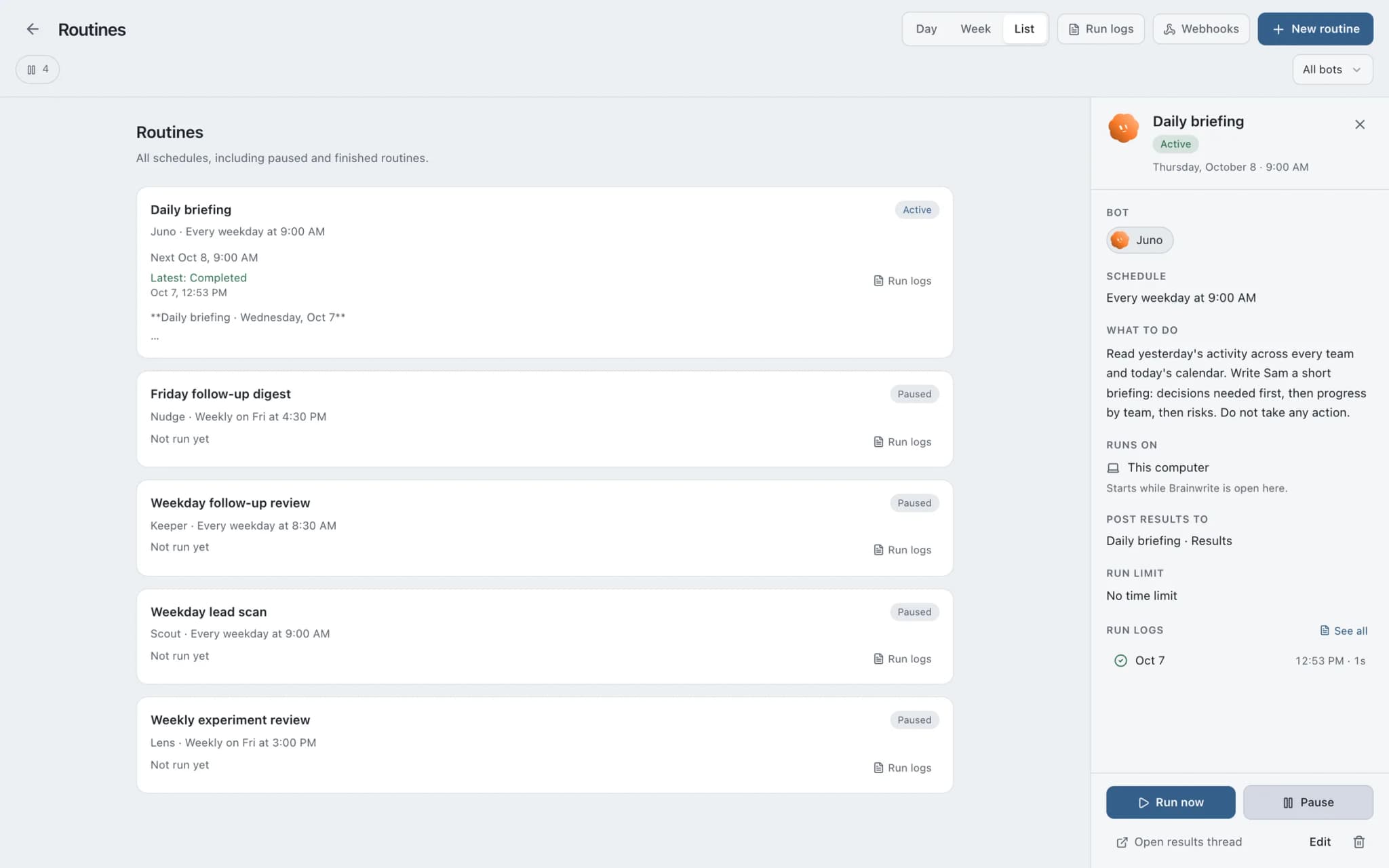
See it in the app
What it looks like in Brainwrite.
A real screenshot from a demo workspace.
Start faster
Ready-made teams to start from.
Your tools
Apps your team works in.

Mailchimp
Bots draft Mailchimp campaigns, manage tags and segments, and read reports. Sends and schedules wait for you.
Salesforce
Bots query Salesforce, review pipeline, log activity, and update records once you approve.

Google Drive
Bots find, download, upload, and organise Google Drive files, and share them once you approve.

Google Sheets
Bots read and write Google Sheets, append and upsert rows, and add charts to trackers and reports.

Canva
Create Canva designs, fill brand templates with copy, resize for each channel, and export finished files.
FAQ
Questions about Brainwrite for nonprofits
How can a nonprofit use AI agents?
Start with drafting and admin that small teams postpone: donor thank-yous, grant report sections, campaign content, and supporter record cleanup. Brainwrite runs bots on your Mac that work from your CRM, spreadsheets, and documents. Staff review each draft, check the figures, and approve every message before it reaches a donor or funder.
What does Brainwrite cost?
Brainwrite Cloud is $99 a month and includes the desktop app and an always-on cloud computer. The Organisation plan is $750 a year for teams that run Brainwrite on their own server. Neither plan includes AI usage, which your AI provider bills. There is no free plan or trial.
Is donor data kept private?
Chats, files, and bot memory stay on your machine, and Brainwrite's account service sees only your email and plan. The data a bot works on is sent to the AI provider you choose and to the apps you connect. Check your provider's terms against your privacy policy and any funder requirements.
Related
Related industries.

Content creators
Research, repurposing, and drafts in your own voice across channels, with you approving every post.

Local businesses
Local SEO checks, customer reply drafts, quote follow-ups, and competitor watch for businesses that serve a local area.

Consultants
Meeting briefs, sourced research, competitor watch, and client updates prepared by bots, with your judgment on top.

Give your first job to Brainwrite.
Download the app, connect the AI you already pay for, and tell your Chief of Staff what needs doing.
macOS today. Windows and Linux are coming soon.