Teams and agents
Brief one bot. Let the team do the work.
A Chief of Staff in Brainwrite is a bot role that receives your requests, delegates focused tasks to the specialist bots on its team, and summarises the results for you. You talk to one bot instead of five. Each specialist keeps its own model, memory and permissions, and every delegated task reports back as completed, failed or cancelled.


Plan my week. Check the Northwind Studio launch thread, see what is due, and draft replies to anything waiting on me.
Your Chief of Staff put a team on it
 Nova· Chief of Staff
 Atlas· Inbox specialist
 Dash· Schedule and task specialist
- Research bot: 3 open questions on the launch brief, summarised below.
- Inbox bot: 4 threads are waiting on you; 2 replies drafted.
- Ops bot: Thursday's review clashes with a client call; two new times proposed.
- Delegated tasks: 3 completed, 0 failed.
Done2 email drafts to approve before they send: waiting for your yes.
 AtlasResearch12 user calls summarisedNovaChief of Staff2 things need you
 SageWriterLanding page, draft 2
 PennyNumbersRunway updated
Monday plan: done. One thing waits for you.
- 1Research bot: 3 open questions on the launch brief, summarised below.
- 2Inbox bot: 4 threads are waiting on you; 2 replies drafted.
- 3Ops bot: Thursday's review clashes with a client call; two new times proposed.
 3 bots on this job
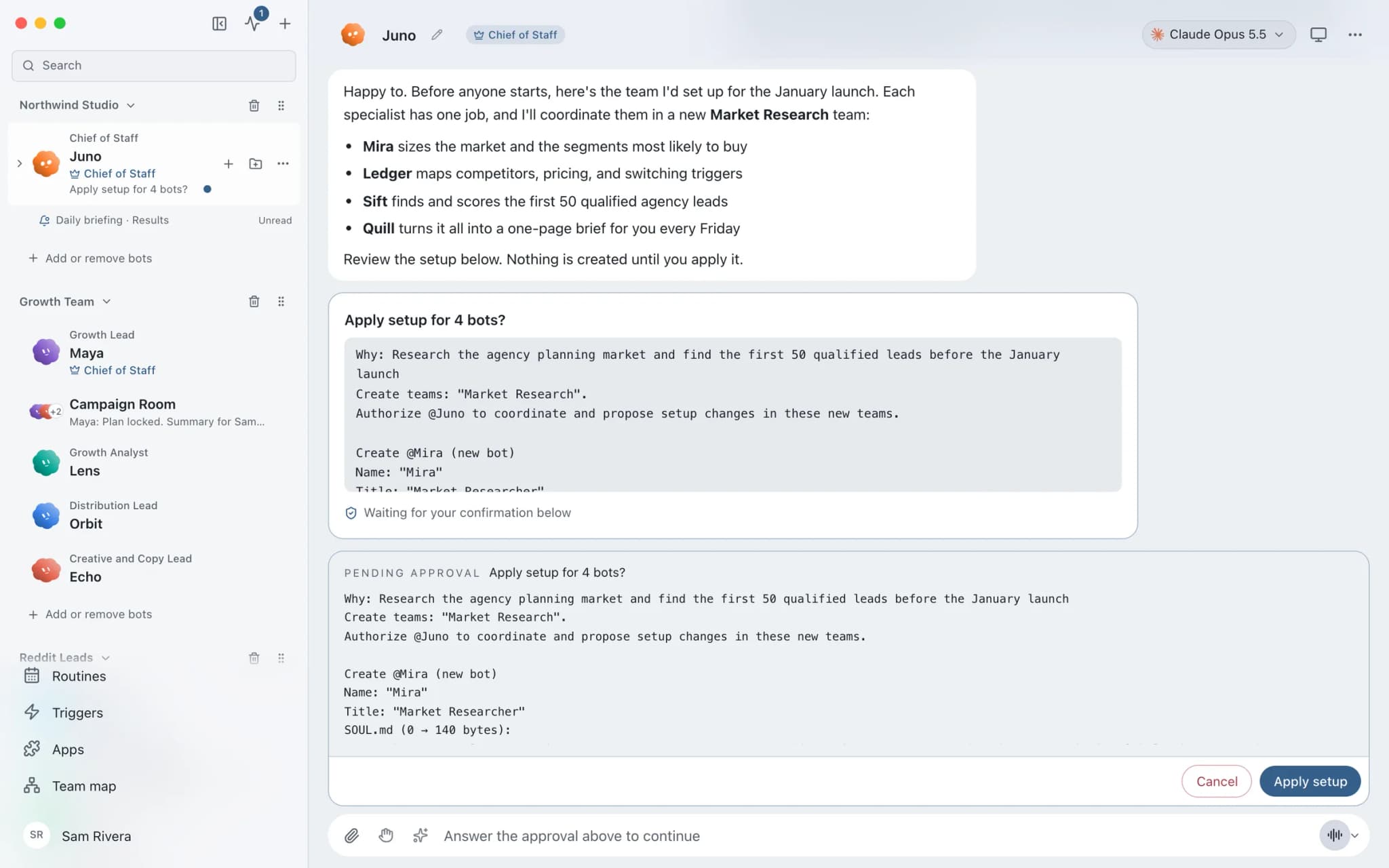
See it in the app
Chief of Staff in Brainwrite.
Why it matters
On your own, with a chatbot, and with Brainwrite.
| Doing it yourself | A single chatbot | Brainwrite | |
|---|---|---|---|
| Splitting a big request | You break it up and brief each person or tool | One assistant works through every part in one chat | The Chief hands bounded tasks to specialists with their own models and permissions |
| Knowing where each part stands | You chase every piece | You scroll back through one long conversation | Each delegated task reports completed, failed or cancelled |
| A missing skill | Find someone who has it | Ask the same assistant to try | The Chief can create a specialist, with apps and automatic approvals off |
| What you read at the end | Every output | The whole transcript | One summary from the Chief |
How it works
How Chief of Staff works.
- 01
Gather the team
Put the bots in a named team with Add bots in the sidebar. Each team has at most one Chief of Staff, who coordinates the rest.
- 02
Brief the Chief
Send your request to the Chief in plain language, the way you would brief a person. Name the outcome you want and any limits.
- 03
It delegates bounded tasks
The Chief hands each specialist a narrow subtask. Each delegated run keeps its own activity and reports its status back to your conversation.
- 04
It adds a specialist if one is missing
The Chief can create a specialist in its own team with the engine, model and reasoning effort you ask for. The new bot starts with connected apps and automatic approvals off.
- 05
You get one summary
The Chief collects what came back and summarises it, so you read one answer instead of checking every bot.
Good to know
The details.
One Chief per team
A team has at most one Chief. Brainwrite refuses a membership change that would put two Chiefs in the same team. To replace a Chief, the change must remove the old one and appoint the new one together.
Chiefs can appoint Chiefs
Ask an existing Chief to appoint a bot as Chief of a team it is authorised to manage, including a new team it creates. In Ask mode you choose Apply setup or Cancel; Full Access applies it at once.
No inherited access
A new Chief can coordinate and configure its own team. It does not inherit its creator's access to other teams or its execution permissions. Removing the assignment removes the extra team access too.
New specialists start locked down
A specialist the Chief creates has connected apps and automatic approvals off. If you do not name a model, it uses the workspace default, not the Chief's model. An invalid model choice is rejected, not swapped.
Clear ownership
Give each delegate a narrow outcome and avoid giving two bots the same files. Brainwrite reports contention on a shared computer, browser or folder instead of letting two agents change it at once.
The edges, plainly
- Each specialist still runs with its own model and permissions, so approval cards can still appear in a delegated task and wait for you.
- A team can only have one Chief, so moving a second Chief into a team is refused until you move or change one of them.
- Delegation works best with narrow tasks. Two bots given the same files or the same outcome will collide.
Use cases
Jobs this feature does for you.





Works with
Apps it's often used with.

Gmail
Bots search, label, and read Gmail threads and draft replies in place. Sending waits for your approval.

Slack
Bots search Slack, summarise channels and threads, and post or schedule updates once you approve.

Google Calendar
Bots read your Google Calendar, find free slots, and create or move events. Invites wait for your approval.

Notion
Bots search Notion, read and write pages, query databases, and add or update rows and comments.
FAQ
Questions about Chief of Staff
What does an AI chief of staff do?
In Brainwrite, a Chief of Staff is a bot role. It receives your requests, delegates focused tasks to specialist bots on its team, and summarises the results. You brief one bot, and the specialists do the work with their own models, memory and permissions. Delegated tasks report back as completed, failed or cancelled.
Can an AI agent create other AI agents?
Yes, within limits. A Chief of Staff can create a specialist bot in its own team and set its engine, model and reasoning effort if you ask. The new bot starts with connected apps and automatic approvals switched off, so it cannot act in your accounts until you give it access.
Can a team have more than one Chief of Staff?
No. Each team has at most one Chief. Brainwrite refuses a membership change that would put two Chiefs in the same team. To replace a Chief, the setup must remove the old assignment and appoint the new Chief in the same change.
Does a Chief of Staff bot get access to all my other bots?
No. A Chief coordinates and configures its own team. A Chief appointed by another Chief does not inherit that creator's access to other teams or its execution permissions. Removing a Chief assignment also removes the extra team-management access that came with it.
Works well with
Related features.

Threads and groups
Up to three independent threads per bot, plus group chats where several bots share one brief.

Team library
Add a ready-made team of bots in one click. Preview first; routines arrive paused and apps stay off.

Approvals
Risky actions become cards you approve or deny in the conversation. Ask or Full Access per thread.

Routines
Run a bot's task once, on an interval, or on chosen weekdays, with a receipt for every run.





Give your first job to Brainwrite.
Download the app, connect the AI you already pay for, and tell your Chief of Staff what needs doing.
macOS today. Windows and Linux are coming soon.