Industry · Law firms
Clear intake, scheduling, and first drafts so lawyers can do legal work
Law firms can use AI agents for the administrative work around legal matters: sorting the intake inbox, scheduling consultations, summarising long documents, and preparing first drafts for a lawyer to review. In Brainwrite, bots work only with the files and apps you grant them. Chats and files stay on your machine, and in Ask mode risky actions wait for approval.
Law firms · example team
 NovaChief of Staff
- NovaChief of Staff
 DashInbox triager
 SageReply drafter
 PennyInbox and CRM specialist
Brief your Chief of Staff. It picks the specialists and runs the team.


Triage the intake inbox: ready for you. Nothing sent.
- 1Consultation scheduling
- 2Document summaries and chronologies
- 3Client call prep


 Law firms team4 bots
Where the week goes
The work that eats your time.
Intake email
Enquiries from prospective clients arrive mixed with existing matters, vendors, and spam. Sorting them is daily work for someone senior enough to judge.
Scheduling consultations
Finding a slot that suits the client and the right lawyer takes several emails per booking.
Long documents to summarise
Contracts, correspondence, and disclosure need summaries and chronologies before anyone can advise.
Being found locally
Most clients search for a lawyer nearby. Practice pages and listings drift out of date.
Start here
The first job to hand off.
Triage the intake inbox
A bot reads new messages in the intake mailbox, separates prospective clients from existing matters and noise, and drafts a reply or a consultation offer for staff to check and send.


Every weekday at 8, go through my work Gmail. Put anything from clients or about invoices at the top, list newsletters and receipts separately, and draft replies for client questions. Do not send or archive anything.
Your Chief of Staff put a team on it
 Nova· Chief of Staff
- Dash· Inbox triager
- Sage· Reply drafter
- Needs you (4): two client questions, one invoice dispute, one contract to sign
- Draft ready for Priya at Harbor & Pine about the revised timeline, waiting for your approval
- Waiting on others (6): replies you sent where the other side owes the next step
- Ignore (31): newsletters, receipts, and notifications, listed in one block
DoneWhich replies get sent, edited, or dropped waits for you. Nothing was sent.
What the team takes on
Jobs your AI team does every week.
Consultation scheduling
Propose times from the lawyer's calendar and draft the confirmation, ready for staff approval.

Document summaries and chronologies
Summarise documents placed in a bot's working folder and draft a dated chronology for the lawyer to verify against the originals.

Client call prep
Before a call, pull the last correspondence and open items on the matter into a one-page brief.

Local search visibility
The Local SEO team checks the firm's site, Business Profile signals, reviews, and listing consistency, and returns a fix list.
Practice area articles
Draft explanatory articles on your practice areas for a lawyer to review and correct before publishing.
Why a team
Why this works better than a chatbot.
Local-first, with your choice of model
Chats, files, and memory stay on your machine. You choose the AI provider for each bot, including local models through OpenCode, Ollama, or LM Studio.
Narrow app access per bot
Give the intake bot email and calendar only. Each bot's grant is all tools, an exact list, or none, and imported bots start with none.
Memory you control
Bot memory is plain text you can read, edit, and delete, so matter details are not held in a hidden profile.
Approval before sending
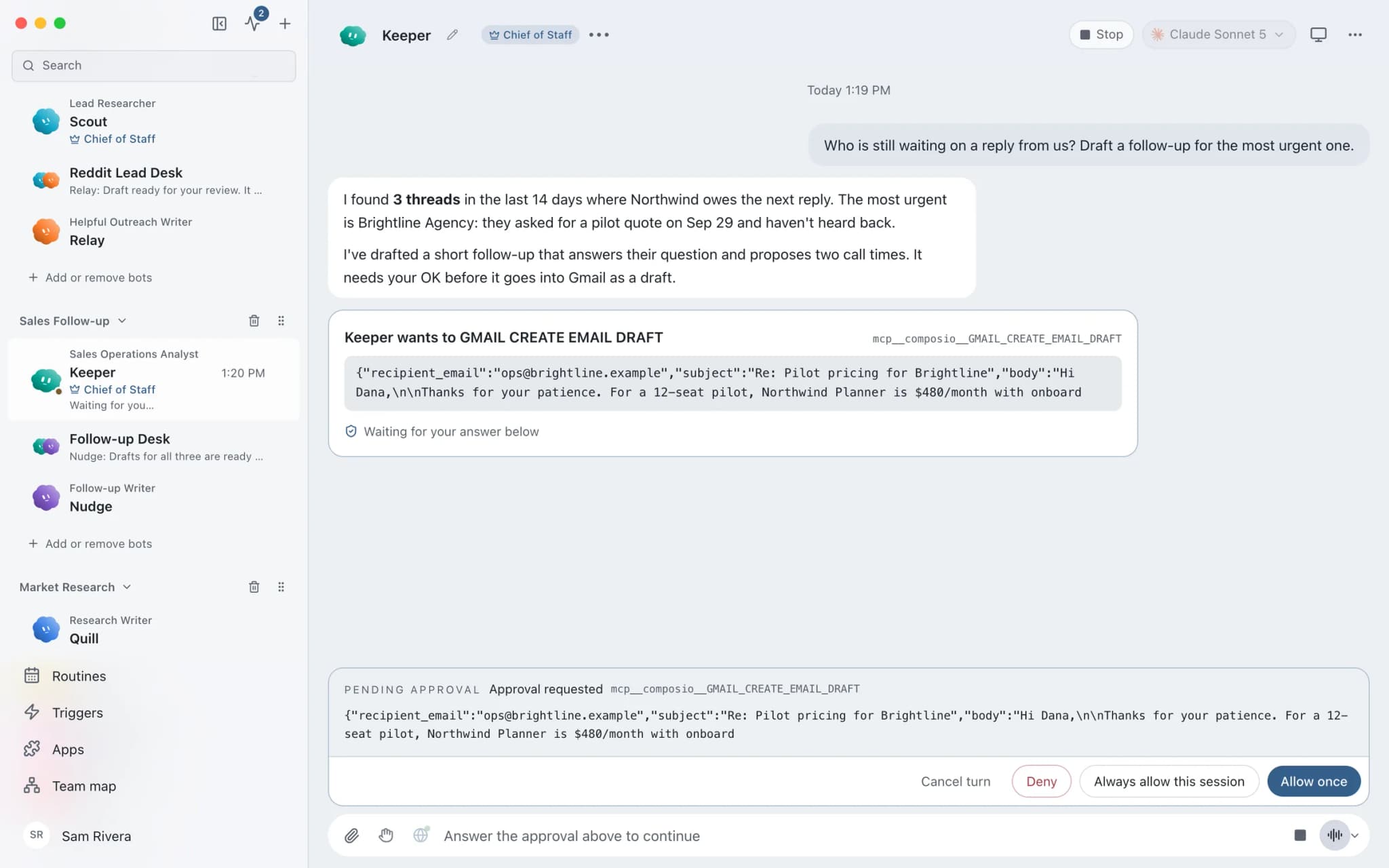
In Ask mode, risky actions such as sending an email appear as approval cards. Staff approve or deny each one in the conversation.




See it in the app
What it looks like in Brainwrite.
A real screenshot from a demo workspace.
Start faster
Ready-made teams to start from.
Your tools
Apps your team works in.

Outlook
Bots search Outlook mail, draft replies, file messages, and find meeting times. Sends wait for your approval.

Gmail
Bots search, label, and read Gmail threads and draft replies in place. Sending waits for your approval.

Calendly
Bots read Calendly bookings and invitee answers, create one-time booking links, and flag no-shows.

Google Drive
Bots find, download, upload, and organise Google Drive files, and share them once you approve.

Dropbox
Bots search, read, upload, and move Dropbox files, and create shared links once you approve.
FAQ
Questions about Brainwrite for law firms
How can a law firm use AI agents?
Use them for administrative and preparatory work: triaging intake email, scheduling consultations, summarising documents, preparing call briefs, and drafting practice area articles. In Brainwrite, each bot works only with the apps and files you grant it, and a lawyer reviews every draft. Bots do not give legal advice.
Is client information kept confidential?
Chats, files, and bot memory stay on your machine, and Brainwrite's account service sees only your email and plan. The text a bot works on is sent to the AI provider you choose, under that provider's terms. Check those terms against your professional obligations, or use a local model so prompts stay on your hardware.
Can I use a local model instead of a cloud AI provider?
Yes. Brainwrite can run local models through OpenCode with Ollama or LM Studio, and you pick the model per bot and per thread. Local models keep prompts on your machine but are usually less capable than large hosted models, so test them on non-sensitive material before relying on them.
Does Brainwrite have SOC 2 or similar certification?
No. Brainwrite does not hold SOC 2, ISO 27001, or HIPAA certification. What it offers is a local-first design: data stays on your machine, the harness listens only on loopback, secrets sit in the macOS secure store, and bots reach only the providers and apps you choose. Assess that against your firm's own policies.
Related
Related industries.

Accountants
Document chasing, inbox triage, and draft summaries from your accounting data, with every figure checked by you.

Consultants
Meeting briefs, sourced research, competitor watch, and client updates prepared by bots, with your judgment on top.

Real estate
Lead replies, showing scheduling, follow-ups, and listing drafts prepared by bots, approved by you before anything sends.

Give your first job to Brainwrite.
Download the app, connect the AI you already pay for, and tell your Chief of Staff what needs doing.
macOS today. Windows and Linux are coming soon.