Use case · Sales
Catch every sales thread where you owe the next step
To handle sales follow-ups with AI agents, install the Recover Unanswered Sales Emails team in Brainwrite and connect Gmail. Keeper finds conversations where your team owes a reply or promised a next step, removes closed and opted-out threads, and ranks the rest. Nudge drafts a short follow-up for each. You review every message before it goes.


Every weekday, check the Sales label in my Gmail for threads older than four business days where we promised the next step. Skip anything closed in HubSpot. Draft the follow-ups but do not send them.
Your Chief of Staff put a team on it
 Atlas· Keeper, Sales Operations Analyst
 Sage· Nudge, Follow-up Writer
- 7 threads where we owe the next step; 12 excluded as closed, opted out, or already answered
- Top item: Dana at Fieldstone was promised a pricing sheet 6 business days ago (owner: you, confidence high)
- Follow-up for Fieldstone drafted and waiting for your approval
- Low confidence: Corvel thread may be a support issue, not a sale; review before drafting
DoneSaved as a routine: Weekdays at 8:30, with a Friday digest at 16:30. It starts paused until you turn it on.


Sales follow-ups: done. Nothing sent.
- 17 threads where we owe the next step; 12 excluded as closed, opted out, or already answered
- 2Top item: Dana at Fieldstone was promised a pricing sheet 6 business days ago (owner: you, confidence high)
- 3Follow-up for Fieldstone drafted and waiting for your approval
 2 bots on this job
The job
Doing it yourself, and handing it off.
Doing it yourself
Deals rarely die from a no. They go quiet because someone said they would send pricing on Thursday and Thursday got busy. Finding those threads means searching the inbox by name, rereading each conversation to see who spoke last, checking the CRM to see whether the deal already closed, and then writing a follow-up that does not read like a template. Most weeks, only the loudest deals get that attention.
What the team does
- Find threads where your team made the last promise and the prospect is waiting
- Exclude opt-outs, closed or lost deals, duplicates, and automated or internal mail
- Rank the queue by commitment, buying intent, age, and confidence
- Draft a specific follow-up with a truthful reason for writing now
What waits for you
- Which follow-ups get sent, and when
- Any change to CRM records
- Which mailboxes, stages, and owners are in scope
See it in the app
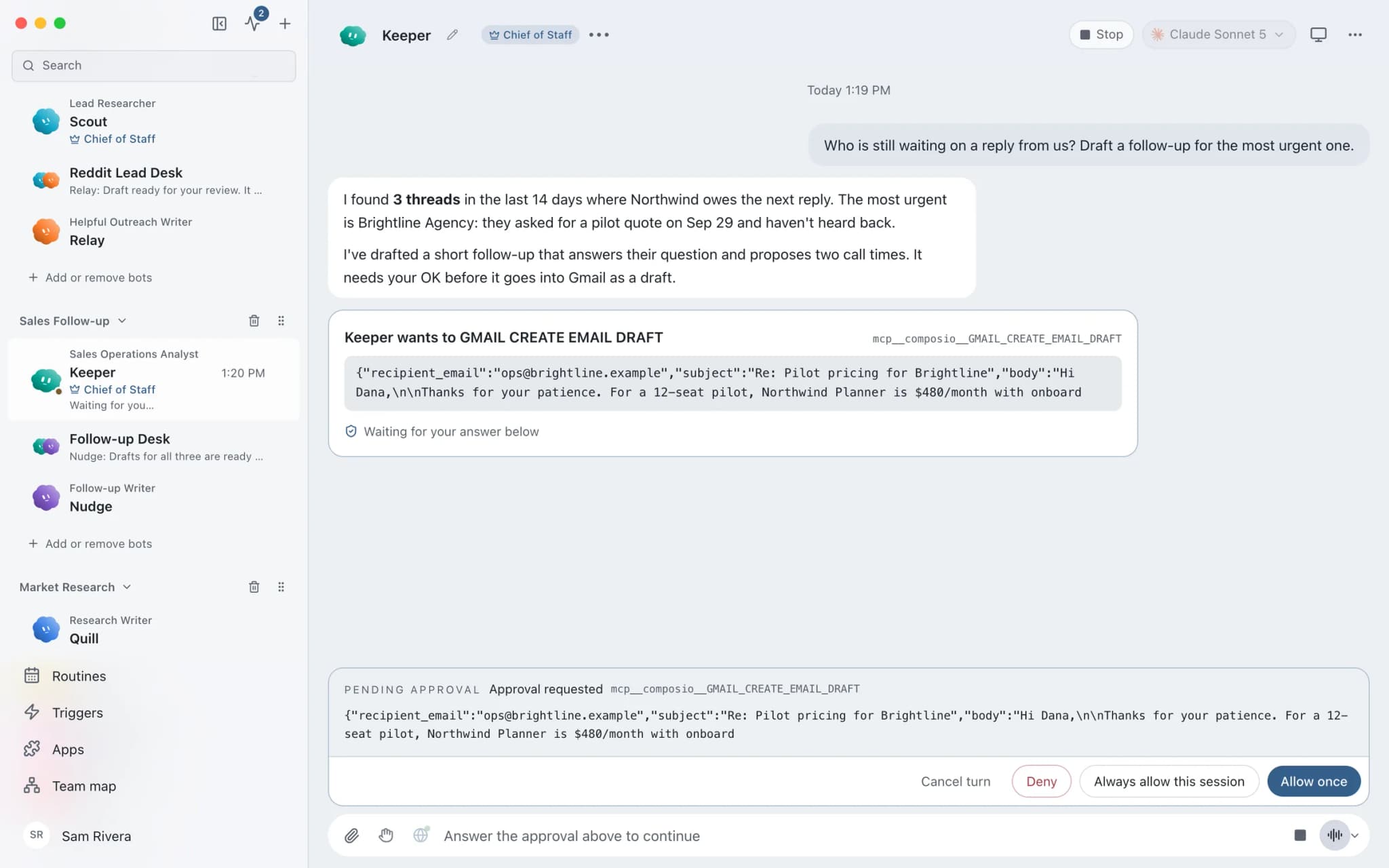
What it looks like in Brainwrite.
A real screenshot from a demo workspace.
The team
Who's on it.
Your Chief of Staff picks the specialists the job needs. Each has its own role, instructions, model, and app access.
 AtlasIllustrated example
Keeper, Sales Operations Analyst
Works only in the mailboxes, labels, owners, and date window you approve. Rebuilds each thread's latest state from email and CRM, and excludes closed deals, opt-outs, duplicates, automated mail, and internal threads.
 SageIllustrated example
Nudge, Follow-up Writer
Drafts the smallest useful follow-up from the actual conversation, keeping its names, dates, and commitments. Never invents urgency, discounts, or earlier promises, and never sends.
How it runs
A run, step by step.
- 01
Install the team
Add the team from teams.brainwrite.in. Its routines arrive paused and its apps stay off until you approve them.
- 02
Set the scope
Connect Gmail and, optionally, HubSpot. Tell Keeper which mailbox or label, owners, deal stages, and date window to use.
- 03
Review the queue
Weekdays at 8:30, Keeper returns a ranked queue with owner, last meaningful exchange, promised next step, age, and confidence.
- 04
Approve the drafts
Nudge drafts a follow-up for each item, and you edit, send, or drop it. Fridays at 16:30, Nudge reports how many drafts were sent, are waiting, or are overdue.
Start faster
Ready-made teams for this job.
Add a team from the library in one click. You see a preview first; routines arrive paused and connected apps stay off until you approve them.


FAQ
Questions about Sales follow-ups
Will the AI send follow-up emails automatically?
No. The team is built to draft only. Its instructions tell both bots never to send email or update the CRM without your explicit approval, and a send through Gmail goes through Brainwrite's approval cards. You read each draft, change what you want, and decide whether it goes.
Do I need a CRM to use it?
No. Gmail is the one required app. HubSpot is optional: when it is connected, Keeper uses the deal state to exclude closed or lost deals and to confirm who owns the follow-up. Without it, Keeper works from the email threads alone and gives each item a confidence level.
How does it avoid nagging people who already replied?
Keeper rebuilds the latest meaningful exchange in each thread before anything is queued. If the prospect sent the last real reply, or the thread is closed, opted out, internal, automated, or a duplicate, it is excluded. Every remaining item says why the follow-up is due and who owns it.
When do the routines run?
The team includes two routines: a weekday follow-up review at 8:30 and a Friday digest at 16:30. Both install paused, so nothing runs until you turn them on. On your Mac, Brainwrite must be running at those times; Brainwrite Cloud runs routines around the clock.
Built on
Features this job relies on.
Team library
Add a ready-made team of bots in one click. Preview first; routines arrive paused and apps stay off.
Routines
Run a bot's task once, on an interval, or on chosen weekdays, with a receipt for every run.
Approvals
Risky actions become cards you approve or deny in the conversation. Ask or Full Access per thread.
Connected apps
Gmail, GitHub, Slack, Notion and hundreds more via OAuth, with per-bot tool grants.
Keep going
Put a team on something else.











Give your first job to Brainwrite.
Download the app, connect the AI you already pay for, and tell your Chief of Staff what needs doing.
macOS today. Windows and Linux are coming soon.