Security and privacy
Stored on your machine. Shared on your terms.
Brainwrite keeps your conversations, files, and bot memory on your own computer. Bots reach only the AI providers and apps you choose, risky actions wait for your approval, and secrets are inserted into requests without bots ever seeing them. Here is exactly where everything lives, and what we don't have yet.

Where your data lives
Every piece of data, and who can see it.
| Data | Where it’s stored | Who sees it |
|---|---|---|
| Chats, files, bot memory, and agent state | On your Mac (or on your own Cloud computer with Brainwrite Cloud) | You |
| What a bot sends to its AI model | Your chosen provider: Anthropic, OpenAI, xAI, Google, a local model… | You and that provider, under its terms |
| Connected-app sign-ins (OAuth tokens) | Composio, the connection service | Never written into bot prompts or the app's interface |
| Secrets you save for skills | Your Mac's secure store | Inserted by Brainwrite only when sending, only to the one site you allow |
| Your email and plan | Brainwrite's account service | Brainwrite, for sign-in and billing |
| Card details | Stripe | Never reach Brainwrite |
Control
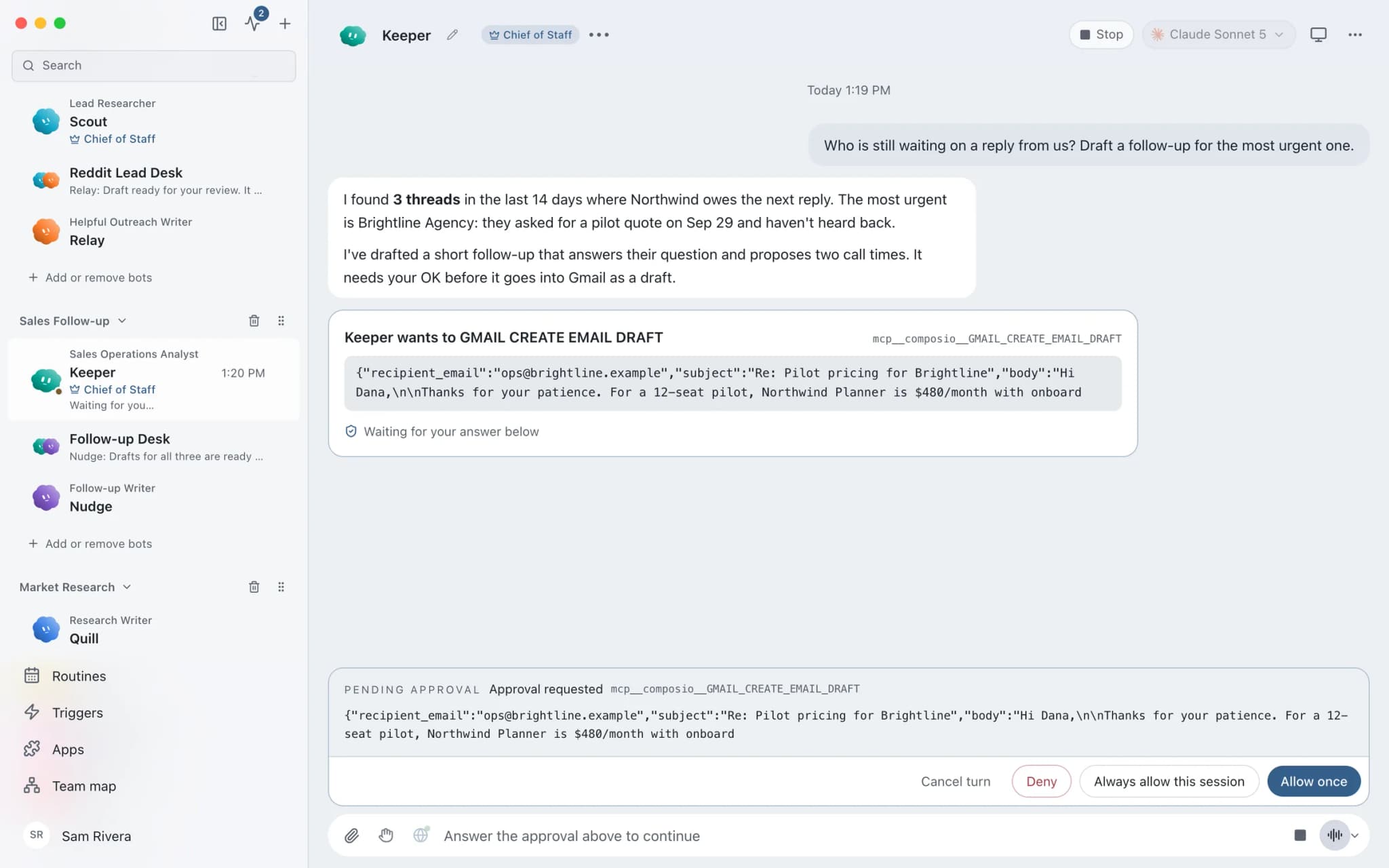
Bots ask before they act.
Approval cards
In Ask mode, risky actions such as shell commands, file writes, and changes in connected apps become cards in the conversation. Deny one and the bot looks for a safer path.
Per-bot app grants
Each bot gets all tools, an exact list, or none for every connected app. A tool a bot isn't granted is never offered to its model, and every allow or deny is logged.
Imported bots start with nothing
Bots from shared team files arrive with no app grants, routines arrive paused, and nothing in a team file can see your chats, AI accounts, or computers.
Preview isn't permission
Watching a bot's screen doesn't let it control your Mac. Controlling this computer is a separate opt-in per bot; isolated VMs and cloud computers are available instead.
Secrets bots never see
A bot names a secret; Brainwrite adds the value only when sending, only over https to the one site you allow, never follows redirects, and scrubs it from responses.
Narrow phone access
Paired phones use a default-deny allowlist and their own revocable token. Provider keys, webhook secrets, and grant editing are unreachable from a phone.
Under the hood
How the app is put together.
- The local harness that runs your agents listens only on loopback (127.0.0.1).
- The app's interface learns whether a credential is configured, never its value.
- Each agent engine receives only its own provider's credentials.
- Webhooks use a separate receiver exposing only health and secret hook routes, with bearer authentication preferred.
- Settings use operating-system-backed encryption where supported, and secret values are scrubbed from configuration and mobile APIs.
- The Mac app is signed and notarised, and updates itself.
- The desktop app has no analytics and no tracking.
Being straight with you
What we don't have yet.
- No SOC 2, ISO 27001, or HIPAA certification. If your work requires one, Brainwrite isn't a fit for that data today.
- Your AI provider sees what a bot sends it. Choose a provider whose terms fit your data, or run a local model.
- Brainwrite assumes the signed-in Mac user owns the workspace. On shared machines, other administrators may be able to read app data; use a dedicated macOS account.
- Secrets work in the desktop app only, not yet on Brainwrite Cloud, a self-hosted server, or the phone apps.
Report a vulnerability
Found a security problem?
Please report it privately, not in a public issue: use the contact form with “Security” in the subject, and include the version of Brainwrite, steps to reproduce, and the impact. Don’t include live secrets. We’ll confirm we’ve received it and keep you updated until it’s fixed.
FAQ
Questions about your data and security
Does Brainwrite see my conversations?
No. Conversations, files, and agent state stay on your Mac, or on your own Cloud computer with Brainwrite Cloud. Brainwrite's account service knows your email and your plan, for sign-in and billing, and nothing about what your bots do.
What does my AI provider see?
Whatever a bot sends to its model: your messages, the files and app data it reads for the task, and its instructions. That goes directly from your computer to the provider you chose, under that provider's terms and privacy policy, not through Brainwrite.
Can a bot send an email or post without me?
Not in Ask mode. Changes in connected apps, shell commands, and file writes become approval cards first. You can allow specific actions, or switch a thread to Full Access, but that's your explicit choice per thread, and you can refresh a thread's permissions later.
Is Brainwrite SOC 2 or HIPAA compliant?
No. Brainwrite has no SOC 2, ISO 27001, or HIPAA certification today. Its local-first design keeps your data off Brainwrite's servers, but if your work requires a certified vendor, check your obligations before using it with regulated data.





Give your first job to Brainwrite.
Download the app, connect the AI you already pay for, and tell your Chief of Staff what needs doing.
macOS today. Windows and Linux are coming soon.