Teams and agents
Use the AI subscriptions you already pay for
Bring your own model means Brainwrite starts the agent CLIs already on your Mac, such as Claude, Codex, Grok, Cursor, Kimi, Factory Droid, Antigravity, OpenCode, Qwen, Hermes and Pi, and shows them in one consistent chat. It also supports the Mistral API and local models. Your provider bills your usage, and Brainwrite does not route your messages through its own model account.


Review the checkout code in this repository and list the three riskiest functions. Do not change files yet.
Your Chief of Staff put a team on it
 Nova· Chief of Staff
 Dash· Triage bot
 Atlas· Rigel, QA and Release Engineer
- 1. applyDiscount: no test covers stacked coupons.
- 2. chargeCard: retries without an idempotency key.
- 3. formatTotal: rounds before tax instead of after.
- Running on your own Codex login; the research bot stays on Claude.
DoneDone. Nothing was sent.
 AtlasResearchRoot cause foundDashOpsTests passing
The right engine for the job: done. Nothing sent.
- 11. applyDiscount: no test covers stacked coupons.
- 22. chargeCard: retries without an idempotency key.
- 33. formatTotal: rounds before tax instead of after.
 3 bots on this job
See it in the app
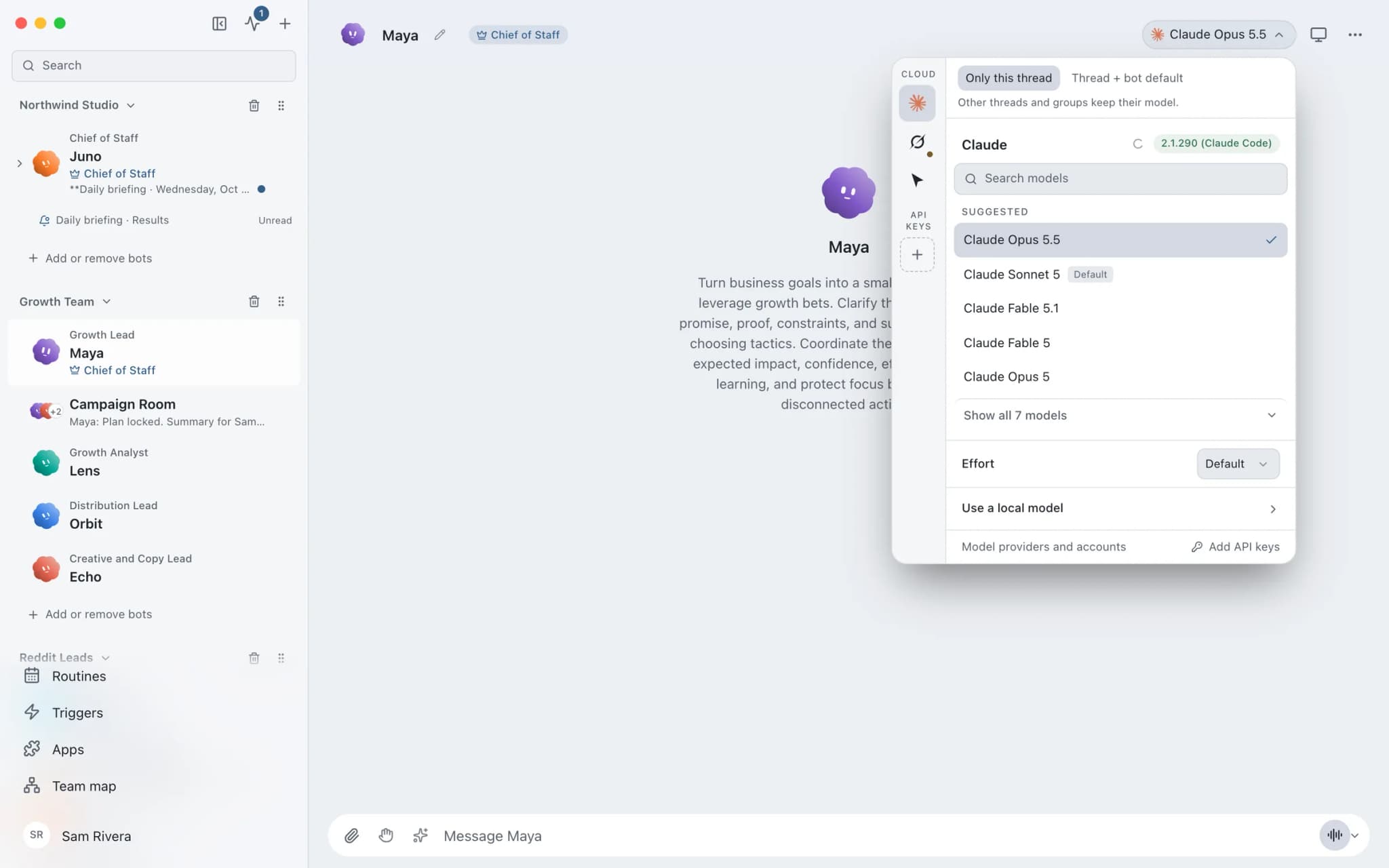
Bring your own model in Brainwrite.
Why it matters
On your own, with a chatbot, and with Brainwrite.
| Doing it yourself | A single chatbot | Brainwrite | |
|---|---|---|---|
| Which models | One app per provider | The models that product offers | Claude, Codex, Grok, Cursor, local models and more, per bot and per thread |
| Who bills you | Each subscription separately | That product's plan | Your own login or API key; your provider bills usage |
| Mixing models | Copy work between apps | Usually one provider's models | A Codex coding bot and a Claude research bot, at the same time |
| Private or offline work | Run a local model by hand | Usually needs the internet | Local models through OpenCode, Ollama or LM Studio |
How it works
How Bring your own model works.
- 01
Install and sign in to a CLI
Install a supported agent CLI and finish its own login, or keep the one you already use. Restart Brainwrite after installing so it is detected.
- 02
Check detection
Open Settings → Engines. If an engine is installed somewhere unusual, or behind a version manager or wrapper, set its executable path there.
- 03
Pick a model per bot
In a bot's model picker, choose the engine and model. The picker groups models by provider, marks defaults, and separates cloud engines from local ones.
- 04
Override per thread
Each thread remembers its own model, so one bot can use a fast model for triage and a stronger one for a hard problem.
Good to know
The details.
Mistral without a CLI
Save a Mistral API key in Settings → Connections and choose Mistral (API) in the picker. Test checks catalog access without sending a chat message. This connection does not get filesystem access.
Local models
Run local models through OpenCode, Ollama or LM Studio for private or offline work. Brainwrite itself keeps working offline for up to 7 days since its last account check.
Antigravity with your Google account
Choose Install official Antigravity, then Sign in with Google. Brainwrite checks the download from dl.google.com against a pinned size and SHA-256 and never asks for your Google password.
Live model lists
Supported engines refresh their catalog from the installed CLI. Codex reads the signed-in CLI's live list, and Brainwrite offers an update command when a newer stable Codex release exists.
One broken engine does not break the rest
An engine that is not available stays visible with a reason, instead of taking the other engines down with it.
The edges, plainly
- AI usage is not included in any Brainwrite plan. Your CLI login or API key decides what you can use and who bills you.
- One subscription does not give access to another provider's models.
- If an engine returns a 401 or asks you to sign in, finish that CLI's own login, then refresh detection in Settings.





FAQ
Questions about Bring your own model
Which AI models can I use in Brainwrite?
Brainwrite starts the agent CLIs you already have: Claude, Codex, Grok, Cursor, Kimi, Factory Droid, Antigravity (Google), OpenCode, Qwen, Hermes and Pi. It also connects to the Mistral API with your key, and to local models through OpenCode, Ollama or LM Studio. You pick the engine and model per bot.
Does Brainwrite include AI usage in its price?
No. Neither the Brainwrite Cloud plan nor the Organisation plan includes AI usage. Brainwrite starts the agent CLIs you sign in to yourself, or uses your API key, and your provider bills that usage under its own terms and limits.
Can I run AI agents on local models?
Yes. Local models run through OpenCode, Ollama or LM Studio, and the model picker shows local engines separately from cloud-backed ones. A local-model bot suits private or offline work. Brainwrite itself keeps working for up to 7 days without reaching its account service.
Can different bots use different AI models at the same time?
Yes. Pick an engine and model per bot, and each thread can keep its own model too. A coding bot can run on Codex while a research bot runs on Claude and a private bot runs on a local model, all at once.
Works well with
Related features.

Multiple Claude accounts
Add Work and Personal Claude logins and choose one per bot. The chat header shows which is in use.

Usage and cost
Per-thread tokens and cost, split into uncached input, cached input and output.

Threads and groups
Up to three independent threads per bot, plus group chats where several bots share one brief.

Brainwrite Cloud
Your own always-on computer that runs your bots 24/7, routines included. $99 a month.





Give your first job to Brainwrite.
Download the app, connect the AI you already pay for, and tell your Chief of Staff what needs doing.
macOS today. Windows and Linux are coming soon.