Use case · Operations
Start each day with one brief instead of five tabs
To get a morning brief from AI agents, set a weekday routine on your Chief of Staff bot in Brainwrite. At the time you choose, it reads your calendar, inbox, and task tools, asks specialists for anything it needs, and posts one short brief to a dedicated results thread. Earlier briefs stay in the same thread, dated.


Set up a routine for weekdays at 7:45. Check my Google Calendar for today, my Gmail since 6pm yesterday, my Slack mentions, and the Linear issues assigned to me. Post a brief to a thread called Morning brief: decisions needed first, then meetings, then everything else.
Your Chief of Staff put a team on it
 Nova· Chief of Staff
 Atlas· Inbox specialist
 Dash· Schedule and task specialist
- Decide today: approve the Northwind renewal quote before their 14:00 deadline
- 3 meetings today; prep notes attached for the 11:00 with Northwind
- Clash: design review and the Lumen call both sit at 15:30
- 2 overnight emails need you; replies drafted and waiting for your approval
DoneSaved as a routine: Weekdays at 7:45. It starts paused until you turn it on.
 AtlasResearch12 user calls summarisedNovaChief of Staff2 things need you
 SageWriterLanding page, draft 2
 PennyNumbersRunway updated
Morning brief: done. Nothing sent.
- 1Decide today: approve the Northwind renewal quote before their 14:00 deadline
- 23 meetings today; prep notes attached for the 11:00 with Northwind
- 3Clash: design review and the Lumen call both sit at 15:30
 3 bots on this job
The job
Doing it yourself, and handing it off.
Doing it yourself
Every morning starts with the same tour. Calendar for today's meetings, email for what came in overnight, Slack for mentions, the task tool for what is due, maybe a dashboard for yesterday's numbers. Each app shows its own slice, and you stitch them together in your head while the first meeting gets closer. Anything you missed on the tour shows up later as a surprise, usually in the middle of something else.
What the team does
- Read today's calendar and point out clashes or meetings with no agenda
- Pull overnight email and mentions that need a decision today
- List tasks that are due or overdue in your task tool
- Write one ordered brief, with an optional voice note of up to 1000 characters
What waits for you
- What goes first in the brief and what gets left out
- Any reply, reschedule, or task change the brief suggests
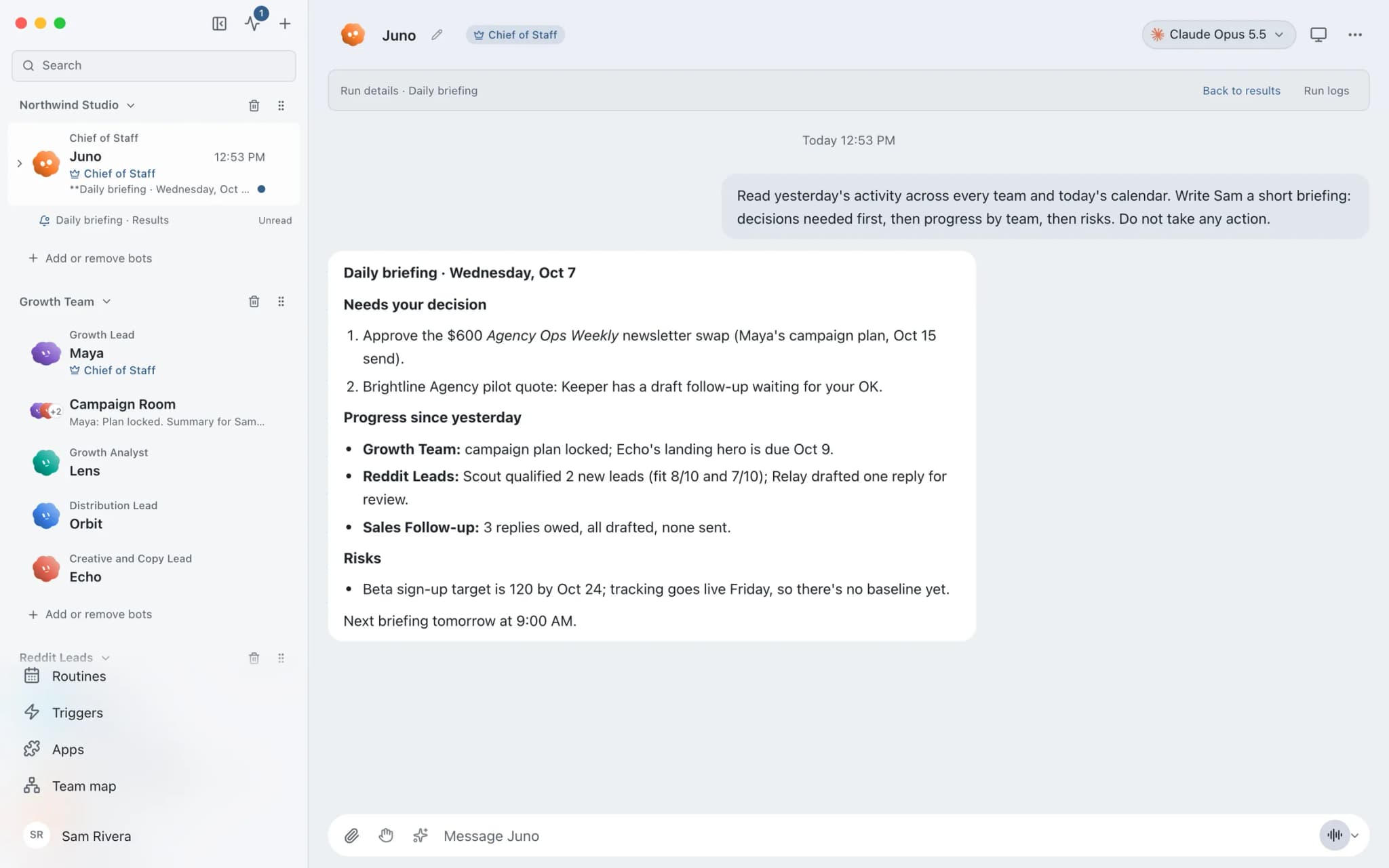
See it in the app
What it looks like in Brainwrite.
A real screenshot from a demo workspace.
The team
Who's on it.
Your Chief of Staff picks the specialists the job needs. Each has its own role, instructions, model, and app access.
- NovaIllustrated example
Chief of Staff
Runs the routine, gathers the pieces from specialists, and writes the brief in the order you care about.
 AtlasIllustrated example
Inbox specialist
Checks overnight mail and Slack mentions and returns only what needs a decision today.
 DashIllustrated example
Schedule and task specialist
Reads today's calendar and due tasks, notes clashes, and lists what each meeting needs from you.
How it runs
A run, step by step.
- 01
Connect the sources
Connect Google Calendar, Gmail, Slack, and your task tool. Grant each bot only the tools its part needs.
- 02
Create the routine
Ask your Chief of Staff for a weekday routine at the time you want. In the routine editor, choose Create a dedicated results thread under Post results to.
- 03
Let it delegate
Each run starts fresh with the bot's model and permissions. The Chief hands bounded checks to specialists, and their results return to the run.
- 04
Read the brief
Open the results thread. Each report is dated, and Open run shows the full conversation and any approval it is waiting on.
What you'll connect
Apps this job uses.

Google Calendar
Bots read your Google Calendar, find free slots, and create or move events. Invites wait for your approval.

Gmail
Bots search, label, and read Gmail threads and draft replies in place. Sending waits for your approval.

Slack
Bots search Slack, summarise channels and threads, and post or schedule updates once you approve.

Linear
File clean Linear issues from bug reports, catch duplicates, review the current cycle, and draft project updates.
FAQ
Questions about Morning brief
What does an AI morning brief include?
Whatever you ask for, from the sources you connect. One useful shape is decisions needed today, then meetings and what each one needs, then due tasks and notable mail. The Chief of Staff works only from the apps and tools you grant it, so a source you have not connected will not appear in the brief.
Will the brief run if my Mac is asleep?
Not as a local routine. Brainwrite must be running when a local routine becomes due, so your Mac has to be awake with the app open. Brainwrite Cloud runs your bots and routines on your own always-on cloud computer, so the brief arrives even when your Mac is closed.
Can I listen to the brief instead of reading it?
Yes. A bot can attach a voice note to its reply using the voice you set for it, such as ElevenLabs, Fish Audio, Grok, a built-in Mac voice, or Chatterbox. Voice notes are limited to 1000 characters, so ask for a short spoken summary and keep the full brief as text.
Can I change the format later?
Yes. Edit the routine's prompt or tell the Chief what to change. Each run starts fresh from the routine's instructions and the bot's saved memory, so the next brief follows the new format. Changing the results thread affects future runs only; links to older reports stay where they were.
Built on
Features this job relies on.
Chief of Staff
One bot takes your request, hands focused tasks to specialists, and returns a single summary.
Routines
Run a bot's task once, on an interval, or on chosen weekdays, with a receipt for every run.
Voice and calls
Per-bot voices, on-device dictation, and calls that take turns or run live.
Brainwrite Cloud
Your own always-on computer that runs your bots 24/7, routines included. $99 a month.









Give your first job to Brainwrite.
Download the app, connect the AI you already pay for, and tell your Chief of Staff what needs doing.
macOS today. Windows and Linux are coming soon.