Control and security
Nothing risky happens until you say yes
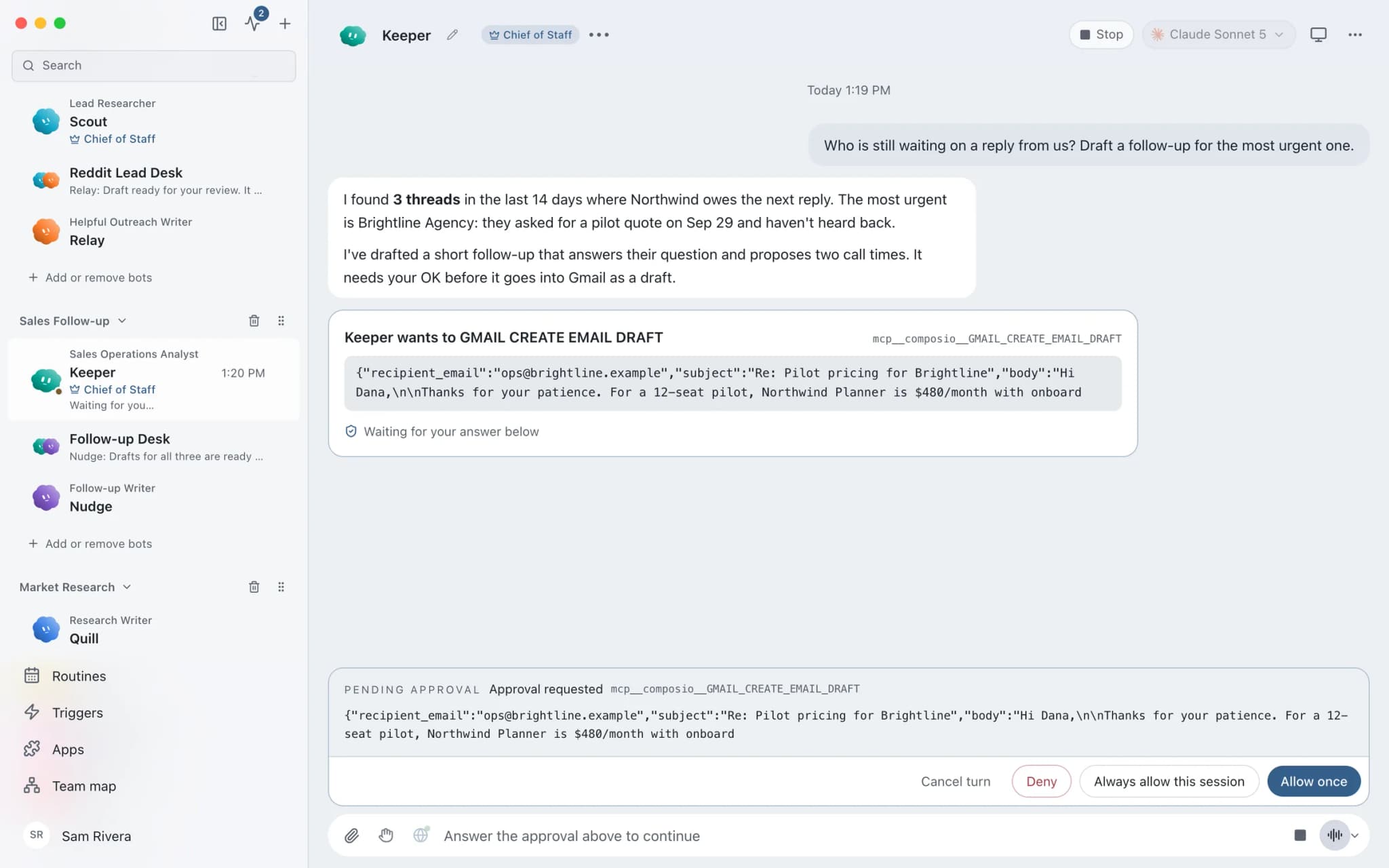
Approvals in Brainwrite turn an agent's risky actions, questions and permission requests into cards in the conversation, where you read the action and its scope before allowing it. Each thread runs in Ask or Full Access mode. Denying an action hands control back to the agent so it can choose a safer path, and Always allow stays narrow instead of granting blanket permission.


Handle the refund request from the Northwind Studio support inbox.
Your Chief of Staff put a team on it
 Atlas· Keeper, Sales Operations Analyst
 Sage· Nudge, Follow-up Writer
- Order #2291 is within the 14-day refund window.
- Drafted a reply to the customer.
- Wants to issue a $49 refund in Stripe. Approval card shown with the amount.
DoneApprove or deny the $49 refund: waiting for your yes.

 NovaChief of StaffMorning run done
 DashOrders14 replies drafted
A refund in Ask mode: done. One thing waits for you.
- 1Order #2291 is within the 14-day refund window.
- 2Drafted a reply to the customer.
- 3Wants to issue a $49 refund in Stripe. Approval card shown with the amount.
 2 bots on this job
See it in the app
Approvals in Brainwrite.
Why it matters
On your own, with a chatbot, and with Brainwrite.
| Doing it yourself | A single chatbot | Brainwrite | |
|---|---|---|---|
| Risky steps | You do them by hand | It suggests; you carry it out elsewhere | The agent prepares the step; it waits as an approval card |
| Saying no | Nothing happens | You rephrase and ask again | Control goes back to the agent to find a safer path |
| Standing permission | Not applicable | Depends on the product | Always allow is narrow, tied to one pending request |
| Record of decisions | Your memory | Somewhere in the chat | The card and its outcome stay with the task that asked |
How it works
How Approvals works.
- 01
Choose the mode
Set Ask or Full Access for a thread in the composer. Each thread keeps the approval level it started with.
- 02
Read the card
When a supported engine asks permission, the request appears as a card attached to the task that produced it, not buried in terminal output.
- 03
Approve or deny
Approve to continue, or deny to send control back so the agent can try a safer way.
- 04
Refresh after changes
After changing a bot's approval level, open a thread's … menu and choose Refresh permissions to apply it there. Other threads stay as they are.
Good to know
The details.
Always allow is narrow
It is tied to a server-issued key and the pending request, not to arbitrary execution.
No stale approvals
Cancelling a turn closes its outstanding requests, so an old card cannot be answered after the turn has ended.
Specialists start careful
A specialist created by a Chief of Staff starts with connected apps and automatic approvals off.
Defaults are not grants
A saved default for new bots never grants Full Access or local-computer Auto by itself. Both still need confirmation when the bot is created.
Approvals out loud
During a voice call, approval requests can be narrated so long-running work does not go quiet.
Scheduled runs wait
A routine run that needs approval shows as waiting until you answer. Open run takes you to the card.
The edges, plainly
- Approval cards appear when the engine supports approvals, and engines differ in what they report.
- Full Access does not ask before protected actions, so keep it for work you trust.
- Refresh permissions is not available while the thread is working.




Works with
Apps it's often used with.

Gmail
Bots search, label, and read Gmail threads and draft replies in place. Sending waits for your approval.

Slack
Bots search Slack, summarise channels and threads, and post or schedule updates once you approve.

Stripe
Look up Stripe customers and payments, prepare invoices and refunds for approval, and summarise revenue every week.
FAQ
Questions about Approvals
Can AI agents act without my permission?
In Ask mode, risky actions from engines that support approvals become cards in the conversation and wait for you. You read the action and its scope, then approve or deny. Full Access does not ask before protected actions, so choose it per thread only for work you trust.
What happens when I deny an AI agent's request?
Denying an action sends control back to the agent so it can choose a safer path. The denied action does not run. The card and its outcome stay in the conversation, attached to the task that produced it, so you can see what was asked and what you decided.
What does Always allow do in Brainwrite?
It saves a narrow approval, tied to a server-issued key and the specific pending request, rather than granting arbitrary execution. After you change a bot's approval level or saved approvals, use Refresh permissions on a thread to apply the bot's current ones there.
What is the difference between Ask and Full Access?
Ask mode stops before protected actions and shows an approval card. Full Access does not ask first; for example, team setup changes apply immediately instead of waiting for Apply setup. You choose the mode per thread in the composer, and each thread keeps the level it started with.
Works well with
Related features.

Inspector
Follow tool calls and raw engine output, then export the run with secrets removed.

Secrets
Bots use API tokens by name. The value goes only to one https site and never reaches the chat.

Connected apps
Gmail, GitHub, Slack, Notion and hundreds more via OAuth, with per-bot tool grants.

Computer use
Let a chosen bot use your Mac's apps, or an isolated desktop, with approvals for risky actions.





Give your first job to Brainwrite.
Download the app, connect the AI you already pay for, and tell your Chief of Staff what needs doing.
macOS today. Windows and Linux are coming soon.