For · Sales teams
Stop losing deals to the follow-up nobody sent
Sales teams can use AI agents to find conversations that went quiet, draft follow-ups grounded in the actual thread, prepare call briefs, and keep the CRM up to date. In Brainwrite, bots work in the mailbox and CRM scope you approve. The ready-made follow-up team sends nothing on its own; reps review each draft and decide what goes out.
Sales teams · example team
 NovaChief of Staff
 AtlasKeeper, Sales Operations Analyst
 SageNudge, Follow-up Writer
 PennyCRM auditor
 DashInbox checker
Brief your Chief of Staff. It picks the specialists and runs the team.


Recover quiet threads: ready for you. Nothing sent.
- 1CRM hygiene
- 2Call prep briefs
- 3Call notes to CRM


 Sales teams team4 bots
Where the week goes
The work that eats your time.
Dropped follow-ups
A prospect asked a question two weeks ago. The rep meant to reply, and the deal went cold.
CRM data entry
Call notes, stages, and next steps are updated late or not at all, so the pipeline is a guess.
Call prep
Reps join calls without rereading the last thread, the deal notes, or what the prospect's company announced.
Prospecting time
Finding people who actually have the problem takes hours of searching before any outreach.
Start here
The first job to hand off.
Recover quiet threads
The Recover Unanswered Sales Emails team reviews the mailbox and CRM scope you approve, removes closed, opted-out, and duplicate threads, and drafts a follow-up for each conversation where your team owes the next step.


Every weekday, check the Sales label in my Gmail for threads older than four business days where we promised the next step. Skip anything closed in HubSpot. Draft the follow-ups but do not send them.
Your Chief of Staff put a team on it
- Atlas· Keeper, Sales Operations Analyst
- Sage· Nudge, Follow-up Writer
- 7 threads where we owe the next step; 12 excluded as closed, opted out, or already answered
- Top item: Dana at Fieldstone was promised a pricing sheet 6 business days ago (owner: you, confidence high)
- Follow-up for Fieldstone drafted and waiting for your approval
- Low confidence: Corvel thread may be a support issue, not a sale; review before drafting
DoneWhich follow-ups get sent, and when waits for you. Nothing was sent.
What the team takes on
Jobs your AI team does every week.

CRM hygiene
Flag deals with no next step, stale stages, or missing contacts, and propose updates for the owner to confirm.

Call prep briefs
Before each call, combine the last emails, CRM notes, and recent public news about the account into one page.

Call notes to CRM
Turn a Fireflies transcript into a summary, next steps, and CRM updates for the rep to approve.

Reddit lead finding
Score conversations in chosen communities against your ideal customer profile and draft context-first replies, with no posing as a customer.
Competitor notes
Get a dated brief when a competitor changes pricing or positioning, so reps hear it before prospects mention it.
Why a team
Why this works better than a chatbot.
Drafts grounded in the thread
Follow-ups quote the actual exchange and state why now, instead of generic check-in templates.
A weekday review routine
The follow-up team includes an 8:30 weekday review. It installs paused, and you switch it on when the drafts look right.
Per-bot app grants
Give the CRM bot only the CRM tools it needs. Each grant is all tools, an exact list, or none, and imported bots start with none.
Reps keep the send button
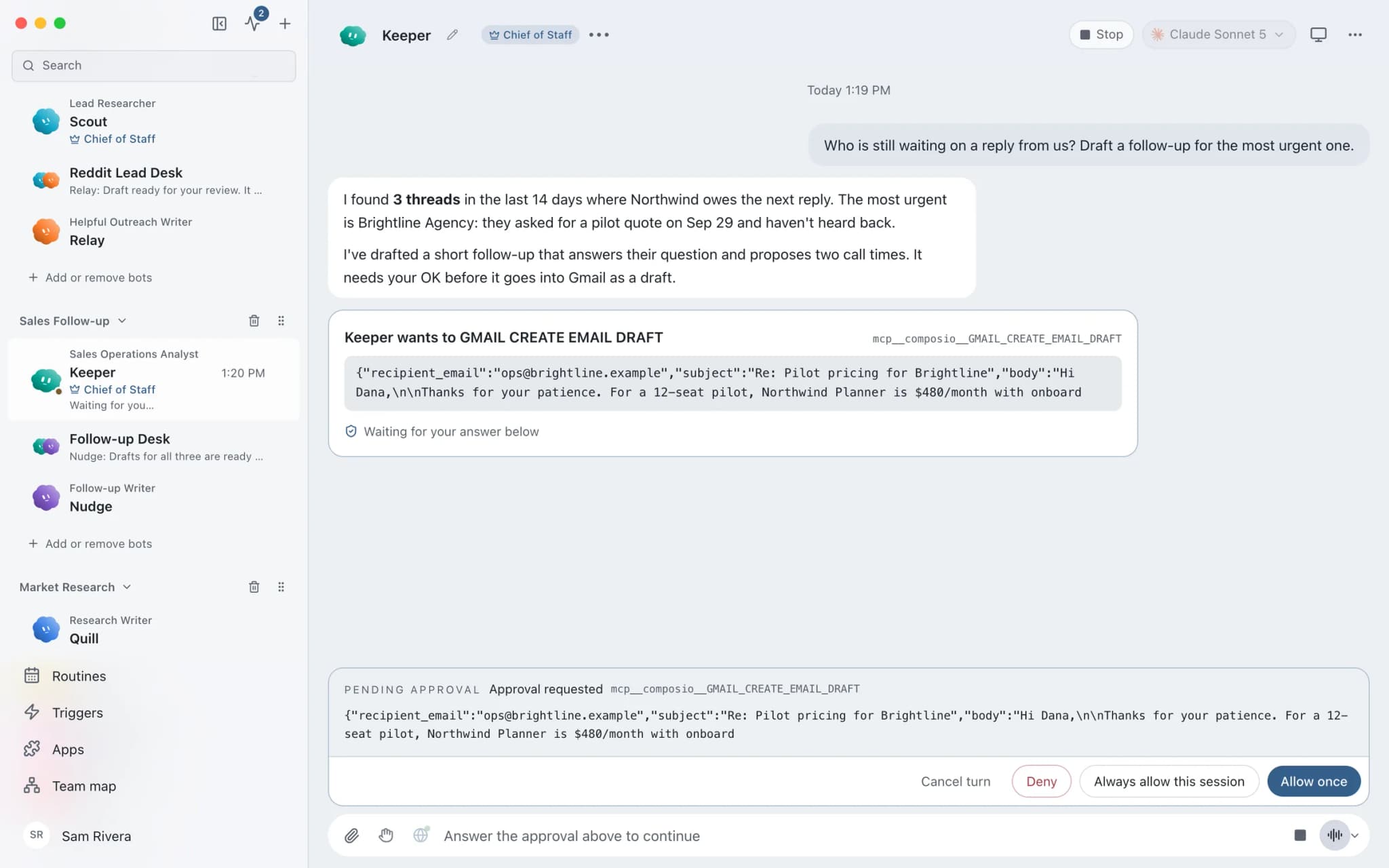
In Ask mode, sending an email becomes an approval card. Denying it hands control back to the bot.
In detail
See the jobs step by step.





See it in the app
What it looks like in Brainwrite.
A real screenshot from a demo workspace.
Start faster
Ready-made teams to start from.
Your tools
Apps your team works in.

HubSpot
Bots search HubSpot contacts and deals, log notes and tasks, and keep records tidy.

Salesforce
Bots query Salesforce, review pipeline, log activity, and update records once you approve.

Gmail
Bots search, label, and read Gmail threads and draft replies in place. Sending waits for your approval.

Apollo
Bots search and enrich prospects in Apollo, build accounts, and add contacts to sequences you approve.

Fireflies
Bots read Fireflies transcripts, ask AskFred about calls, and turn what was said into follow-ups and CRM notes.
FAQ
Questions about Brainwrite for sales teams
How can a sales team use AI agents?
Point them at the work that leaks deals: follow-ups nobody sent, CRM records that fall behind, and calls without prep. Brainwrite's follow-up team finds conversations where your team owes the next step and drafts a reply from the real thread. Other bots prepare call briefs and propose CRM updates. Reps approve what is sent and saved.
Will bots email prospects automatically?
Not by default. The ready-made follow-up team drafts messages and sends nothing on its own. In Ask mode, sending becomes an approval card for a person to approve or deny. You can switch a thread to Full Access, but most teams keep approval on for anything a prospect will read.
Which CRMs does it work with?
Brainwrite connects to HubSpot, Salesforce, Pipedrive, Attio, Zoho CRM, Close, and Apollo through connected apps, signed in through your browser. Tokens stay with the connection service and never appear in prompts. You can also add a custom MCP server for a system that is not on the list.
Where does prospect data go?
Chats, files, and bot memory stay on your machine. The text a bot works on is sent to the AI provider you chose and to the apps you connected. Brainwrite's account service sees your email and plan. Bot memory is plain text you can read, edit, and delete.
Related
Other teams.

Founders
A Chief of Staff bot that delegates your briefs, follow-ups, meeting prep, and competitor watch to specialist bots.

Marketing teams
Campaign planning, channel assets, repurposing, and reporting from a bot team that leaves publish and spend decisions to you.

Support teams
Reply drafts for repeat tickets, tagging and routing, thread summaries, and help centre updates, with agents approving sends.
Give your first job to Brainwrite.
Download the app, connect the AI you already pay for, and tell your Chief of Staff what needs doing.
macOS today. Windows and Linux are coming soon.