Industry · Marketing agencies
Get client reports and campaign drafts done before the account call
Marketing agencies can use AI agents to prepare the recurring work behind each account: weekly reports, campaign drafts, SEO checks, and competitor briefs. In Brainwrite, a Chief of Staff bot takes your request and hands focused tasks to specialist bots. You review the drafts, approve anything that would send or publish, and keep client files on your own Mac.
Marketing agencies · example team
 NovaChief of Staff
- NovaChief of Staff
 AtlasDelivery tracker
 PennyNumbers bot
 SageMaya, Growth Lead
Brief your Chief of Staff. It picks the specialists and runs the team.


4 client reports drafted from your dashboards. Ready for your notes.


 Client reports2 bots
Where the week goes
The work that eats your time.
Reporting week
Every client wants a report. Someone pulls numbers from Analytics and Search Console, pastes them into a doc, and writes the same commentary again.
First drafts for every channel
A campaign needs ad copy, landing page copy, emails, and posts. Writing the first version of each takes longer than editing it.
Watching each client's market
Clients expect you to know when a competitor changes pricing or launches something. Checking those pages by hand slips when the team is busy.
Pitch prep
New-business pitches need a quick audit of the prospect's site. It gets done the night before, if at all.
Start here
The first job to hand off.
A weekly report draft for one client
Connect that client's Google Analytics and Search Console, then ask the Chief of Staff for a one-page summary of what moved and why it might matter. Once the format is right, run it as a weekly routine. You edit and send it.


Every Friday at 16:00, write our weekly report: what shipped from Linear and GitHub, what slipped and why, pipeline changes in HubSpot, and the numbers from our metrics sheet. Post it to the Weekly reports thread and draft a Slack message for the team channel. Ask before posting.
Your Chief of Staff put a team on it
 Nova· Chief of Staff
- Atlas· Delivery tracker
 Penny· Numbers bot
- Shipped: 14 issues closed, 9 pull requests merged (links attached)
- Slipped: CSV export moved to next week, blocked on review
- Pipeline: 3 deals moved to Proposal, 1 closed won (source: HubSpot)
- Numbers: weekly active teams from the metrics sheet, with last week's figure for comparison
DoneWhat the report says about misses and risks waits for you. Nothing was sent.
What the team takes on
Jobs your AI team does every week.
Campaign launch packs
The Launch a Measurable Campaign team turns one audience insight into a position, channel assets, a distribution plan, and a date to decide whether to stop or scale.

Competitor briefs per client
A two-bot desk checks the competitor pages you list and writes a dated brief of what changed, separating real moves from cosmetic edits.

SEO audits for pitches and onboarding
The SEO audit team reviews technical, content, and schema issues and returns a prioritised list you can put in front of a prospect.

Blog drafts that pass a quality bar
Writer, research, and reviewer bots take a brief to a sourced draft. Nothing is published until you approve it.
Repurposing approved work
Turn one approved article or webinar into posts, an email, and a short newsletter section in the client's voice.
Why a team
Why this works better than a chatbot.
Several accounts per app
Connect up to five labelled accounts per app, such as one Analytics login per client. Per-bot grants control which tools a bot can call, not which account, so run clients that need strict separation in a separate installation.
Approvals before anything goes out
In Ask mode, risky actions such as sending an email or publishing a post appear as approval cards in the conversation. Deny one and the bot looks for another way.
Ready-made teams
Add campaign, SEO, blog, and competitor teams from the team library. They arrive with skills on, routines paused, and apps off until you grant them.
Client files stay local
Chats, files, and bot memory stay on your Mac. Content goes only to the model provider and apps you choose.
In detail
See the jobs step by step.



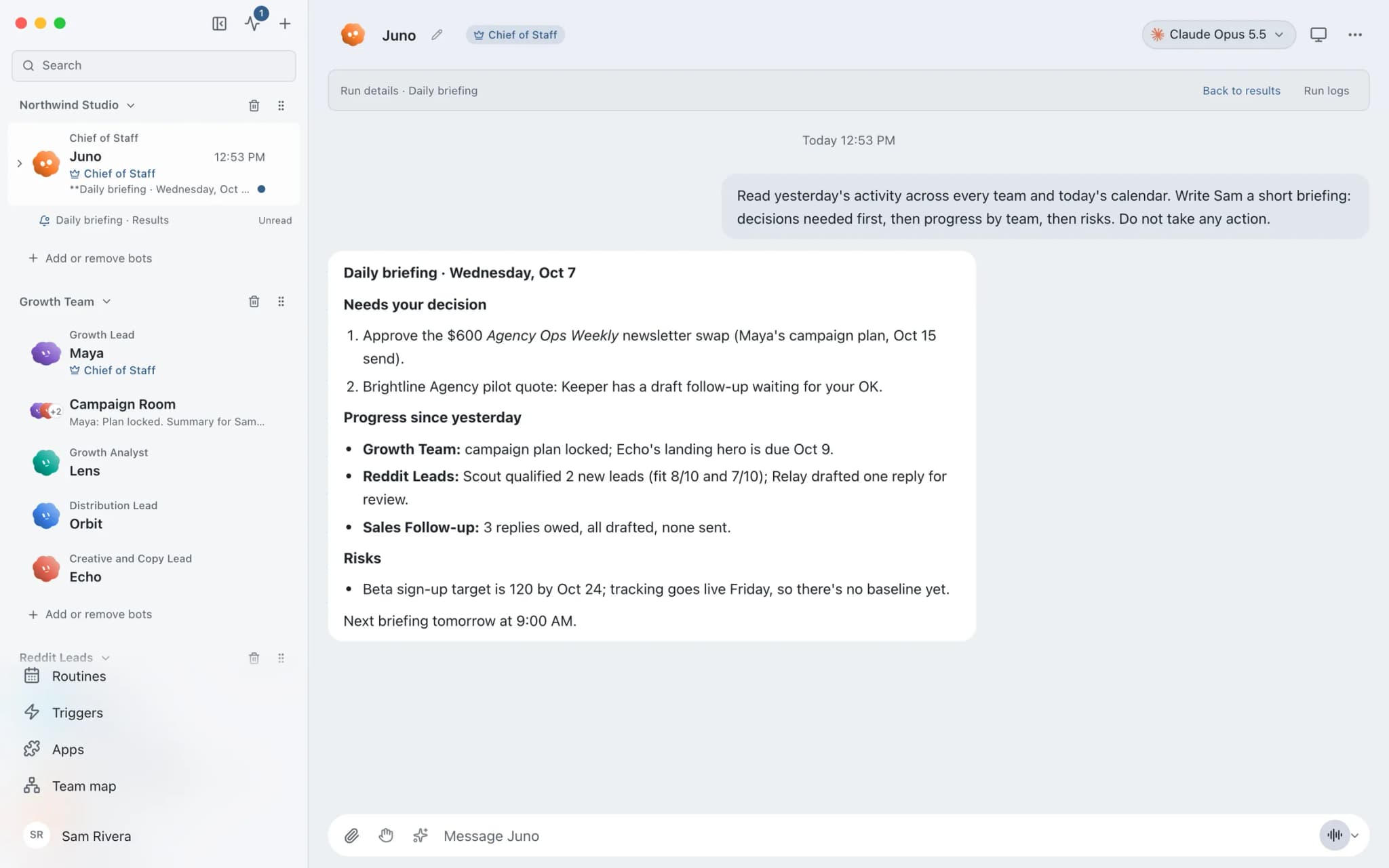
See it in the app
What it looks like in Brainwrite.
A real screenshot from a demo workspace.
Your tools
Apps your team works in.

Google Analytics
Run GA4 reports, compare periods, check funnels and realtime traffic, and get changes explained in plain English.

Google Search Console
Pull Search Console queries and pages, inspect URL indexing, check sitemaps, and find pages losing clicks.

Google Docs
Bots create Google Docs from Markdown, read and search docs, edit sections, and export PDFs.

Slack
Bots search Slack, summarise channels and threads, and post or schedule updates once you approve.

HubSpot
Bots search HubSpot contacts and deals, log notes and tasks, and keep records tidy.
FAQ
Questions about Brainwrite for marketing agencies
How can a marketing agency use AI agents?
Start with the recurring work every account needs: weekly reports, campaign first drafts, SEO checks, and competitor briefs. Brainwrite runs a team of bots on your Mac that prepare that work from the apps you connect. You review the output and approve anything that would send, post, or publish before it reaches a client.
Can I keep client accounts separate in Brainwrite?
You can connect up to five labelled accounts per app, so each client's login has its own name. Per-bot grants limit which tools a bot can call, but a grant covers every account of that service on the installation. If a client contract requires strict separation, run that client in a separate Brainwrite installation or configuration.
Where does client data go when a bot works on it?
Chats, files, and bot memory stay on your Mac. When a bot works, the text it needs is sent to the AI provider you picked for that bot and to the apps you connected. Brainwrite's account service sees your email and plan. Check your provider's data terms against your client agreements.
Is AI usage included in the price?
No. Brainwrite Cloud is $99 a month and does not include AI usage. You bring your own AI, such as a Claude or Codex login or an API key, and your provider bills you. Each thread shows its token use and cost, so you can see what a piece of client work cost to produce.
Related
Related industries.

Software agencies
Scoped plans, release checks, issue triage, and client status updates from an engineering team of bots your developers direct.

Content creators
Research, repurposing, and drafts in your own voice across channels, with you approving every post.

Consultants
Meeting briefs, sourced research, competitor watch, and client updates prepared by bots, with your judgment on top.

Give your first job to Brainwrite.
Download the app, connect the AI you already pay for, and tell your Chief of Staff what needs doing.
macOS today. Windows and Linux are coming soon.