Industry · Consultants
Spend client hours on judgment, not on research and recaps
Consultants can use AI agents to prepare meeting briefs, research markets, watch a client's competitors, and draft weekly updates and follow-ups. In Brainwrite, a Chief of Staff bot takes each request and delegates research and writing to specialist bots. You check the sources, add the judgment, and decide what reaches the client.
Consultants · example team
 NovaChief of Staff
- NovaChief of Staff
 PennyInbox and CRM specialist
 AtlasResearch bot
 SageDesk researcher
Brief your Chief of Staff. It picks the specialists and runs the team.


Proposal drafted from Tuesday's call notes. Pricing left for you.


 Proposal desk2 bots
Where the week goes
The work that eats your time.
Prep before every meeting
Finding the last email, the open actions, and who is attending takes fifteen minutes per call, several times a day.
Desk research for each engagement
Every new engagement starts with market sizing, competitor lists, and background reading before any real analysis.
Weekly client updates
Clients want a written summary of progress. It gets written late on Friday from scattered notes.
Proposals that go quiet
A proposal goes out and the prospect stops replying. Following up falls behind billable work.
Start here
The first job to hand off.
A brief before every client meeting
Connect Google Calendar and Gmail. A weekday morning routine reads the day's meetings and prepares a short brief for each: who is attending, the last thread with them, and open items.


Every weekday at 7:30, look at my Google Calendar for meetings with people outside the company. For each, summarise our last email threads, the HubSpot deal stage, and anything I promised, and post the briefs to a thread called Meeting prep.
Your Chief of Staff put a team on it
 Nova· Chief of Staff
 Penny· Inbox and CRM specialist
- Atlas· Research bot
- 3 external meetings today; briefs below
- 11:00 Northwind (Alex Rivera, Ops Lead): deal in Proposal stage; you promised a security questionnaire by Friday
- 14:00 Lumen Dental: first call; their site lists 4 clinics and a new booking page launched this month
- 16:30 Harbor & Pine: last thread ended with their question on onboarding time, still unanswered
DoneWhat to raise in the meeting waits for you. Nothing was sent.
What the team takes on
Jobs your AI team does every week.
Sourced market research
A research bot gathers public sources on a market or company and writes a summary with links, so you can check every claim.

Competitor watch for a client
Monitor the competitor pages a client cares about and turn material changes into a short watch, respond, or ignore note.

Weekly client report
Draft the Friday update from your notes, call transcripts, and tracker, in the same structure every week.

Meeting notes to actions
Turn a Fireflies transcript into decisions, owners, and dates, and draft the follow-up email for you to send.
Proposal follow-ups
Find proposals where you owe or are owed a reply and draft a follow-up grounded in the actual exchange.
Why a team
Why this works better than a chatbot.
Memory you can read
Each bot's memory is plain text you can view, edit, and delete. Remove an engagement's details when the work ends.
Bots that work together
Put a researcher and a writer in one group conversation, or let the Chief of Staff delegate bounded subtasks and summarise the results.
Approvals on outgoing mail
In Ask mode, risky actions such as sending an email become approval cards, so a draft never reaches a client by accident.
Client material stays local
Chats, files, and memory stay on your Mac. Text goes only to the AI provider and apps you choose.
In detail
See the jobs step by step.




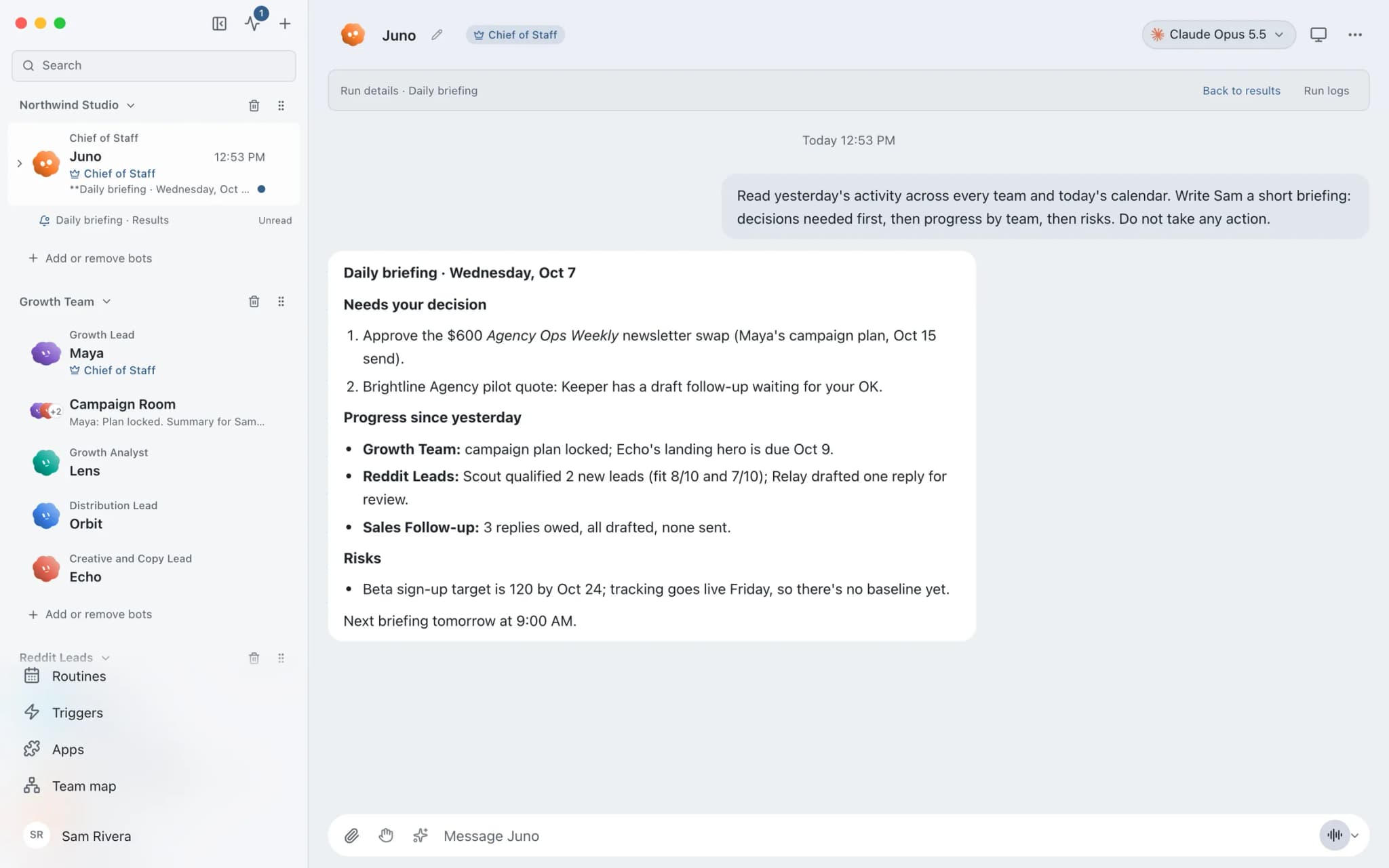
See it in the app
What it looks like in Brainwrite.
A real screenshot from a demo workspace.
Start faster
Ready-made teams to start from.
Your tools
Apps your team works in.

Gmail
Bots search, label, and read Gmail threads and draft replies in place. Sending waits for your approval.

Google Calendar
Bots read your Google Calendar, find free slots, and create or move events. Invites wait for your approval.

Google Docs
Bots create Google Docs from Markdown, read and search docs, edit sections, and export PDFs.

Notion
Bots search Notion, read and write pages, query databases, and add or update rows and comments.

Fireflies
Bots read Fireflies transcripts, ask AskFred about calls, and turn what was said into follow-ups and CRM notes.
FAQ
Questions about Brainwrite for consultants
How can consultants use AI agents?
Give them the preparation around client work: meeting briefs, desk research, competitor monitoring, weekly updates, and follow-ups. Brainwrite runs a team of bots on your Mac that pull from your calendar, email, and notes. You review the drafts, check the sources, and keep the analysis and recommendations for yourself.
Can a bot show where its research came from?
Ask for sources and the research bot includes links with its summary, and the competitor watch team keeps a dated evidence trail of what changed. Always open the sources yourself. A model can misread a page or cite something out of date, and the Inspector shows which tools and pages the bot used.
Is client information kept confidential?
Chats, files, and bot memory stay on your Mac, and memory is plain text you can delete. The text a bot works on is sent to the AI provider you picked, under its terms. If an engagement forbids that, use a local model through OpenCode, Ollama, or LM Studio, or keep that work out of Brainwrite.
Will routines run while I travel?
Local routines need the Brainwrite app running on your Mac, and missed runs appear in the run receipts. Brainwrite Cloud includes an always-on cloud computer that runs routines 24/7, so morning briefs still arrive while your laptop is closed. The desktop app works offline for up to 7 days since its last account check.
Related
Related industries.

Software agencies
Scoped plans, release checks, issue triage, and client status updates from an engineering team of bots your developers direct.

Marketing agencies
Client reports, campaign drafts, and competitor briefs prepared by a team of bots and reviewed by you before they go out.

Accountants
Document chasing, inbox triage, and draft summaries from your accounting data, with every figure checked by you.

Give your first job to Brainwrite.
Download the app, connect the AI you already pay for, and tell your Chief of Staff what needs doing.
macOS today. Windows and Linux are coming soon.