Industry · Course creators
Launch the course and answer students without writing every email yourself
Course creators can use AI agents to plan launches, draft email sequences, answer common student questions, and turn lessons into posts and newsletters. In Brainwrite, a team of bots handles research, drafting, and support replies from the apps you connect, such as Mailchimp, Stripe, and your helpdesk. You approve every email and post before it goes out.
Course creators · example team
 NovaChief of Staff
 AtlasMaya, Growth Lead
 SageEcho, Creative and Copy Lead
 DashOrbit, Distribution Lead
 PennyLens, Growth Analyst
Brief your Chief of Staff. It picks the specialists and runs the team.
Where the week goes
The work that eats your time.
Launch emails
A launch needs a waitlist sequence, sales emails, and reminders, all written in the same fortnight as the course itself.
Student questions
Login problems, refund requests, and the same lesson questions fill the inbox after every cohort starts.
Lessons that stay in the course
Each lesson could become a post or a newsletter. Rewriting it for each channel never makes the list.
Guessing the next module
You need to know what people ask about your topic before you build the next course, and that research keeps slipping.
Start here
The first job to hand off.
Draft your launch plan
The Launch a Measurable Campaign team turns your course and audience into one position, assets for each channel, a distribution plan, and a date to decide whether to stop or scale. You edit and schedule.


We launch our scheduling add-on next month. Build one focused campaign with positioning, creative angles, distribution, measurement, and a stop-or-scale rule.
Your Chief of Staff put a team on it
 Atlas· Maya, Growth Lead
 Sage· Echo, Creative and Copy Lead
 Dash· Orbit, Distribution Lead
 Penny· Lens, Growth Analyst
- Bet: clinic managers who rebook by phone; promise: fewer no-shows from self-serve rescheduling (hypothesis, proof needed)
- Asset set: 1 landing page, 3 email variants, 4 LinkedIn posts, all on the same claim
- Distribution: 10 dated steps across email, LinkedIn, and one partner newsletter, each with an owner
- Primary metric: trial starts from the landing page; scale above 4%, stop below 1.5% after 3 weeks
DoneThe bet and the budget waits for you. Nothing was sent.
What the team takes on
Jobs your AI team does every week.

Email sequence drafts
Draft waitlist, launch, and onboarding emails in Mailchimp from your outline. Scheduling or sending a campaign waits for your approval.

Student reply drafts
A bot reads new support conversations, drafts answers from your course FAQ and policies, and flags refunds and complaints for you.

New student welcome
When a Stripe payment arrives through a webhook, a bot prepares the welcome email from your template for your approval.

Lesson repurposing
Turn a lesson transcript into a newsletter section, a LinkedIn post, and short captions in your voice.
Topic research
Find questions people ask in the Reddit communities you choose and turn them into lesson and post ideas.
Why a team
Why this works better than a chatbot.
Ready-made teams
Campaign, blog, SEO, and Reddit research teams install from the team library with routines paused and apps off until you approve them.
Approval before anything sends
In Ask mode, sending an email or scheduling a campaign becomes an approval card in the conversation.
Webhooks start the work
Brainwrite's separate webhook receiver can start a bot's task when a payment arrives, through a narrow tunnel you set up.
Your voice in visible memory
Bots keep notes on your style in plain-text memory you can read, correct, and delete.
In detail
See the jobs step by step.
 Launch campaignOne bet, one message, a channel plan, a stop rule.See the job
 Support repliesEvery ticket answered in draft. A person sends.See the job
 Content repurposingOne finished post, a draft for every channel.See the job
 Customer onboardingA new payment starts the welcome, ready to approve.See the job
See it in the app
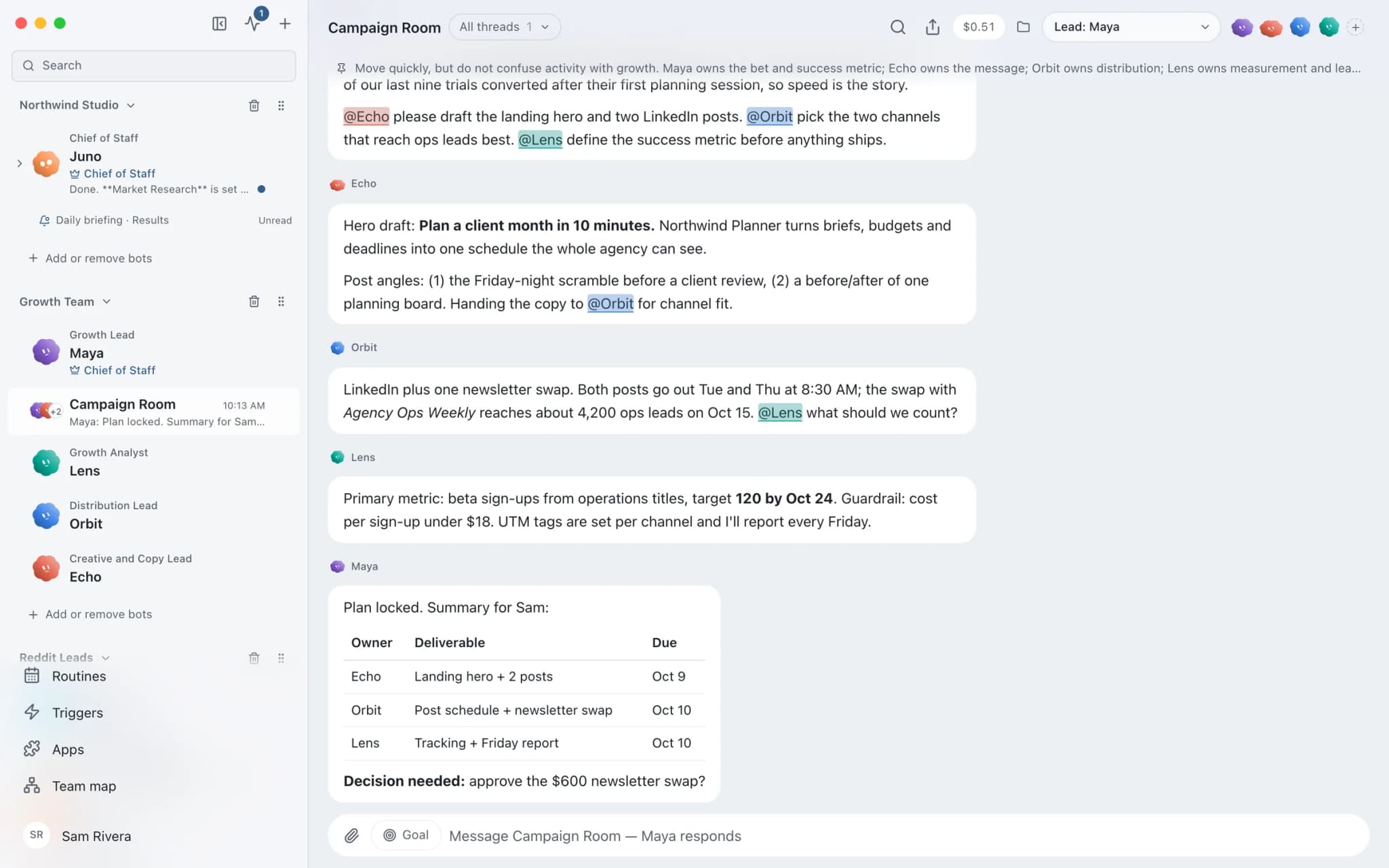
What it looks like in Brainwrite.
A real screenshot from a demo workspace.
Your tools
Apps your team works in.

Mailchimp
Bots draft Mailchimp campaigns, manage tags and segments, and read reports. Sends and schedules wait for you.

Stripe
Look up Stripe customers and payments, prepare invoices and refunds for approval, and summarise revenue every week.

Help Scout
Read Help Scout conversations, draft replies from saved replies, tag and note threads, and summarise inbox reports.

YouTube
Read YouTube captions and stats, sort comments, update video details, and reply only after you approve.

beehiiv
Bots write beehiiv draft posts, review past issues, and manage subscribers and segments. You publish.
FAQ
Questions about Brainwrite for course creators
How can course creators use AI agents?
Use them on the work around teaching: launch plans, email sequences, replies to common student questions, welcome emails for new students, and repurposing lessons into posts. Brainwrite runs a team of bots that draft from your email tool, payments, and helpdesk. You edit the drafts and approve every send.
Does Brainwrite connect to my course platform?
Check the connected apps list for your platform. If it is not there, you can work from student list exports, from the platform's webhooks through Brainwrite's webhook receiver, or from a custom MCP server if one exists. Mailchimp, beehiiv, Stripe, and Help Scout are available as connected apps.
Can a bot issue refunds?
Only with tools you grant and approval you give. Each bot's grant is all tools, an exact list, or none. In Ask mode, a Stripe refund becomes an approval card before it happens. Many creators let the bot flag refund requests and handle the refund themselves.
Will launch routines run while I sleep?
Local routines need the Brainwrite app running on your Mac, and missed runs show in the run receipts. Brainwrite Cloud, at $99 a month, includes an always-on cloud computer that runs routines 24/7. AI usage is billed separately by your provider.
Related
Related industries.

Content creators
Research, repurposing, and drafts in your own voice across channels, with you approving every post.

SaaS startups
Issue triage, release checks, SEO, and lead finding handled by specialist bots, so a small team can cover more ground.
Fitness studios
Trial enquiry replies, win-back messages, class promotions, and local search checks for gyms and studios.
Give your first job to Brainwrite.
Download the app, connect the AI you already pay for, and tell your Chief of Staff what needs doing.
macOS today. Windows and Linux are coming soon.