Use case · Operations
Start onboarding the moment a customer pays
To automate customer onboarding with AI agents, point your payment provider's webhook at Brainwrite's webhook receiver through a narrow tunnel. When a payment event arrives on its secret hook route, Brainwrite starts a task for your onboarding bot. The bot prepares the welcome email, the customer's project, and a kickoff invite, and each one waits for your approval.


When a payment webhook arrives, look up the new customer in Stripe, draft a welcome email from our onboarding template, prepare their project in Asana from the Onboarding template, and draft a kickoff invite for next week. Ask me before sending or creating anything.
Your Chief of Staff put a team on it
 Dash· Onboarding bot
 Atlas· Project setup specialist
 Nova· Chief of Staff
- Webhook received: new payment from Kestrel Labs, Growth plan (checked in Stripe)
- Welcome email to Jordan at Kestrel Labs drafted, waiting for your approval
- Asana project prepared from the Onboarding template, waiting for your approval to create it
- Kickoff invite drafted for Tuesday at 10:00, waiting for your approval
DoneWhether the welcome email goes out, and what it says waits for you. Nothing was sent.


Customer onboarding: done. Nothing sent.
- 1Webhook received: new payment from Kestrel Labs, Growth plan (checked in Stripe)
- 2Welcome email to Jordan at Kestrel Labs drafted, waiting for your approval
- 3Asana project prepared from the Onboarding template, waiting for your approval to create it
 3 bots on this job
The job
Doing it yourself, and handing it off.
Doing it yourself
A new customer pays, and then nothing happens until someone notices. Someone sees the payment email, copies the customer's details into the project tool, writes a welcome message, creates a shared folder, and finds a time for kickoff. If the payment lands on a weekend or in a busy week, the customer can wait days for a first reply, right after handing over money.
What the team does
- Start work as soon as a payment event reaches the hook route
- Look up the customer and plan in Stripe
- Draft a welcome email from your template
- Prepare the project and a kickoff invite from your checklist
What waits for you
- Whether the welcome email goes out, and what it says
- Creating the project and sending invites
- Exceptions such as custom plans or refunds
See it in the app
What it looks like in Brainwrite.
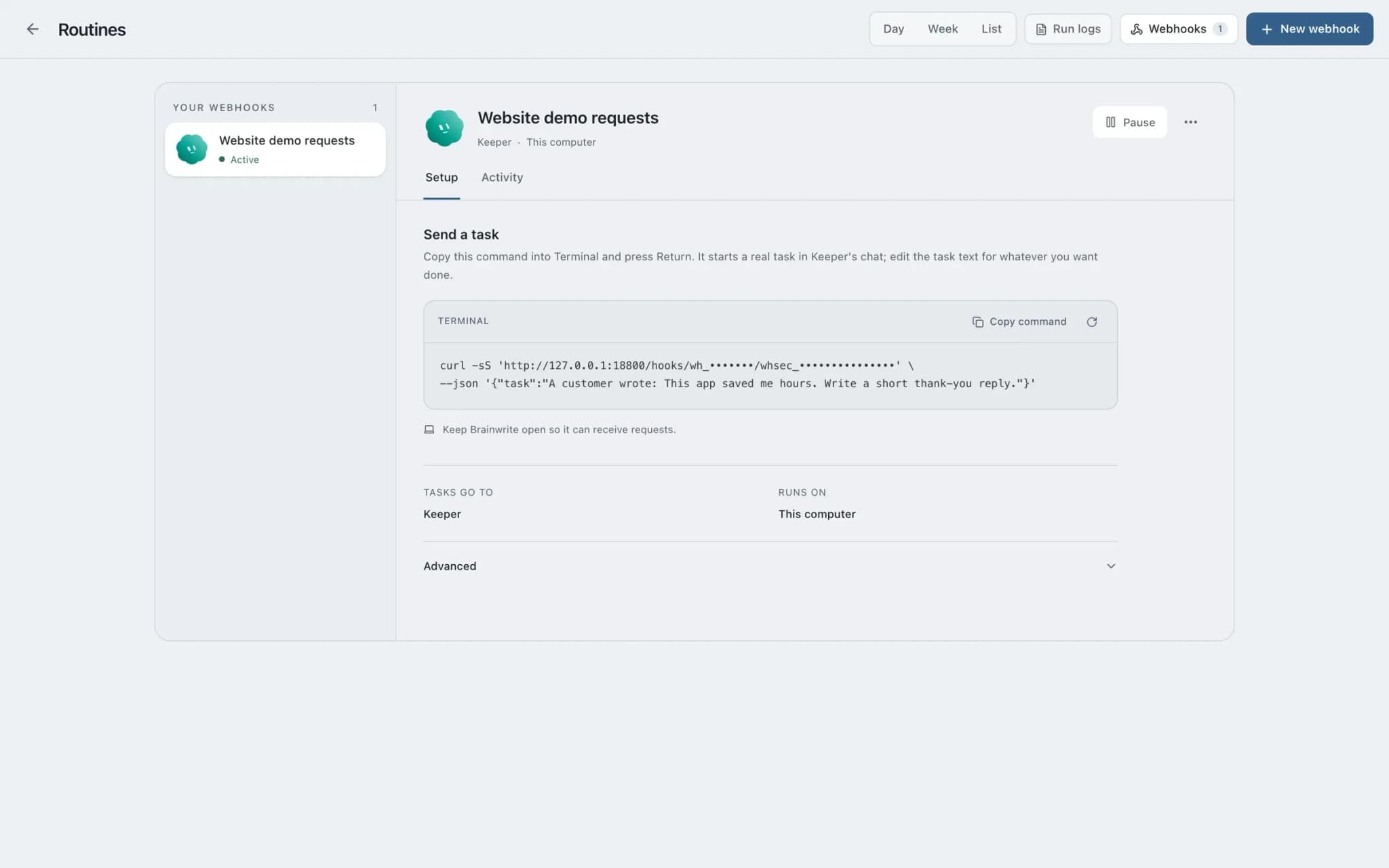
A real screenshot from a demo workspace.
The team
Who's on it.
Your Chief of Staff picks the specialists the job needs. Each has its own role, instructions, model, and app access.
 DashIllustrated example
Onboarding bot
Starts when the webhook fires, looks up the new payment in Stripe, and prepares each step of your onboarding checklist.
 AtlasIllustrated example
Project setup specialist
Prepares the customer's project in Asana from your template, created only after you approve it.
- NovaIllustrated example
Chief of Staff
Hands parts of the checklist to specialists and summarises what is ready for your approval.
How it runs
A run, step by step.
- 01
Use the webhook receiver
Brainwrite's webhook receiver is separate from the main app and listens on 127.0.0.1:8800 by default. It exposes only health and secret hook routes, not the broader Brainwrite API.
- 02
Expose it narrowly
To accept events from the internet, proxy only the webhook receiver through a narrowly configured tunnel or relay. Never expose the main harness port.
- 03
Authenticate the sender
Use bearer authentication where the sender can set headers, which keeps the secret out of URLs and most logs. If it cannot set headers, use the capability URL.
- 04
A payment starts the task
Each event starts the same queued task executor routines use. The bot checks the payment in Stripe and prepares the email, project, and invite.
- 05
You approve
In Ask mode, the welcome email, project creation, and invite each appear as approval cards. Approve, edit, or deny each one.
What you'll connect
Apps this job uses.

Stripe
Look up Stripe customers and payments, prepare invoices and refunds for approval, and summarise revenue every week.

Gmail
Bots search, label, and read Gmail threads and draft replies in place. Sending waits for your approval.

Asana
Turn meeting notes into Asana tasks, chase overdue work, and draft project status updates from the real task list.

Google Calendar
Bots read your Google Calendar, find free slots, and create or move events. Invites wait for your approval.
FAQ
Questions about Customer onboarding
How does a payment start a Brainwrite task?
Your payment provider sends a webhook to Brainwrite's webhook receiver, which starts the same queued task executor that routines use. The receiver is separate from the main app, listens on 127.0.0.1:8800 by default, and exposes only health and secret hook routes. Webhooks work independently of schedules.
Is it safe to accept webhooks on my Mac?
Expose only the webhook receiver, never the main harness port, and do it through a narrowly configured tunnel or relay. The receiver does not expose the broader Brainwrite API. Bearer authentication is preferred because it keeps the secret out of URLs and most access logs; a capability URL is there for senders that cannot set headers.
Does Brainwrite need to be running?
Yes. The local receiver runs with the desktop app, and closing Brainwrite stops both the receiver and the local task executor. Webhook deliveries are not hosted jobs, so keep the app open on a Mac that stays awake if you rely on it to start onboarding.
Will it email the customer automatically?
Not by default. The bot drafts the welcome email and prepares the project, and in Ask mode each send or create action becomes an approval card in the conversation. You can edit the draft before approving, or deny it, and the bot will look for another way forward.
Built on
Features this job relies on.
Webhooks
Start a bot's task from an HTTP event, through a separate local receiver with secret routes.
Approvals
Risky actions become cards you approve or deny in the conversation. Ask or Full Access per thread.
Connected apps
Gmail, GitHub, Slack, Notion and hundreds more via OAuth, with per-bot tool grants.
Chief of Staff
One bot takes your request, hands focused tasks to specialists, and returns a single summary.









Give your first job to Brainwrite.
Download the app, connect the AI you already pay for, and tell your Chief of Staff what needs doing.
macOS today. Windows and Linux are coming soon.