Use case · Support
Answer support tickets faster without auto-replying
To draft support replies with AI agents, connect your help desk to a Brainwrite bot and give it your help docs. At the interval you set, it reads new tickets, drafts an answer for each from your documentation and past replies, flags the ones that need a person, and leaves every draft for review. Nothing reaches a customer without approval.


Every hour, read new Zendesk tickets. Draft a reply for each using the help articles in the Docs folder, flag anything about refunds or outages for me, and do not send anything.
Your Chief of Staff put a team on it
 Sage· Support drafter
 Atlas· Escalation checker
 Nova· Chief of Staff
- 8 new tickets since the last run
- 6 replies drafted from help articles, each waiting for approval before it is sent
- Escalated: refund request from Jordan at Kestrel Labs, summary attached
- Escalated: 2 tickets mention the same export error; possible outage
DoneSaved as a routine: Every hour. It starts paused until you turn it on.


Support replies: done. Nothing sent.
- 18 new tickets since the last run
- 26 replies drafted from help articles, each waiting for approval before it is sent
- 3Escalated: refund request from Jordan at Kestrel Labs, summary attached
 3 bots on this job
The job
Doing it yourself, and handing it off.
Doing it yourself
Many tickets ask something the help docs already answer, but each still needs reading, a search for the right article, and a reply in the right tone. The tickets that need real attention sit in the same queue as password resets. The team spends the day switching context, simple tickets wait longer than they should, and the hard ones get the least time because they arrive between everything else.
What the team does
- Read new tickets since the last run
- Draft answers grounded in your help docs and past replies
- Flag refunds, outages, and upset customers for a person
- List questions the docs do not answer, so you can fix the docs
What waits for you
- Every reply that reaches a customer
- Refunds, credits, and exceptions
- Which tickets the bot may read
See it in the app
What it looks like in Brainwrite.
A real screenshot from a demo workspace.
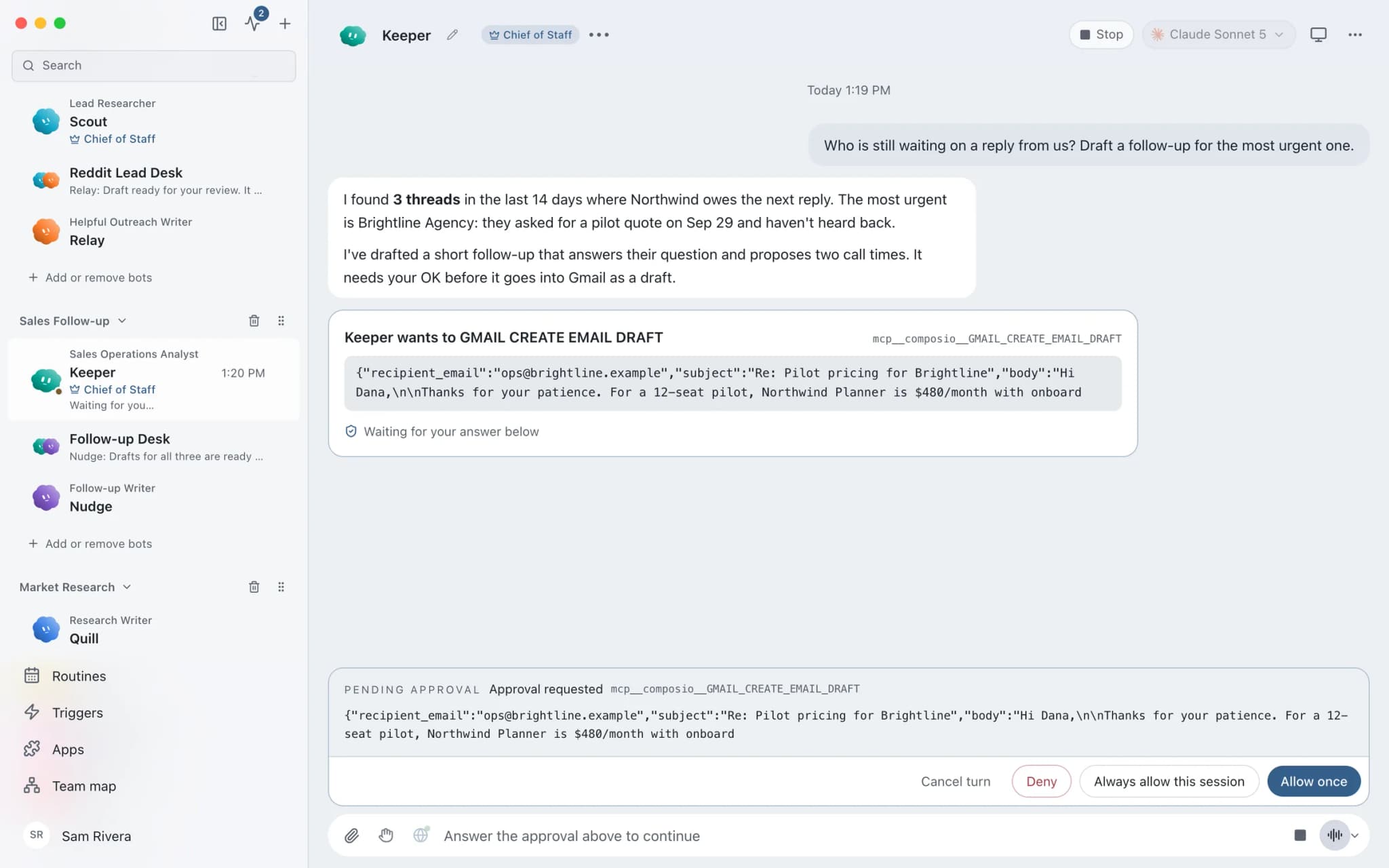
The team
Who's on it.
Your Chief of Staff picks the specialists the job needs. Each has its own role, instructions, model, and app access.
 SageIllustrated example
Support drafter
Reads new tickets, finds the matching help article or past reply, and drafts an answer in your tone.
 AtlasIllustrated example
Escalation checker
Flags tickets about refunds, outages, legal questions, or an upset customer, and summarises each one for a person.
- NovaIllustrated example
Chief of Staff
Summarises each run: what was drafted, what was escalated, and what the docs could not answer.
How it runs
A run, step by step.
- 01
Connect the help desk
Connect Zendesk, Intercom, Help Scout, or Freshdesk and grant the bot only the tools it needs.
- 02
Give it the source of truth
Put your help articles, policies, and tone notes in the bot's working folder, and your standing rules in its memory.
- 03
Run at an interval
A routine checks for new tickets on the interval you set and posts a summary to one results thread.
- 04
Review and send
A person reviews each draft, edits it, and sends it. In Ask mode, any reply the bot tries to post appears as an approval card first.
What you'll connect
Apps this job uses.

Zendesk
Triage Zendesk tickets, read full threads, draft replies with your macros, and merge duplicates you confirm.

Intercom
Search Intercom conversations, draft replies, add notes, tag and assign chats, and keep help articles current.

Help Scout
Read Help Scout conversations, draft replies from saved replies, tag and note threads, and summarise inbox reports.

Freshdesk
Filter Freshdesk tickets, add private notes, draft replies from canned responses, and summarise satisfaction ratings.
FAQ
Questions about Support replies
Will the AI reply to customers directly?
Not by default. Sending a reply through a connected help desk is an action the bot must request, and in Ask mode it appears as an approval card in the conversation. You can also give the bot an exact list of tools that leaves out sending, so it can read tickets and draft in Brainwrite but cannot reply.
How does it know the right answers?
From what you give it. Put help articles, policies, and tone notes in the bot's working folder, and keep standing rules in its memory. Bot memory is plain text you can read, correct, or delete, so a wrong rule is quick to fix. When the docs have no answer, the bot says so instead of guessing.
What happens to customer data in tickets?
Brainwrite stores chats, memory, and files on your Mac, and help desk access runs through Composio with OAuth, keeping tokens out of prompts. Ticket text the bot reads is sent to the AI provider you chose for that bot, so pick a provider whose data terms suit your customers.
Built on
Features this job relies on.
Connected apps
Gmail, GitHub, Slack, Notion and hundreds more via OAuth, with per-bot tool grants.
Approvals
Risky actions become cards you approve or deny in the conversation. Ask or Full Access per thread.
Memory
Plain-text memory per bot that you can read, fix and delete. No hidden profile.
Routines
Run a bot's task once, on an interval, or on chosen weekdays, with a receipt for every run.








Give your first job to Brainwrite.
Download the app, connect the AI you already pay for, and tell your Chief of Staff what needs doing.
macOS today. Windows and Linux are coming soon.