Industry · Photographers
Answer enquiries and prep every shoot without spending evenings on email
Photographers can use AI agents to reply to booking enquiries, draft shoot prep notes for clients, follow up on quotes, and write blog posts about recent sessions. In Brainwrite, specialist bots draft each message from your email, calendar, and booking links. You approve every reply before it reaches a client, and your files stay on your Mac.
Photographers · example team
 NovaChief of Staff
- NovaChief of Staff
 DashInbox triager
 SageReply drafter
 AtlasKeeper, Sales Operations Analyst
Brief your Chief of Staff. It picks the specialists and runs the team.
Where the week goes
The work that eats your time.
Enquiries during shoots
Booking requests arrive while you are behind the camera. By the time you reply, the client may have booked someone else.
The same questions every time
Pricing, availability, what to wear, and how long until the gallery. Each answer is short, and together they take hours.
Quotes nobody chases
A quote goes out, the client goes quiet, and editing comes first.
A blog that stalls
Session posts help people find you in search. They get written months after the shoot, if at all.
Start here
The first job to hand off.
Draft replies to new enquiries
Give a bot your inbox, your pricing guide, and your Calendly link. It sorts new enquiries by date and type, checks your calendar, and drafts a reply with availability for you to approve.


Every weekday at 8, go through my work Gmail. Put anything from clients or about invoices at the top, list newsletters and receipts separately, and draft replies for client questions. Do not send or archive anything.
Your Chief of Staff put a team on it
 Nova· Chief of Staff
 Dash· Inbox triager
 Sage· Reply drafter
- Needs you (4): two client questions, one invoice dispute, one contract to sign
- Draft ready for Priya at Harbor & Pine about the revised timeline, waiting for your approval
- Waiting on others (6): replies you sent where the other side owes the next step
- Ignore (31): newsletters, receipts, and notifications, listed in one block
DoneWhich replies get sent, edited, or dropped waits for you. Nothing was sent.
What the team takes on
Jobs your AI team does every week.

Shoot prep notes
Before each booked session, draft a note for the client with timing, location, and what to bring, from your template and their booking answers.

Quote follow-ups
Find quotes where the client went quiet and draft a short, specific follow-up. Nothing sends automatically.

Session blog posts
Draft a post about a recent session from your notes, with a search-friendly title, for you to add images and publish.

After-delivery thank-yous
When a gallery is delivered, draft a thank-you that asks for a review or a print order, for you to send.
Local search visibility
The Local SEO team checks your site, Business Profile signals, and listing consistency, and returns a prioritised fix list.
Why a team
Why this works better than a chatbot.
Approval before clients hear from you
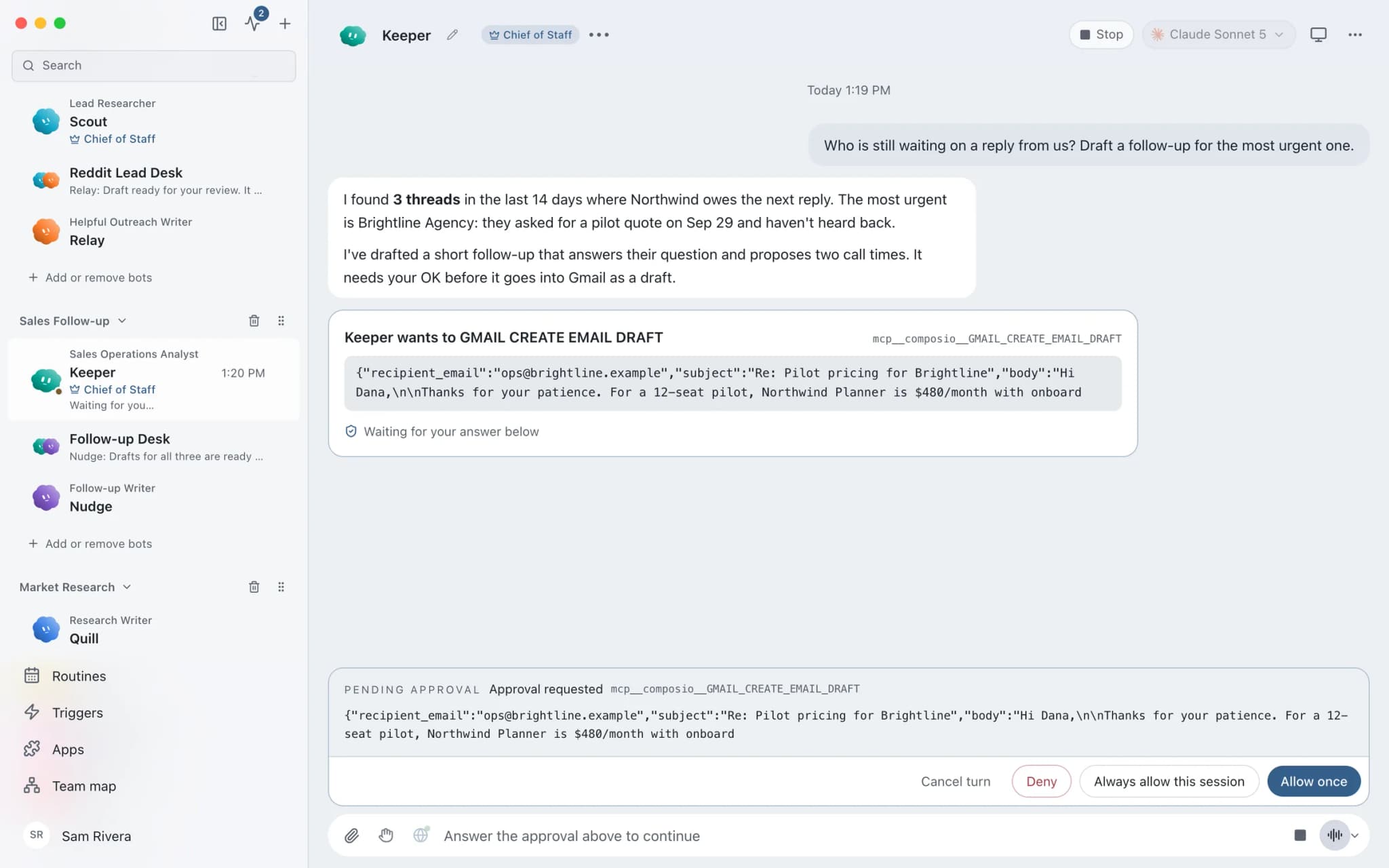
In Ask mode, sending an email becomes an approval card. You read each draft and approve or deny it.
Your tone in visible memory
Bots keep notes on how you write in plain-text memory you can read, correct, and delete.
Dictate between sessions
Speak a reply idea into Brainwrite on your Mac with Apple's on-device dictation, and a bot turns it into a draft.
Ready-made teams
Local SEO, blog, and follow-up teams install from the team library with routines paused and apps off until you approve them.
In detail
See the jobs step by step.




See it in the app
What it looks like in Brainwrite.
A real screenshot from a demo workspace.
Start faster
Ready-made teams to start from.
Your tools
Apps your team works in.

Gmail
Bots search, label, and read Gmail threads and draft replies in place. Sending waits for your approval.

Calendly
Bots read Calendly bookings and invitee answers, create one-time booking links, and flag no-shows.

Google Calendar
Bots read your Google Calendar, find free slots, and create or move events. Invites wait for your approval.

WordPress.com
Read your WordPress.com posts and create and update drafts. Publishing stays with you in the editor.

Dropbox
Bots search, read, upload, and move Dropbox files, and create shared links once you approve.
FAQ
Questions about Brainwrite for photographers
How can a photographer use AI agents?
Use them for the email and admin around your sessions: replying to booking enquiries, sending prep notes, following up on quotes, and drafting blog posts about recent shoots. Brainwrite runs bots on your Mac that draft from your inbox, calendar, and booking links. You approve every message before it reaches a client.
Can Brainwrite edit or cull my photos?
No. Brainwrite runs AI agents that read, write, and organise in the apps you connect; it is not a photo editor. Bots can work with files you grant, such as listing what is in a Dropbox folder, but editing and culling stay in the tools you already use.
Will bots reply to enquiries automatically?
Not by default. In Ask mode, sending an email becomes an approval card, so each draft waits for you. You can switch a thread to Full Access, but most photographers keep approval on for anything a client will read.
Do I need my laptop open for routines to run?
Local routines need the Brainwrite app running on your Mac, and missed runs show in the run receipts. Brainwrite Cloud, at $99 a month, includes an always-on cloud computer that runs routines 24/7 while you are on a shoot. AI usage is billed separately by your provider.
Related
Related industries.

Content creators
Research, repurposing, and drafts in your own voice across channels, with you approving every post.
Design studios
Proposal drafts, call recaps, feedback chasing, and case study drafts, so designers spend their hours on the work itself.

Local businesses
Local SEO checks, customer reply drafts, quote follow-ups, and competitor watch for businesses that serve a local area.

Give your first job to Brainwrite.
Download the app, connect the AI you already pay for, and tell your Chief of Staff what needs doing.
macOS today. Windows and Linux are coming soon.