Industry · Accountants
Stop chasing clients for documents and retyping the same answers
Accountants can use AI agents to chase missing client documents, sort the inbox during busy season, prepare meeting briefs, and draft summaries from QuickBooks or Xero reports. In Brainwrite, each bot gets only the apps you grant it, and files and chats stay on your machine. A qualified person checks every figure before it reaches a client.
Accountants · example team
 NovaChief of Staff
- NovaChief of Staff
 DashInbox triager
 SageReply drafter
 AtlasOnboarding bot
Brief your Chief of Staff. It picks the specialists and runs the team.


142 receipts sorted, 6 need your judgement. Nothing posted to the books.


 Month-end team2 bots
Where the week goes
The work that eats your time.
Chasing documents
Bank statements, receipts, and signed forms arrive late. Someone sends reminder after reminder and tracks who has replied.
Busy-season inbox
Client questions, portal notifications, and document uploads pile up just when there is least time to read them.
The same client questions
When is my deadline, what do you need from me, why is this different from last year. Each answer is short; together they fill days.
Month-end commentary
Management accounts need a short written explanation of what changed, drafted from reports you already have.
Start here
The first job to hand off.
Chase missing documents
Keep a simple checklist in Google Sheets or Excel. A weekday routine finds clients with missing items and drafts a polite, specific reminder for each, which you approve before it sends.


Every weekday at 8, go through my work Gmail. Put anything from clients or about invoices at the top, list newsletters and receipts separately, and draft replies for client questions. Do not send or archive anything.
Your Chief of Staff put a team on it
 Nova· Chief of Staff
- Dash· Inbox triager
- Sage· Reply drafter
- Needs you (4): two client questions, one invoice dispute, one contract to sign
- Draft ready for Priya at Harbor & Pine about the revised timeline, waiting for your approval
- Waiting on others (6): replies you sent where the other side owes the next step
- Ignore (31): newsletters, receipts, and notifications, listed in one block
DoneWhich replies get sent, edited, or dropped waits for you. Nothing was sent.
What the team takes on
Jobs your AI team does every week.
Inbox triage
Sort new email into urgent, waiting on client, and routine, and draft replies to common questions for you to check.

Month-end summary drafts
Read QuickBooks or Xero reports and draft plain-English commentary on the main movements for you to verify.

Client onboarding
Send each new client the same welcome, document checklist, and next steps, drafted from your template.

Meeting prep
Before a client meeting, pull the last correspondence and outstanding items into a one-page brief.
Follow up on enquiries
Find prospective clients whose enquiry went quiet and draft a follow-up based on what they asked.
Why a team
Why this works better than a chatbot.
Grants scoped to the job
The reminder bot gets email and the checklist sheet, not your accounting software. Each grant is all tools, an exact list, or none.
Approval before anything sends
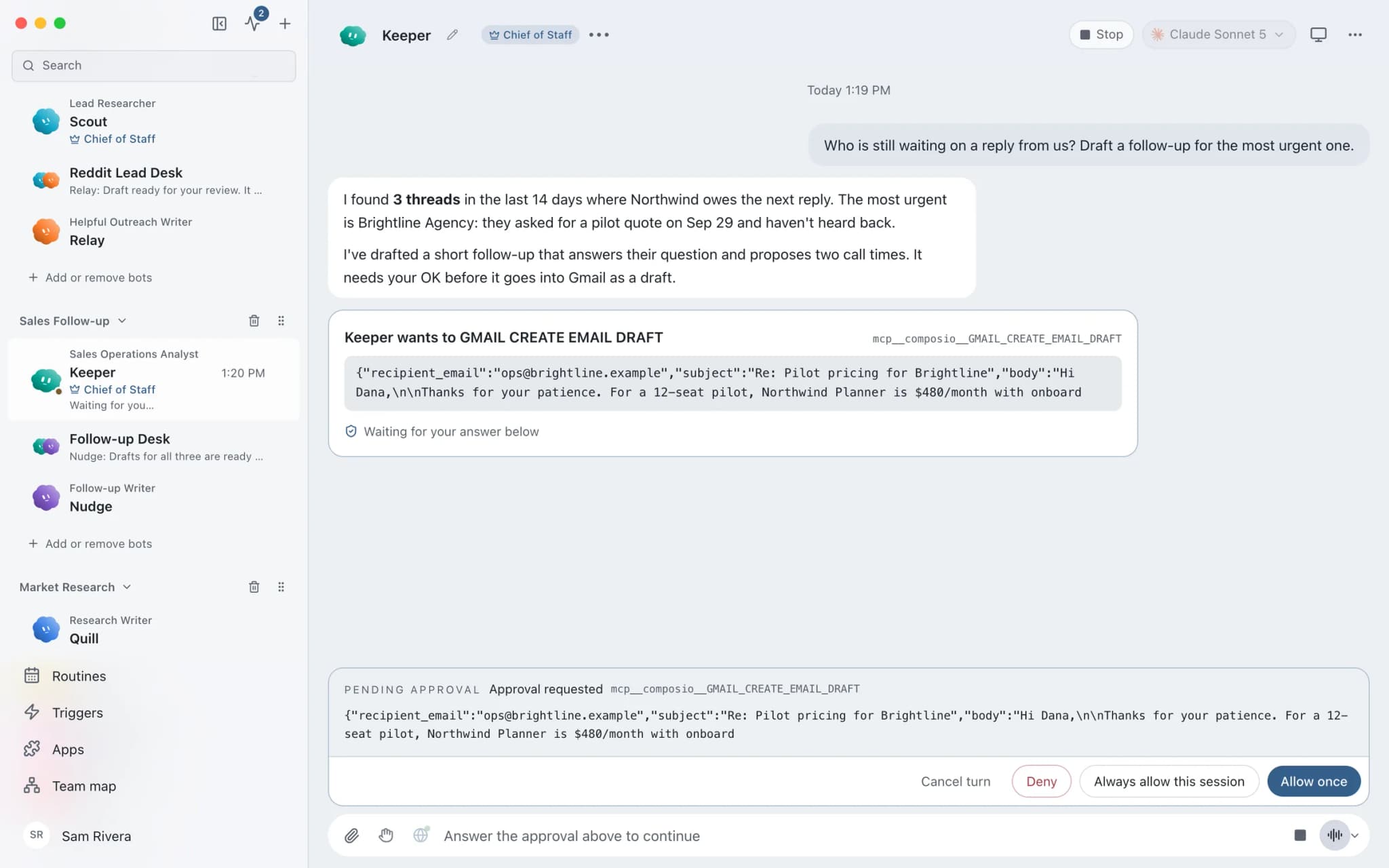
In Ask mode, risky actions such as sending an email become approval cards. Deny one and the bot looks for another way.
Routines with receipts
Run reminders on chosen weekdays. Every run records whether it completed, failed, or was missed, so nothing silently stops.
Data stays on your machine
Chats, files, and memory are stored locally. Text goes only to the AI provider and apps you choose.
In detail
See the jobs step by step.





See it in the app
What it looks like in Brainwrite.
A real screenshot from a demo workspace.
Start faster
Ready-made teams to start from.
Your tools
Apps your team works in.

QuickBooks
Pull QuickBooks reports, chase receivables, and draft invoices, estimates, and bills for a person to approve.

Xero
Run Xero reports, draft invoices and quotes, and prepare payments that a person approves.

Gmail
Bots search, label, and read Gmail threads and draft replies in place. Sending waits for your approval.

Google Sheets
Bots read and write Google Sheets, append and upsert rows, and add charts to trackers and reports.

Excel
Bots read and update Excel workbooks in OneDrive and SharePoint, add table rows, and build charts.
FAQ
Questions about Brainwrite for accountants
How can accountants use AI agents?
Start with administrative work that repeats every month: chasing documents, sorting the inbox, answering common client questions, and drafting commentary from reports. Brainwrite runs bots on your Mac that work in the apps you grant, such as Gmail, Google Sheets, QuickBooks, or Xero. You check every figure and approve every message before it goes out.
Can a bot post entries in QuickBooks or Xero?
Only if you grant it tools that can write. You choose all tools, an exact list, or none for each bot, and in Ask mode risky actions wait for your approval. Most practices start with read-only access for drafting summaries and keep bookkeeping entries with a person.
Is client financial data kept private?
Chats, files, and bot memory stay on your machine. When a bot works, the data it needs is sent to the AI provider you chose and to the apps you connected. Brainwrite's account service sees your email and plan. Brainwrite holds no SOC 2 or ISO 27001 certification, so assess it against your own policies.
Does Brainwrite replace practice management software?
No. Brainwrite runs bots that work alongside the apps you already use, through connected apps and custom MCP servers. Your records stay in your existing systems. The bots read from them, draft work, and ask for approval before risky actions.
Related
Related industries.

Law firms
Intake triage, consultation scheduling, and document summaries for lawyer review, with files kept on your own machine.

Consultants
Meeting briefs, sourced research, competitor watch, and client updates prepared by bots, with your judgment on top.

Local businesses
Local SEO checks, customer reply drafts, quote follow-ups, and competitor watch for businesses that serve a local area.

Give your first job to Brainwrite.
Download the app, connect the AI you already pay for, and tell your Chief of Staff what needs doing.
macOS today. Windows and Linux are coming soon.