Industry · Real estate
Follow up with every lead and every showing, even in a busy week
Real estate agents can use AI agents to reply to new leads, schedule showings, follow up after viewings, and draft listing descriptions for review. In Brainwrite, a Chief of Staff bot hands each task to a specialist bot working in your email, calendar, and CRM. You approve messages before they reach buyers or sellers.
Real estate · example team
 NovaChief of Staff
 AtlasKeeper, Sales Operations Analyst
 SageNudge, Follow-up Writer
- NovaChief of Staff
 DashInbox triager
Brief your Chief of Staff. It picks the specialists and runs the team.

 NovaChief of StaffShowing prep done
Your 11:00 showing: the buyer's questions are summarised. 2 follow-ups drafted.


 Listings team3 bots
Where the week goes
The work that eats your time.
Slow replies to new leads
Enquiries arrive while you are at a showing. By the evening, the buyer has already talked to someone else.
Follow-ups after viewings
Every viewing should get a follow-up. After a busy weekend, half of them never go out.
Listing copy and posts
Each new listing needs a description, a few social posts, and an email to your buyer list.
A CRM that falls behind
Notes from calls and showings stay in your head or your phone instead of the CRM.
Start here
The first job to hand off.
Follow up on quiet leads
The Recover Unanswered Sales Emails team reviews the mailbox and CRM scope you approve, finds buyers and sellers waiting on you, and drafts a specific follow-up for each. Nothing sends automatically.


Every weekday, check the Sales label in my Gmail for threads older than four business days where we promised the next step. Skip anything closed in HubSpot. Draft the follow-ups but do not send them.
Your Chief of Staff put a team on it
- Atlas· Keeper, Sales Operations Analyst
- Sage· Nudge, Follow-up Writer
- 7 threads where we owe the next step; 12 excluded as closed, opted out, or already answered
- Top item: Dana at Fieldstone was promised a pricing sheet 6 business days ago (owner: you, confidence high)
- Follow-up for Fieldstone drafted and waiting for your approval
- Low confidence: Corvel thread may be a support issue, not a sale; review before drafting
DoneWhich follow-ups get sent, and when waits for you. Nothing was sent.
What the team takes on
Jobs your AI team does every week.

New lead triage
Sort incoming enquiries by property, budget, and urgency, and draft a first reply with suggested viewing times.

Showing scheduling
Propose times from your calendar or Calendly and draft the confirmation for you to approve.
Listing description drafts
Turn your notes and the property details into a listing description and posts for you to check and edit.

CRM updates
Draft notes, next steps, and stage changes in HubSpot from your emails and call notes, for you to confirm.
Local search visibility
The Local SEO team checks your site, Business Profile signals, reviews, and listing consistency against nearby competitors.
Why a team
Why this works better than a chatbot.
Approvals before messages go out
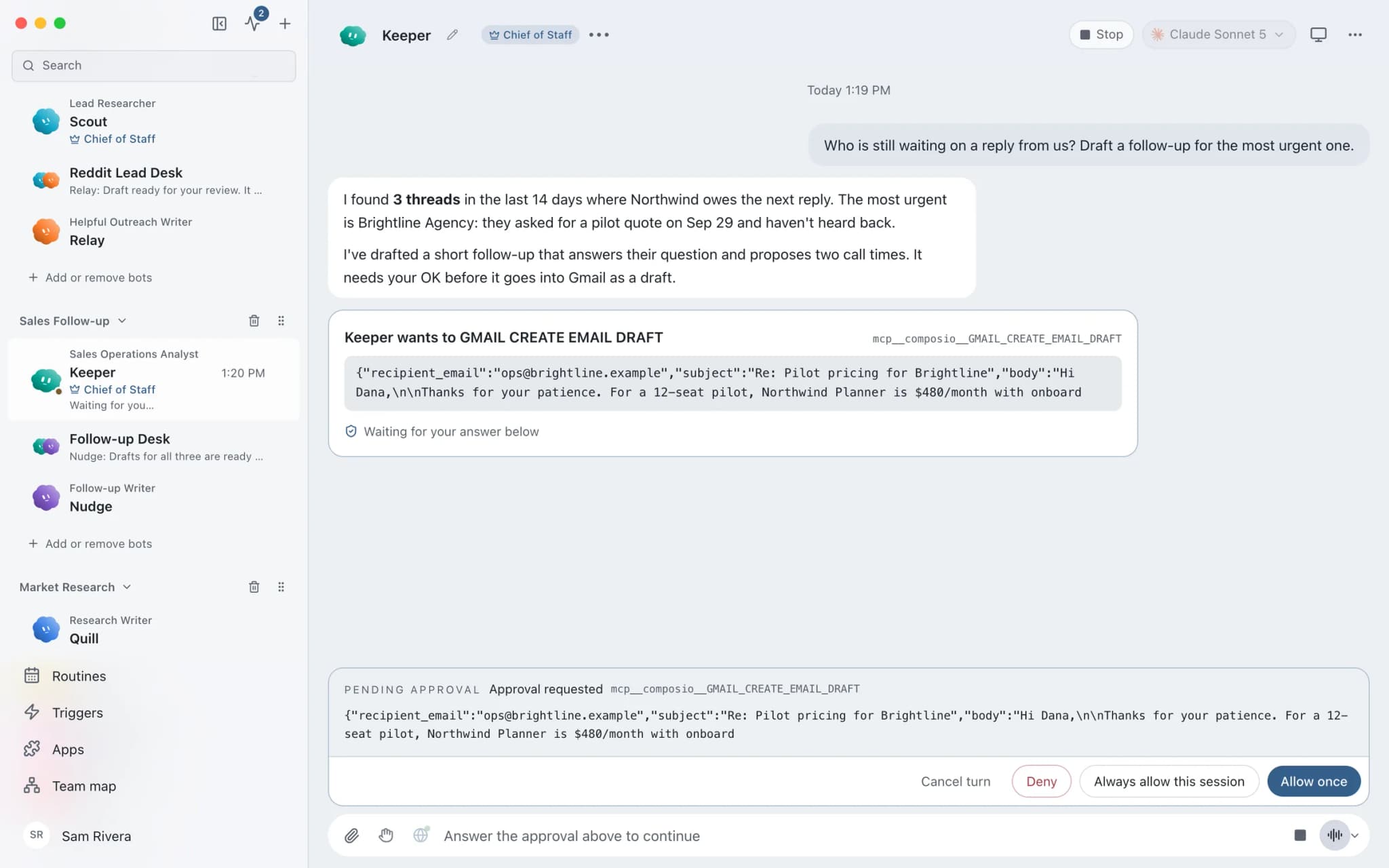
In Ask mode, risky actions such as sending an email or message appear as approval cards. You read the draft and approve or deny.
A daily follow-up routine
The follow-up team includes a weekday morning review routine. It installs paused, and you switch it on when the drafts look right.
Work and personal accounts
Connect labelled accounts per app, such as a brokerage inbox and a personal one, without one replacing the other.
Client details stay local
Chats, files, and memory stay on your Mac. Text goes only to the AI provider and apps you choose.
In detail
See the jobs step by step.




See it in the app
What it looks like in Brainwrite.
A real screenshot from a demo workspace.
Start faster
Ready-made teams to start from.
Your tools
Apps your team works in.

Gmail
Bots search, label, and read Gmail threads and draft replies in place. Sending waits for your approval.

Google Calendar
Bots read your Google Calendar, find free slots, and create or move events. Invites wait for your approval.

Calendly
Bots read Calendly bookings and invitee answers, create one-time booking links, and flag no-shows.

HubSpot
Bots search HubSpot contacts and deals, log notes and tasks, and keep records tidy.

WhatsApp
Bots send WhatsApp Business messages and templates, and manage templates and media. Sends wait for you.
FAQ
Questions about Brainwrite for real estate
How can real estate agents use AI agents?
Use them for the follow-up work that slips when you are out at showings: replying to new leads, scheduling viewings, following up afterwards, drafting listing copy, and updating your CRM. Brainwrite's bots prepare each message from your email, calendar, and CRM, and you approve it before it reaches a buyer or seller.
Will bots message leads automatically?
Not by default. The ready-made follow-up team drafts messages and sends nothing on its own. In Ask mode, risky actions such as sending an email or WhatsApp message become approval cards. You can widen permissions per thread with Full Access, but most agents keep approval on for anything a client will read.
Does it work while I am out at showings?
Local routines need the Brainwrite app running on your Mac. Brainwrite Cloud includes an always-on cloud computer that runs routines 24/7, so morning follow-up reviews still happen. The iPhone and Android companion apps are coming soon and not available today, so you review drafts in the Mac app.
Where does client information go?
Chats, files, and bot memory stay on your Mac. The text a bot needs is sent to the AI provider you chose and to the apps you connected, such as Gmail or HubSpot. Brainwrite's account service sees your email and plan. Bot memory is plain text you can read and delete.
Related
Related industries.

Local businesses
Local SEO checks, customer reply drafts, quote follow-ups, and competitor watch for businesses that serve a local area.

Recruiting
Interview scheduling, candidate updates, application summaries, and call prep, with recruiters making every hiring decision.

Law firms
Intake triage, consultation scheduling, and document summaries for lawyer review, with files kept on your own machine.

Give your first job to Brainwrite.
Download the app, connect the AI you already pay for, and tell your Chief of Staff what needs doing.
macOS today. Windows and Linux are coming soon.