Industry · Construction
Chase quotes and update clients without leaving the job site for the office
Construction contractors can use AI agents to chase subcontractor quotes, draft weekly progress updates for clients, follow up on bids, and turn site notes into action lists. In Brainwrite, specialist bots work from your email, spreadsheets, and project boards. You make the calls on price, schedule, and safety, and approve every message before it goes out.
Construction · example team
 NovaChief of Staff
 AtlasKeeper, Sales Operations Analyst
 SageNudge, Follow-up Writer
- NovaChief of Staff
 DashDelivery tracker
Brief your Chief of Staff. It picks the specialists and runs the team.
Where the week goes
The work that eats your time.
Quotes that arrive late
Bids depend on subcontractor and supplier prices, and chasing them by phone eats the week.
Client updates
Clients want to know where the job stands. The update gets written on Sunday night from memory.
Bids that go quiet
An estimate goes out and the client stops replying. Follow-ups lose out to the jobs already running.
Notes scattered across phones
Site notes, photos, and voice memos never make it into one list of actions.
Start here
The first job to hand off.
Chase open subcontractor quotes
Keep each bid's quote list in Google Sheets. A weekday routine finds subcontractors who have not replied and drafts a short reminder for each with the deadline, which you approve before it sends.


Every weekday, check the Sales label in my Gmail for threads older than four business days where we promised the next step. Skip anything closed in HubSpot. Draft the follow-ups but do not send them.
Your Chief of Staff put a team on it
 Atlas· Keeper, Sales Operations Analyst
 Sage· Nudge, Follow-up Writer
- 7 threads where we owe the next step; 12 excluded as closed, opted out, or already answered
- Top item: Dana at Fieldstone was promised a pricing sheet 6 business days ago (owner: you, confidence high)
- Follow-up for Fieldstone drafted and waiting for your approval
- Low confidence: Corvel thread may be a support issue, not a sale; review before drafting
DoneWhich follow-ups get sent, and when waits for you. Nothing was sent.
What the team takes on
Jobs your AI team does every week.

Weekly site reports
Draft a plain-English update on progress, upcoming work, and decisions the client needs to make, from your site notes and schedule.

Bid follow-ups
Find estimates where the client went quiet and draft a follow-up grounded in the original conversation. Nothing sends automatically.

Site notes to tasks
Dictate notes after a site visit, and a bot turns them into items on your monday.com board for you to confirm.

Change order drafts
Draft a change order description from the client's request and your notes, for you to price, check, and send.
Local search visibility
The Local SEO team checks your site, Business Profile signals, and listings, and maps nearby contractors from public data.
Why a team
Why this works better than a chatbot.
Approval before anything sends
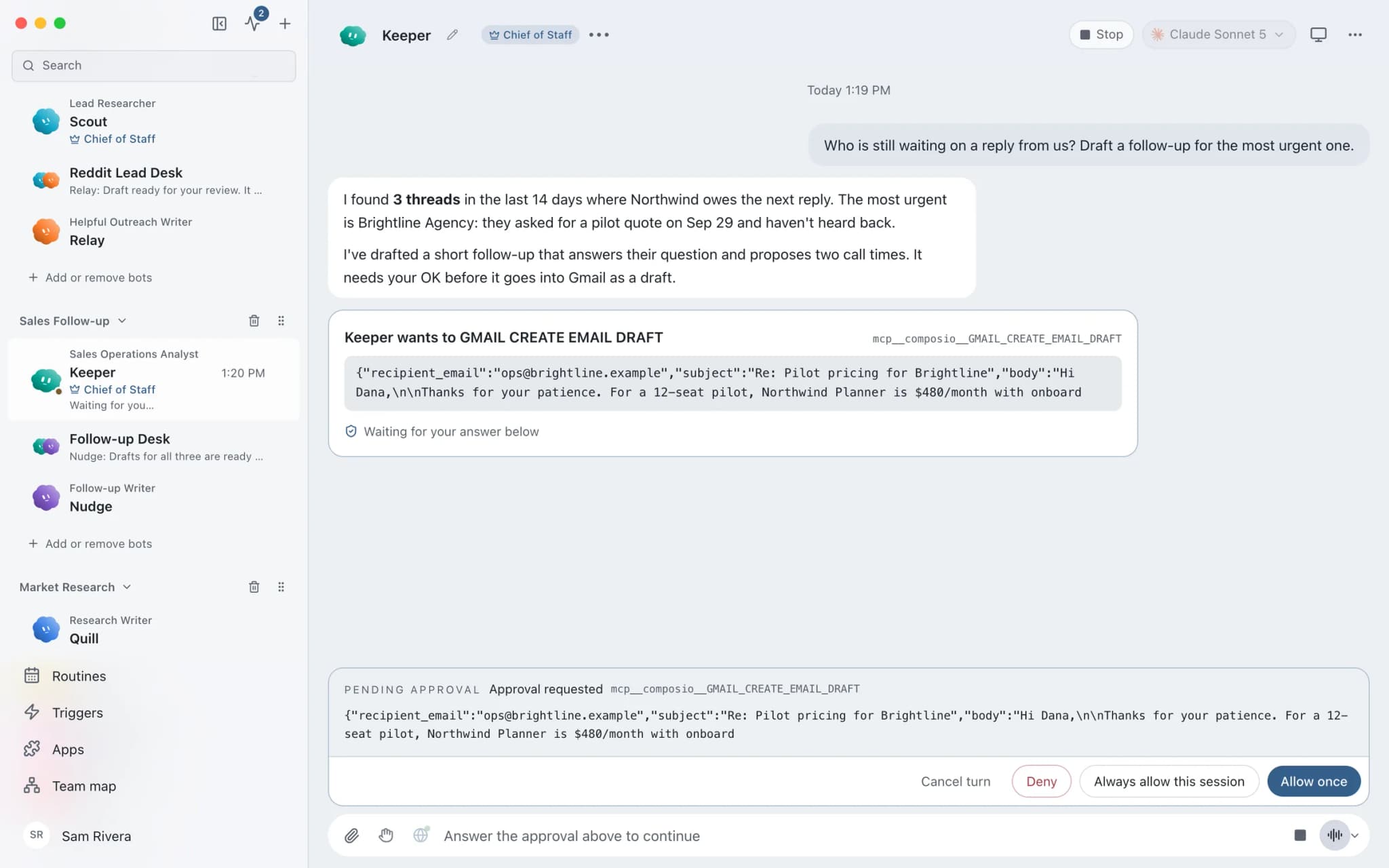
In Ask mode, sending an email becomes an approval card. A reminder never reaches a subcontractor or client unseen.
Dictate on your Mac
Speak notes into Brainwrite with Apple's on-device dictation. The iPhone and Android apps are coming soon, so today you dictate on your Mac.
Grants scoped to the job
The quote-chasing bot gets email and the bid sheet, not your accounts. Each grant is all tools, an exact list, or none.
Runs while you are on site
Brainwrite Cloud runs routines 24/7 on an always-on cloud computer. Local routines need your Mac awake with Brainwrite open.
In detail
See the jobs step by step.






See it in the app
What it looks like in Brainwrite.
A real screenshot from a demo workspace.
Start faster
Ready-made teams to start from.
Your tools
Apps your team works in.

Gmail
Bots search, label, and read Gmail threads and draft replies in place. Sending waits for your approval.

Google Sheets
Bots read and write Google Sheets, append and upsert rows, and add charts to trackers and reports.

monday.com
Create monday.com items, change statuses, post updates, and get a weekly summary of what is stuck on a board.

Dropbox
Bots search, read, upload, and move Dropbox files, and create shared links once you approve.

QuickBooks
Pull QuickBooks reports, chase receivables, and draft invoices, estimates, and bills for a person to approve.
FAQ
Questions about Brainwrite for construction
How can a construction company use AI agents?
Use them for the office work that follows you home: chasing subcontractor quotes, drafting client progress updates, following up on bids, turning site notes into tasks, and drafting change order descriptions. Brainwrite runs bots that draft from your email, sheets, and project board. You check every figure and approve every message.
Does Brainwrite connect to my construction management software?
Check the connected apps list for your system. Project boards such as monday.com, files in Dropbox, and QuickBooks are available as connected apps. If your construction software is not listed, export what you need to Google Sheets, or add it as a custom MCP server if its vendor provides one.
Can I use it from the job site?
Brainwrite runs on macOS today. The iPhone and Android companion apps are coming soon and not available yet, so you review drafts in the Mac app. Brainwrite Cloud keeps routines running 24/7 while you are on site, so reminders and reports are ready when you get back.
Can a bot check my plans against building codes?
No. Bots can summarise documents you give them and gather public sources with links, but they do not check designs or code compliance, and they can misread a document. Code, safety, and structural questions belong to qualified people. Use bots for the correspondence and admin around the job.
Related
Related industries.
Architects
Meeting minutes, fee proposal drafts, consultant chasers, and client updates, while architects keep the design decisions.
Property management
Maintenance request triage, tenant and owner updates, contractor chasing, and monthly owner reports, with you approving each.

Local businesses
Local SEO checks, customer reply drafts, quote follow-ups, and competitor watch for businesses that serve a local area.

Give your first job to Brainwrite.
Download the app, connect the AI you already pay for, and tell your Chief of Staff what needs doing.
macOS today. Windows and Linux are coming soon.