Industry · Property management
Sort maintenance requests and keep owners updated without a second inbox shift
Property managers can use AI agents to sort maintenance requests, draft updates to tenants and owners, chase contractors for quotes, and prepare monthly owner reports. In Brainwrite, specialist bots work from the email, spreadsheets, and boards you grant them. You decide which repairs go ahead and approve every message before it reaches a tenant or owner.
Property management · example team
 NovaChief of Staff
- NovaChief of Staff
 DashInbox triager
 SageReply drafter
 AtlasDelivery tracker
Brief your Chief of Staff. It picks the specialists and runs the team.
Where the week goes
The work that eats your time.
Maintenance requests everywhere
Leaks, broken locks, and noise complaints arrive by email, message, and phone, with no single list of what is open.
Owners asking for updates
Each owner wants to know what happened this month and what it cost.
Chasing contractors
Quotes and completion photos arrive late, and someone keeps asking.
Renewals and notices
Lease renewal dates come round, and each tenant needs a timely, accurate letter.
Start here
The first job to hand off.
Sort the maintenance inbox
A bot reads new requests, separates urgent repairs from routine ones, proposes a card on your Trello board for each, and drafts an acknowledgement to the tenant. You confirm the cards and approve each message.


Every weekday at 8, go through my work Gmail. Put anything from clients or about invoices at the top, list newsletters and receipts separately, and draft replies for client questions. Do not send or archive anything.
Your Chief of Staff put a team on it
 Nova· Chief of Staff
 Dash· Inbox triager
 Sage· Reply drafter
- Needs you (4): two client questions, one invoice dispute, one contract to sign
- Draft ready for Priya at Harbor & Pine about the revised timeline, waiting for your approval
- Waiting on others (6): replies you sent where the other side owes the next step
- Ignore (31): newsletters, receipts, and notifications, listed in one block
DoneWhich replies get sent, edited, or dropped waits for you. Nothing was sent.
What the team takes on
Jobs your AI team does every week.

Contractor chasers
Find jobs waiting on a contractor's quote or completion and draft a short reminder for each. Nothing sends automatically.

Monthly owner reports
Draft each owner's summary of repairs, costs, and occupancy from your sheets and QuickBooks reports, for you to check.

Tenant update drafts
Draft updates on repair progress, planned works, and access visits, for you to approve.

Renewal reminders
From a renewal sheet, draft reminders and renewal letters for review. You set the terms.
Vacancy listing drafts
Turn unit details and your notes into a listing description for you to check before it is published.
Why a team
Why this works better than a chatbot.
Approval before tenants hear from you
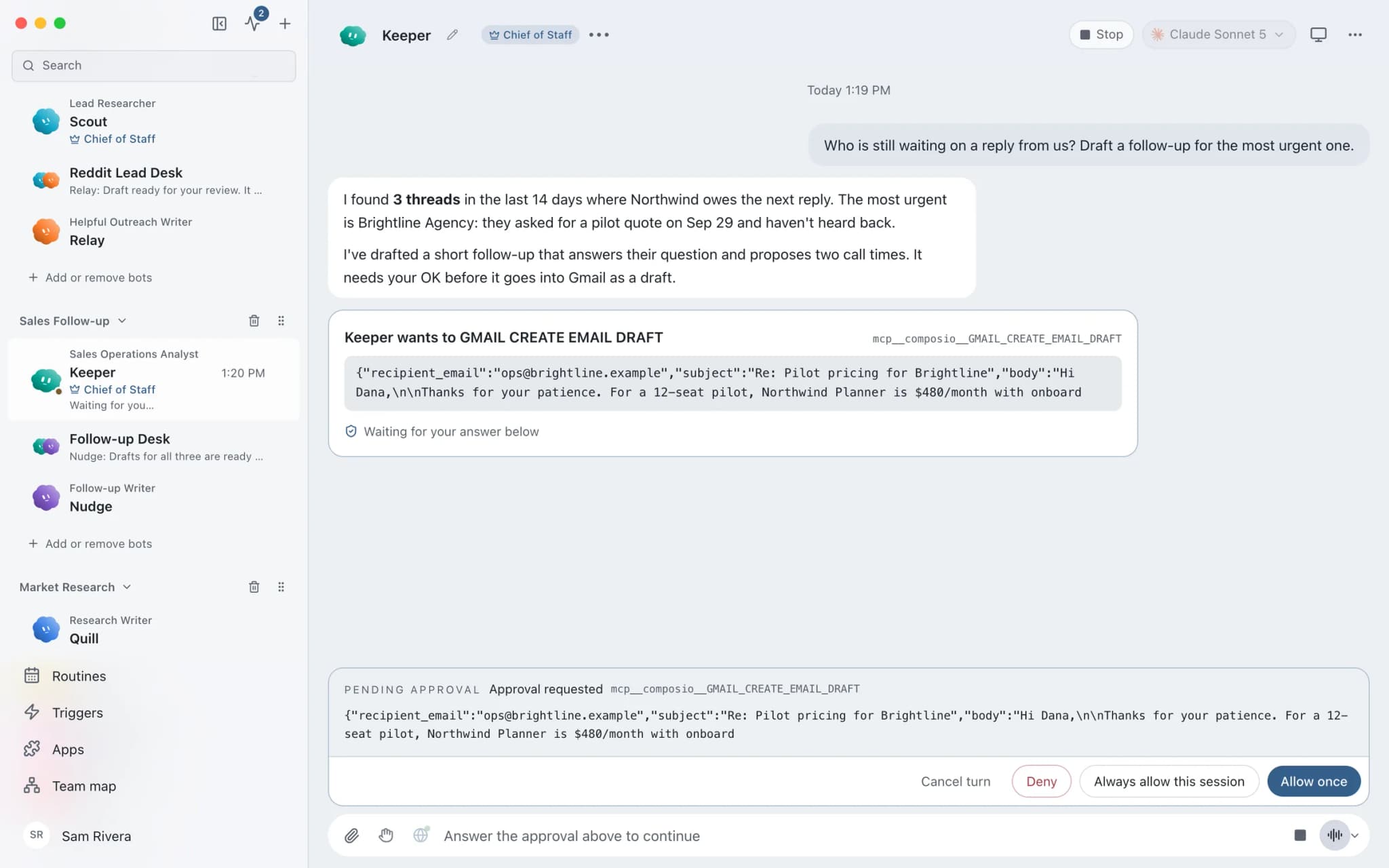
In Ask mode, sending an email or WhatsApp message becomes an approval card. You read the draft and approve or deny it.
Separate inboxes, labelled
Connect up to five labelled accounts per app, such as a maintenance inbox and a leasing inbox, without one replacing the other.
Routines with receipts
Run contractor chasers on chosen weekdays. Every run records whether it completed, failed, or was missed.
Tenant data stays local
Chats, files, and memory stay on your Mac. Text goes only to the AI provider and apps you choose.
In detail
See the jobs step by step.






See it in the app
What it looks like in Brainwrite.
A real screenshot from a demo workspace.
Start faster
Ready-made teams to start from.
Your tools
Apps your team works in.

Gmail
Bots search, label, and read Gmail threads and draft replies in place. Sending waits for your approval.

Trello
Add Trello cards with checklists, move them between lists, set due dates, and spot cards stuck on a board.

Google Sheets
Bots read and write Google Sheets, append and upsert rows, and add charts to trackers and reports.

QuickBooks
Pull QuickBooks reports, chase receivables, and draft invoices, estimates, and bills for a person to approve.

WhatsApp
Bots send WhatsApp Business messages and templates, and manage templates and media. Sends wait for you.
FAQ
Questions about Brainwrite for property management
How can a property manager use AI agents?
Use them for the coordination that fills the week: sorting maintenance requests, chasing contractors, drafting tenant and owner updates, preparing monthly owner reports, and drafting renewal letters. Brainwrite runs bots on your Mac that draft from your email, sheets, and boards. You decide which repairs go ahead and approve every message.
Does Brainwrite connect to my property management software?
Check the connected apps list for your system. If it is not there, export tenancies, repairs, or renewals to Google Sheets or Excel and let a bot work from that, or add the software as a custom MCP server if its vendor provides one. Custom servers are saved switched off until you test them.
Can a bot approve repairs or spend money?
Not unless you grant it tools that can and approve the action. Bots draft and organise; you decide which repairs go ahead and which contractor gets the job. In Ask mode, risky actions such as sending an email or recording a payment become approval cards. Many managers give bots read-only access to their accounts.
Will it handle emergency requests out of hours?
Do not rely on it for that. Local routines run only while your Mac is awake with Brainwrite open, and even Brainwrite Cloud, which runs routines 24/7, checks on the schedule you set rather than the moment a message arrives. Keep a phone line for emergencies and use bots for routine sorting.
Related
Related industries.

Real estate
Lead replies, showing scheduling, follow-ups, and listing drafts prepared by bots, approved by you before anything sends.
Construction
Quote chasing, client progress updates, bid follow-ups, and site notes into tasks, for contractors who spend the day on site.

Accountants
Document chasing, inbox triage, and draft summaries from your accounting data, with every figure checked by you.

Give your first job to Brainwrite.
Download the app, connect the AI you already pay for, and tell your Chief of Staff what needs doing.
macOS today. Windows and Linux are coming soon.