Automation
Let an outside event start the work
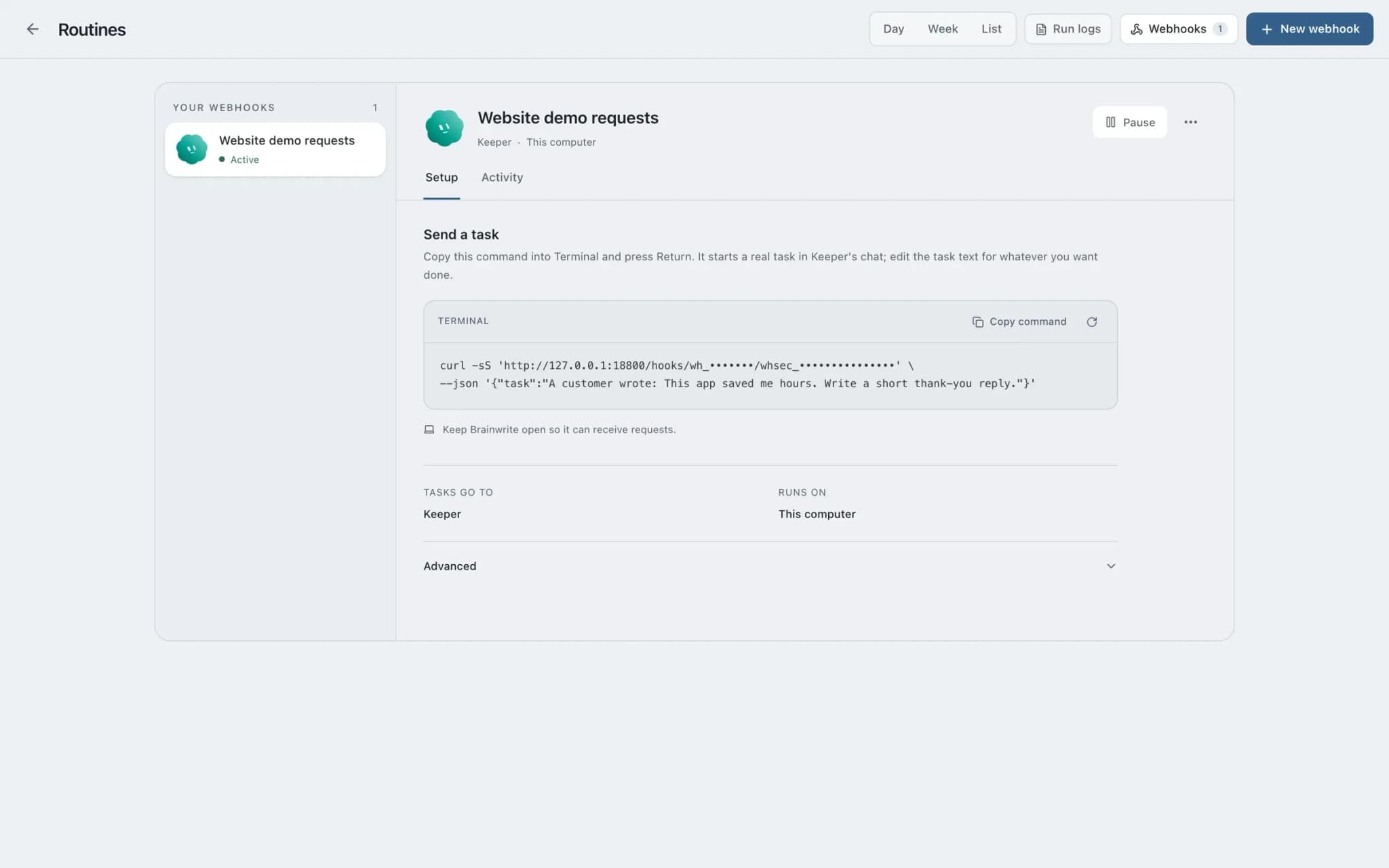
Webhooks in Brainwrite start a bot's task from an external HTTP request, using the same queued executor as routines. They arrive at a separate local receiver, 127.0.0.1:8800 by default, which exposes only a health route and secret hook routes. Bearer authentication is preferred, and a capability URL is available for senders that cannot set headers.


When an issue reaches this webhook, check it for duplicates, suggest labels and post a summary here.
Your Chief of Staff put a team on it
 Nova· Chief of Staff
 Dash· Triage bot
 Atlas· Rigel, QA and Release Engineer
- Issue #482 received through the webhook.
- Likely duplicate of #455: same stack trace in checkout.
- Suggested labels: bug, checkout.
- Drafted a comment linking the two issues.
Done1 comment to approve before it posts: waiting for your yes.


A new issue arrives: done. One thing waits for you.
- 1Issue #482 received through the webhook.
- 2Likely duplicate of #455: same stack trace in checkout.
- 3Suggested labels: bug, checkout.
 3 bots on this job
See it in the app
Webhooks in Brainwrite.
How it works
How Webhooks works.
- 01
Give the hook its own endpoint
Each webhook trigger gets a dedicated secret route on the local receiver, separate from any schedule.
- 02
Authenticate the sender
Send the secret as a bearer token so it stays out of URLs and most access logs. Use the capability URL only when the sender cannot set headers.
- 03
Reach it from outside, narrowly
To accept events from the internet, proxy only the webhook receiver through a narrowly configured relay or tunnel. Never expose the main harness port.
- 04
Follow the run
The event starts a queued task with a fresh context and a durable run receipt, the same as a routine run.
Good to know
The details.
A separate receiver
The receiver is not the Brainwrite API. It exposes health and secret hook routes and nothing else.
Loopback by default
On 127.0.0.1, only your own machine can reach the receiver until you deliberately put a tunnel in front of it.
Independent of schedules
A webhook can trigger a bot that has no schedule at all, and a routine needs no webhook.
Same executor, same receipts
Webhook runs use the same queued task executor as routines, so you get the same run receipts and notifications for work that needs attention.
The edges, plainly
- Webhook deliveries are not hosted jobs. Brainwrite must be running on your Mac, or the receiver is not listening.
- Accepting events from the internet needs a relay or tunnel that you set up and keep narrow.
- A capability URL carries the secret in the address, so it is more likely to show up in logs than a bearer token.



Works with
Apps it's often used with.

GitHub
Triage GitHub issues, review pull requests, read failing workflow logs, and draft release notes. Merges wait for you.

Stripe
Look up Stripe customers and payments, prepare invoices and refunds for approval, and summarise revenue every week.

Sentry
Triage new Sentry errors, read events and tags, check release health, and resolve or assign issues.

Shopify
Look up Shopify orders, update product listings, watch stock, and prepare refunds and discounts for your approval.
FAQ
Questions about Webhooks
Can a webhook trigger an AI agent?
Yes. In Brainwrite, a webhook starts a bot's task from an external HTTP request, using the same queued executor as routines. Each trigger has a dedicated secret route on a local receiver, and each run gets a fresh context and a durable receipt.
Is it safe to expose an AI agent webhook to the internet?
Expose as little as possible. The receiver listens on 127.0.0.1:8800 by default and offers only health and secret hook routes, not the wider Brainwrite API. Put only that receiver behind a narrowly configured relay or tunnel, never the main harness port, and prefer bearer authentication.
Do webhooks work when Brainwrite is closed?
No. Local webhook deliveries are not hosted jobs. Closing the desktop app stops the local receiver and executor, so events sent while it is closed are not picked up by that receiver. Keep Brainwrite running on the Mac that should receive them.
Should I use a bearer token or a capability URL for webhooks?
Use a bearer token when the sender can set headers. It keeps the secret out of URLs and most access logs. The capability URL exists for senders that cannot set headers, but because the secret is part of the address, it is easier to leak through logs.
Works well with
Related features.

Routines
Run a bot's task once, on an interval, or on chosen weekdays, with a receipt for every run.

Secrets
Bots use API tokens by name. The value goes only to one https site and never reaches the chat.

Approvals
Risky actions become cards you approve or deny in the conversation. Ask or Full Access per thread.

Inspector
Follow tool calls and raw engine output, then export the run with secrets removed.





Give your first job to Brainwrite.
Download the app, connect the AI you already pay for, and tell your Chief of Staff what needs doing.
macOS today. Windows and Linux are coming soon.