For · Support teams
Draft the repeat answers so your agents can handle the hard tickets
Support teams can use AI agents to draft replies to common tickets, tag and route new requests, summarise long threads, and turn recurring issues into help centre updates. In Brainwrite, a bot reads tickets in the helpdesk you connect and prepares a draft. A support agent edits it and decides whether to send.
Support teams · example team
 NovaChief of Staff
 SageSupport drafter
 AtlasEscalation checker
- NovaChief of Staff
 DashTriage bot
Brief your Chief of Staff. It picks the specialists and runs the team.


Reply drafts for your top five questions: ready for you. Nothing sent.
- 1Tagging and routing
- 2Escalation summaries
- 3Help centre drafts


 Support teams team4 bots
Where the week goes
The work that eats your time.
The same questions
Password resets, billing dates, and how-to questions fill the queue and leave less time for real problems.
Triage and routing
Someone reads every new ticket just to tag it and decide who should handle it.
Long thread handovers
Escalated tickets arrive with forty messages and no summary of what has been tried.
Out-of-date help articles
The same issue keeps coming in because the help centre never caught up with the product.
Start here
The first job to hand off.
Reply drafts for your top five questions
Write down the five questions you answer most and the correct answer to each in the bot's memory. The bot drafts replies to matching tickets; an agent checks and sends.


Every hour, read new Zendesk tickets. Draft a reply for each using the help articles in the Docs folder, flag anything about refunds or outages for me, and do not send anything.
Your Chief of Staff put a team on it
- Sage· Support drafter
- Atlas· Escalation checker
 Nova· Chief of Staff
- 8 new tickets since the last run
- 6 replies drafted from help articles, each waiting for approval before it is sent
- Escalated: refund request from Jordan at Kestrel Labs, summary attached
- Escalated: 2 tickets mention the same export error; possible outage
DoneEvery reply that reaches a customer waits for you. Nothing was sent.
What the team takes on
Jobs your AI team does every week.

Tagging and routing
Read new tickets, propose tags, priority, and the right queue, and leave the change for an agent to confirm.

Escalation summaries
Summarise a long thread into the problem, what was tried, and what the customer needs, and draft an issue for engineering.
Help centre drafts
Spot repeat questions and draft a help article or an update to an existing one.

Weekly support report
Summarise volume, top themes, and unresolved issues for the team and product in the same format each week.
Onboarding emails
Draft welcome and setup emails for new customers based on what they have and have not done.
Why a team
Why this works better than a chatbot.
Agents keep the send
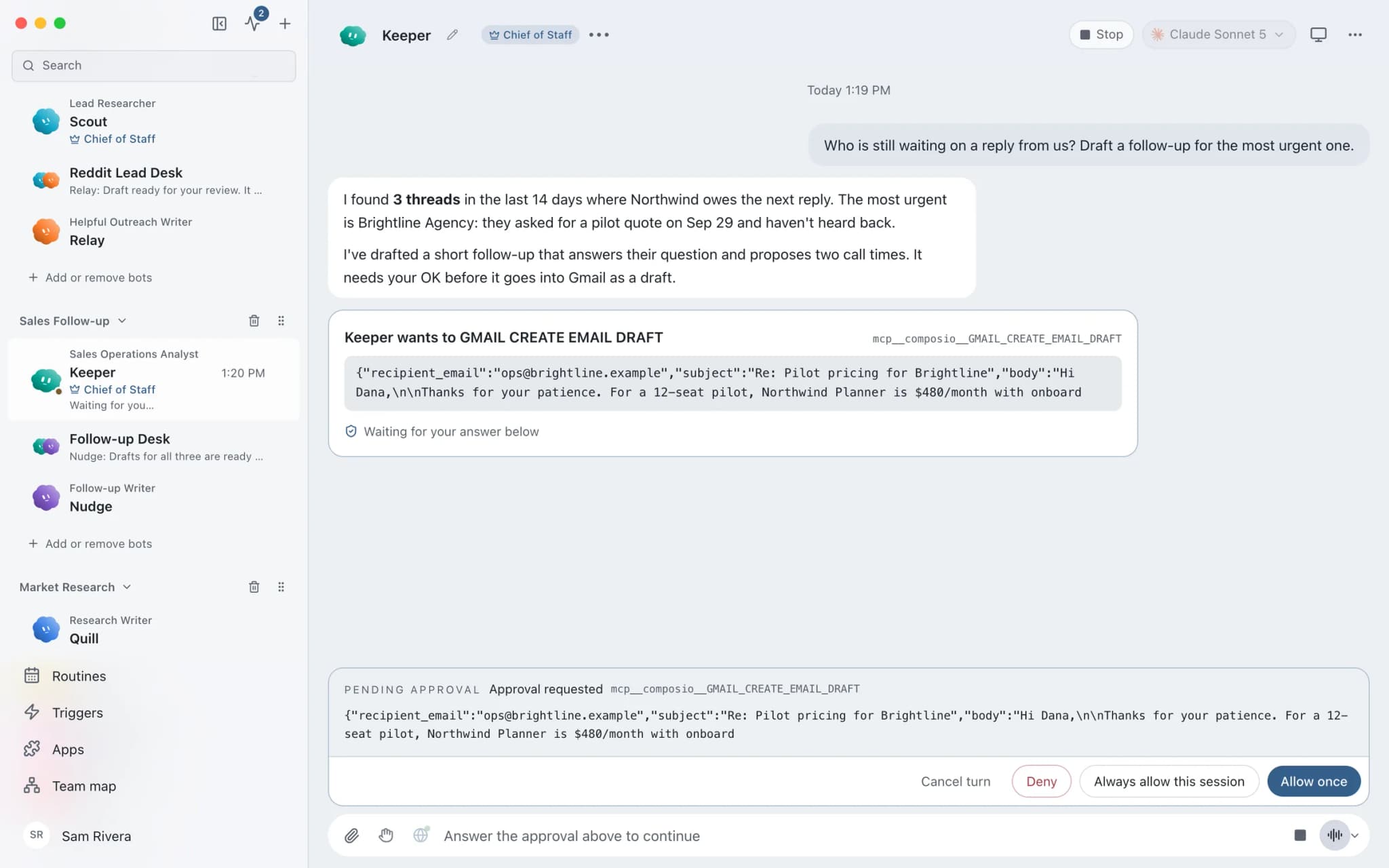
In Ask mode, sending a reply becomes an approval card. Denying it hands control back to the bot to revise.
Product facts in visible memory
Bot memory is plain text your team can read and correct, so a wrong answer gets fixed at the source.
Exact tool lists
Grant the support bot only the helpdesk tools it needs, from all tools, an exact list, or none.
A model per job
Pick a model per bot and per thread, such as a cheaper model for tagging and a stronger one for complex replies.
In detail
See the jobs step by step.
 Support repliesEvery ticket answered in draft. A person sends.See the job
 Issue triageDuplicates grouped, labels and owners proposed.See the job
 Weekly reportFriday's report, gathered from what actually shipped.See the job
 Customer onboardingA new payment starts the welcome, ready to approve.See the job
See it in the app
What it looks like in Brainwrite.
A real screenshot from a demo workspace.
Your tools
Apps your team works in.

Zendesk
Triage Zendesk tickets, read full threads, draft replies with your macros, and merge duplicates you confirm.

Intercom
Search Intercom conversations, draft replies, add notes, tag and assign chats, and keep help articles current.

Freshdesk
Filter Freshdesk tickets, add private notes, draft replies from canned responses, and summarise satisfaction ratings.

Help Scout
Read Help Scout conversations, draft replies from saved replies, tag and note threads, and summarise inbox reports.

Linear
File clean Linear issues from bug reports, catch duplicates, review the current cycle, and draft project updates.
FAQ
Questions about Brainwrite for support teams
How can support teams use AI agents?
Use them to draft replies to repeat questions, tag and route new tickets, summarise long threads for escalation, and draft help centre updates. In Brainwrite, a bot works in the helpdesk you connect, such as Zendesk, Intercom, Freshdesk, or Help Scout. A support agent reviews each draft and decides whether to send it.
Will a bot reply to customers on its own?
Not unless you set it up that way. In Ask mode, risky actions such as sending a reply become approval cards for an agent to approve or deny. You choose which helpdesk tools each bot can use. Most teams keep approval on for anything a customer will read.
Where does ticket data go?
Chats, files, and bot memory stay on your machine. The ticket text a bot needs is sent to the AI provider you chose and stays in the helpdesk you connected. Brainwrite's account service sees your email and plan. Brainwrite holds no SOC 2 or ISO 27001 certification.
Does Brainwrite replace our helpdesk?
No. Brainwrite runs bots that work inside the helpdesk you already use through connected apps, or through a custom MCP server you add. Tickets, customers, and history stay in your helpdesk. The bots read, draft, and propose changes for your team to approve.
Related
Other teams.
Operations teams
Scheduled reports, status chasing, record cleanup, and onboarding checklists, each run logged with a receipt.

Sales teams
Quiet-deal detection, grounded follow-up drafts, call prep, and CRM cleanup, with reps deciding what gets sent.

Engineering teams
Your existing coding agents as named bots with their own computers, approval cards, routines, and per-thread costs.

Give your first job to Brainwrite.
Download the app, connect the AI you already pay for, and tell your Chief of Staff what needs doing.
macOS today. Windows and Linux are coming soon.