Industry · IT service providers
Clear the ticket queue and write client reports without pulling technicians off jobs
IT service providers can use AI agents to triage incoming support tickets, draft replies to routine requests, prepare monthly client reports, and brief technicians before review meetings. In Brainwrite, each bot gets only the apps you grant it and its own computer, such as a local VM or your own Linux server. Technicians approve risky actions and every client message.
IT service providers · example team
 NovaChief of Staff
 SageSupport drafter
 AtlasEscalation checker
- NovaChief of Staff
 DashTriage bot
Brief your Chief of Staff. It picks the specialists and runs the team.
Where the week goes
The work that eats your time.
A ticket queue that never empties
Password resets, printer problems, and real outages arrive in the same queue, and someone senior has to sort them.
Monthly client reports
Each client expects a summary of tickets, fixes, and recommendations, rebuilt from the helpdesk every month.
Quarterly business reviews
Review meetings need ticket trends, open risks, and renewal dates pulled together for every client.
Documentation drift
How-to notes live in one technician's head or an old wiki page nobody trusts.
Start here
The first job to hand off.
Triage new tickets every morning
Connect your helpdesk, such as Zendesk or Freshdesk. Each weekday a bot groups new tickets, flags likely outages, proposes priority, and drafts replies to routine requests for a technician to check and send.


Every hour, read new Zendesk tickets. Draft a reply for each using the help articles in the Docs folder, flag anything about refunds or outages for me, and do not send anything.
Your Chief of Staff put a team on it
 Sage· Support drafter
 Atlas· Escalation checker
 Nova· Chief of Staff
- 8 new tickets since the last run
- 6 replies drafted from help articles, each waiting for approval before it is sent
- Escalated: refund request from Jordan at Kestrel Labs, summary attached
- Escalated: 2 tickets mention the same export error; possible outage
DoneEvery reply that reaches a customer waits for you. Nothing was sent.
What the team takes on
Jobs your AI team does every week.

Routine reply drafts
Draft answers to common requests from your own runbooks and past replies. A technician edits and sends each one.

Monthly client reports
Draft a plain-English summary of each client's tickets, fixes, and open issues in the same format every month.

Review meeting prep
Pull ticket trends and open items into a one-page brief before each quarterly business review.

Runbook drafts
Turn resolved tickets and technician notes into draft how-to articles in Confluence or Notion, for review.
Proposal follow-ups
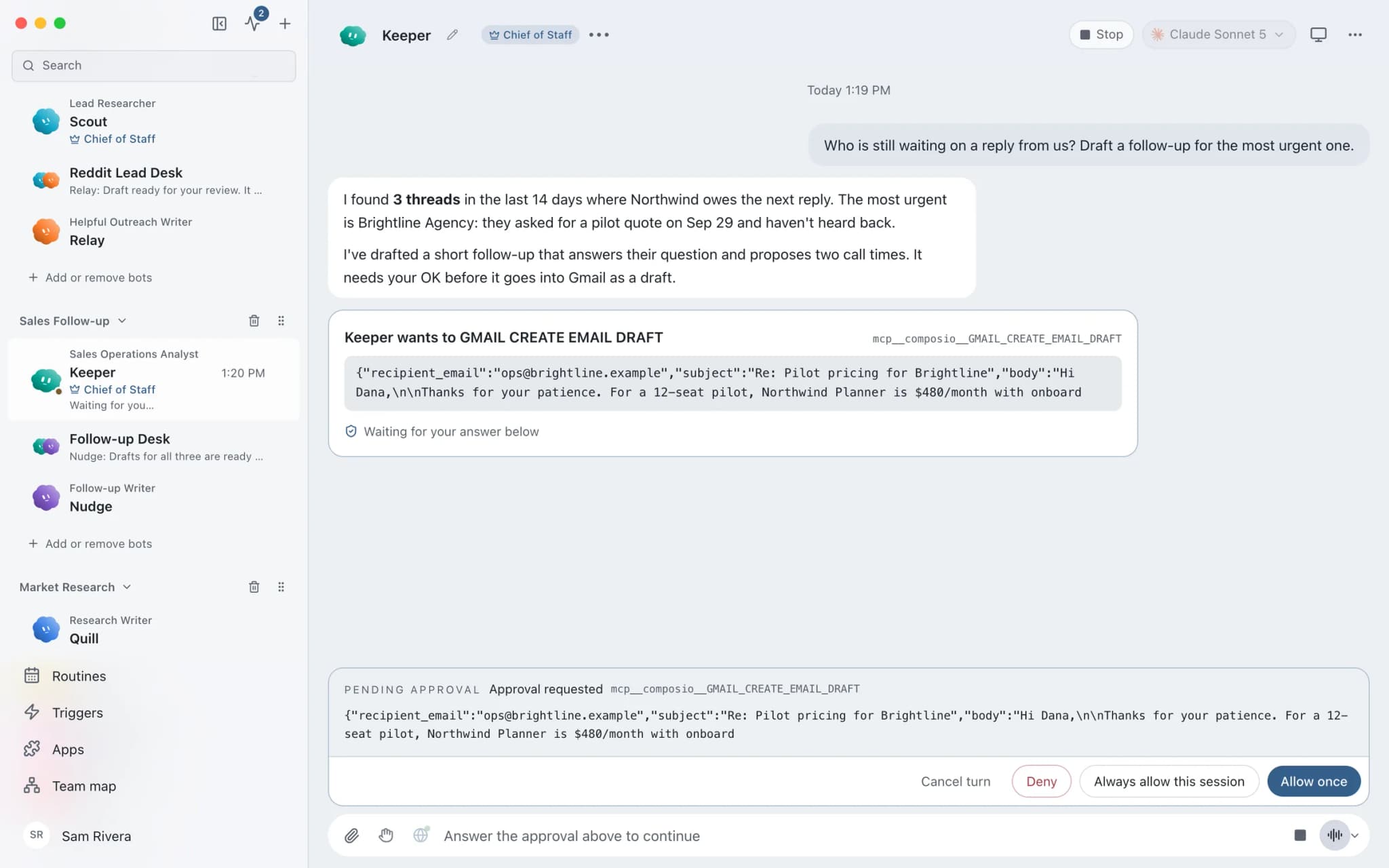
Find quotes and proposals where the client went quiet and draft a follow-up. Nothing sends automatically.
Why a team
Why this works better than a chatbot.
A separate computer per bot
Give a bot a local VM through Docker or Podman, a hosted cloud computer, or your own Linux VPS over SSH. Using your Mac directly is a separate opt-in.
Secrets stay out of prompts
API tokens live in the OS secure store. The bot names a secret, and Brainwrite inserts the value only when sending to one https site, then scrubs it from responses.
Bring your own tools
Add custom MCP servers by command or URL. They are saved switched off; you test them, then turn them on.
A record of every tool call
The Inspector shows what each bot ran, and Export saves a conversation with secrets removed.
In detail
See the jobs step by step.





See it in the app
What it looks like in Brainwrite.
A real screenshot from a demo workspace.
Start faster
Ready-made teams to start from.
Your tools
Apps your team works in.

Zendesk
Triage Zendesk tickets, read full threads, draft replies with your macros, and merge duplicates you confirm.

Freshdesk
Filter Freshdesk tickets, add private notes, draft replies from canned responses, and summarise satisfaction ratings.

Microsoft Teams
Bots search Teams, summarise channels and chats, and post replies or set up meetings once you approve.

Confluence
Bots search Confluence, read pages and comments, and create or update pages and blog posts.

Jira
Search Jira with JQL, file and transition issues, fill sprints, and get a plain summary of what blocks a release.
FAQ
Questions about Brainwrite for it service providers
How can an IT service provider use AI agents?
Use them on the work around the fixes: sorting the ticket queue, drafting replies to routine requests, writing monthly client reports, preparing quarterly reviews, and turning resolved tickets into runbooks. Brainwrite runs bots that work in your helpdesk and docs. Technicians check each draft and approve risky actions.
Can a bot run commands on client machines?
Brainwrite is not a remote monitoring and management tool. A bot runs commands only on the computer you assign it: none, a local VM, a hosted cloud computer, or your own Linux VPS over SSH. Using your Mac is a separate opt-in. In Ask mode, risky actions become approval cards, and the Inspector shows every tool call.
Does it connect to my PSA or RMM?
Check the connected apps list for your system. Helpdesks such as Zendesk and Freshdesk, and trackers such as Jira, connect through Composio with sign-in in your browser. If your PSA or RMM offers an MCP server, you can add it as a custom MCP server, which is saved switched off until you test it.
Where do client credentials go?
Saved secrets live in the OS secure store on your machine. A bot refers to a secret by name, and Brainwrite inserts the value only when sending to one https site, never follows redirects, and scrubs the value from responses. Secrets are desktop only for now.
Related
Related industries.

Software agencies
Scoped plans, release checks, issue triage, and client status updates from an engineering team of bots your developers direct.

Consultants
Meeting briefs, sourced research, competitor watch, and client updates prepared by bots, with your judgment on top.

Accountants
Document chasing, inbox triage, and draft summaries from your accounting data, with every figure checked by you.

Give your first job to Brainwrite.
Download the app, connect the AI you already pay for, and tell your Chief of Staff what needs doing.
macOS today. Windows and Linux are coming soon.