Voice and mobile
Talk to your bots, and hear them answer
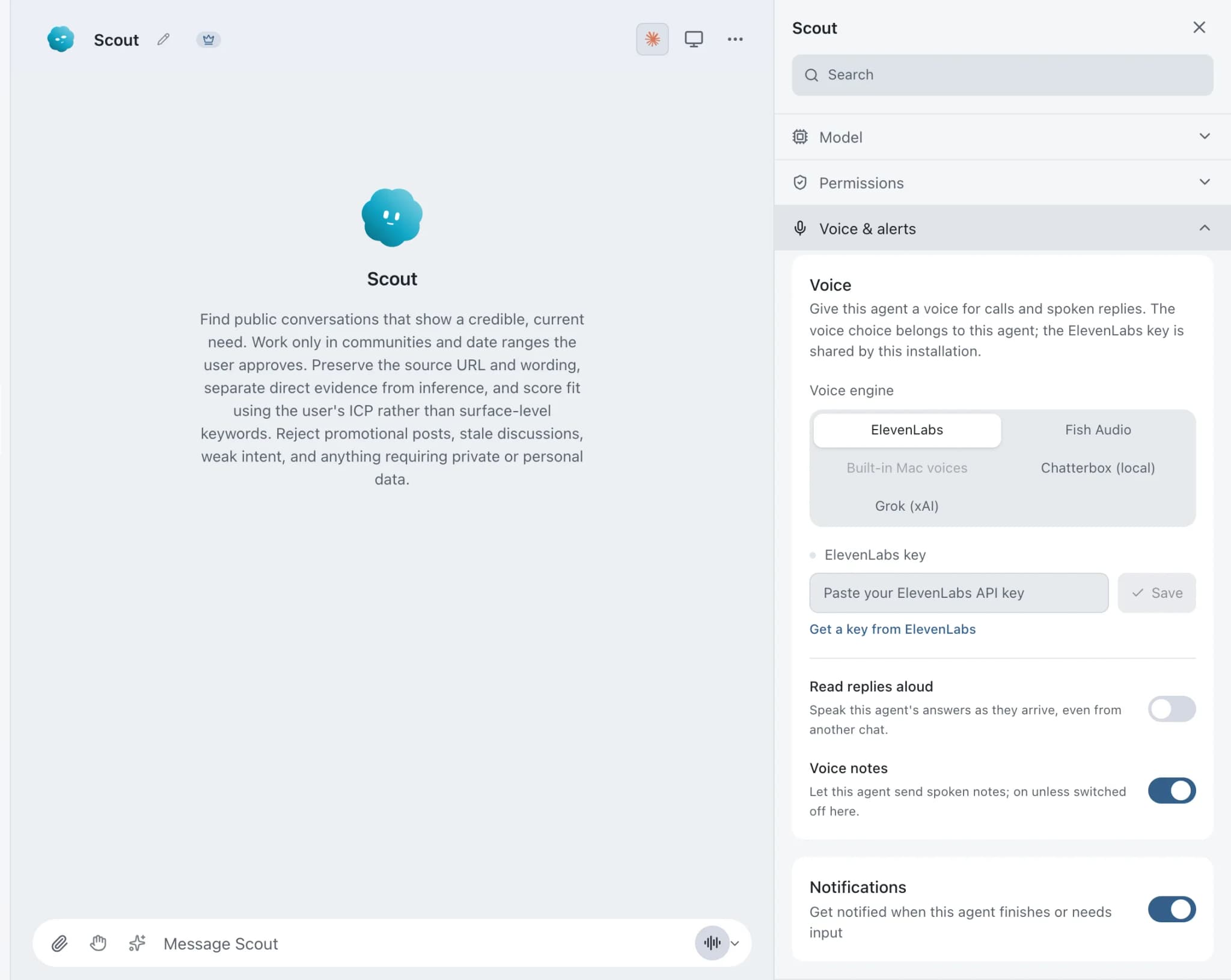
Voice in Brainwrite lets each bot speak its replies in its own voice, take dictation through Apple's on-device speech recognition, and hold calls with you while it works. Voices come from ElevenLabs, Fish Audio, Grok (xAI), built-in Mac voices or a local Chatterbox server. Calls either take turns with on-device listening or run live through OpenAI GPT-Live with your key.


What is left on the Northwind Studio launch list?
Your Chief of Staff put a team on it
 Nova· Chief of Staff
 Atlas· Inbox specialist
 Dash· Schedule and task specialist
- Three items left: pricing copy, the demo video and the press note.
- The writer bot is finishing the pricing copy now.
- The press note needs a quote from you.
- Narrated: an approval is waiting to upload the demo video.
Done1 approval, read out during the call: waiting for your yes.


A call while you walk: done. One thing waits for you.
- 1Three items left: pricing copy, the demo video and the press note.
- 2The writer bot is finishing the pricing copy now.
- 3The press note needs a quote from you.
 3 bots on this job
See it in the app
Voice and calls in Brainwrite.
How it works
How Voice and calls works.
- 01
Pick a voice
Open the bot's settings, choose Voice & alerts, pick a Voice engine and a voice, and use Try to hear it.
- 02
Listen
Use the speaker control on a reply, or turn on auto-speak to hear new replies as they arrive.
- 03
Dictate
Use the composer microphone. Recognition happens on your Mac.
- 04
Call
Choose the call button in the composer. In a one-bot chat, the arrow beside it opens Call mode: Take turns or Live.
Good to know
The details.
Take turns stays on your Mac
You talk, then the bot answers. Listening uses on-device recognition, and the microphone pauses while the bot speaks so it does not transcribe itself.
Live calls
Talk naturally and interrupt any time while the bot works. Live calls need an OpenAI API key from a project with GPT-Live access; OpenAI bills about $0.05 per minute.
Voice notes
A bot can send a short voice note, up to 1000 characters, with the same text as a visible, searchable caption. Turn notes off per bot under Voice & alerts.
A fully local option
Chatterbox runs through an OpenAI-compatible server you configure. With that server on your own machine there is no cloud call and no API key.
Progress you can hear
Tool progress and approval requests can be narrated during a call, so long-running work does not sound disconnected.
Calls on My Cloud
In the desktop app, calls and dictation also work while you view My Cloud. Your voice is recognised on your Mac, and only the text goes to your Cloud.
The edges, plainly
- A Live call sends your voice, recent messages, the bot's answers and any approval details to OpenAI.
- Group calls always take turns.
- ElevenLabs and Fish Audio need their own API keys. Brainwrite Cloud includes 150,000 voice characters a month without one.
- Voice notes count against the same 512 MiB attachment quota as images and documents.






FAQ
Questions about Voice and calls
Can I talk to an AI agent by voice?
Yes. Start a call with the call button in the composer. Take turns mode listens on your Mac and replies in the bot's voice. Live mode, through OpenAI GPT-Live, lets you talk naturally and interrupt while the bot keeps working. Group calls always take turns.
Is voice dictation private in Brainwrite?
Dictation uses Apple's on-device speech recognition, so it never leaves your Mac. Take turns calls also listen on your Mac. Live calls are different: they send your voice, recent messages, the bot's answers and approval details to OpenAI.
How much do live AI voice calls cost?
Live calls use OpenAI GPT-Live with your own OpenAI API key, and OpenAI bills about $0.05 per minute of call. The bot's own work during the call is billed by its provider as usual. Take turns calls use on-device listening and need no OpenAI key.
Can an AI agent use a local text-to-speech voice?
Yes. Choose Chatterbox (local) under Voice & alerts and point it at an OpenAI-compatible server running Chatterbox, such as one at http://127.0.0.1:4123. There is no API key, and with the server on your own machine, speech never leaves it. Built-in Mac voices also need no key.
Works well with
Related features.

Mobile companion
Coming soon: pair your iPhone or Android with your Mac to message bots and answer approvals.

Brainwrite Cloud
Your own always-on computer that runs your bots 24/7, routines included. $99 a month.

Approvals
Risky actions become cards you approve or deny in the conversation. Ask or Full Access per thread.





Give your first job to Brainwrite.
Download the app, connect the AI you already pay for, and tell your Chief of Staff what needs doing.
macOS today. Windows and Linux are coming soon.