For · Solopreneurs
Run sales, content, and admin when you are the whole company
Solopreneurs can use AI agents to cover the jobs a one-person business has nobody else for: sorting the inbox, following up with prospects, chasing invoices, and writing content. In Brainwrite, a Chief of Staff bot hands each job to a specialist bot and reports back. You make the decisions and approve what goes out.
Solopreneurs · example team
 NovaChief of Staff
- NovaChief of Staff
 DashInbox triager
 SageReply drafter
 AtlasScout, Lead Researcher
Brief your Chief of Staff. It picks the specialists and runs the team.


3 client emails drafted, 2 invoices ready to send. Nothing goes out without you.


 Studio desk2 bots
Where the week goes
The work that eats your time.
Every job is yours
Sales, delivery, marketing, and admin all land on one person. Client work wins, so everything else waits.
An inbox with no filter
Client questions, leads, invoices, and newsletters arrive in one stream with no one to sort it.
Content that stops
Posting goes well for two weeks, then a project lands and the blog goes quiet for two months.
Unpaid invoices
Chasing late payments is awkward and easy to postpone.
Start here
The first job to hand off.
Inbox triage
Each morning a bot sorts new email into reply today, can wait, and ignore, and drafts replies for the first group. You edit and send them.


Every weekday at 8, go through my work Gmail. Put anything from clients or about invoices at the top, list newsletters and receipts separately, and draft replies for client questions. Do not send or archive anything.
Your Chief of Staff put a team on it
 Nova· Chief of Staff
- Dash· Inbox triager
- Sage· Reply drafter
- Needs you (4): two client questions, one invoice dispute, one contract to sign
- Draft ready for Priya at Harbor & Pine about the revised timeline, waiting for your approval
- Waiting on others (6): replies you sent where the other side owes the next step
- Ignore (31): newsletters, receipts, and notifications, listed in one block
DoneWhich replies get sent, edited, or dropped waits for you. Nothing was sent.
What the team takes on
Jobs your AI team does every week.
Prospect follow-ups
Find conversations where you owe the next step and draft a specific follow-up from the actual thread.

Invoice reminders
Check unpaid invoices in Stripe and draft a polite reminder for each, for you to approve.

Blog posts
Take a topic to a researched, sourced draft that passes a quality review before it reaches you.

Repurposing
Turn one finished post or talk into a newsletter section and a few social posts in your voice.
Reddit leads
Find people asking for what you offer in the communities you choose, and draft a helpful reply for you to post.
Why a team
Why this works better than a chatbot.
Ready-made teams
Add follow-up, lead-finding, and blog teams from the team library instead of writing bots from scratch. They install with routines paused and apps off.
Runs while you work
Brainwrite Cloud includes an always-on cloud computer, so routines run 24/7. Local routines need your Mac awake with the app open.
Use the AI you already pay for
Bring a Claude, Codex, or other AI login. Your provider bills usage, and each thread shows its cost.
Nothing goes out unseen
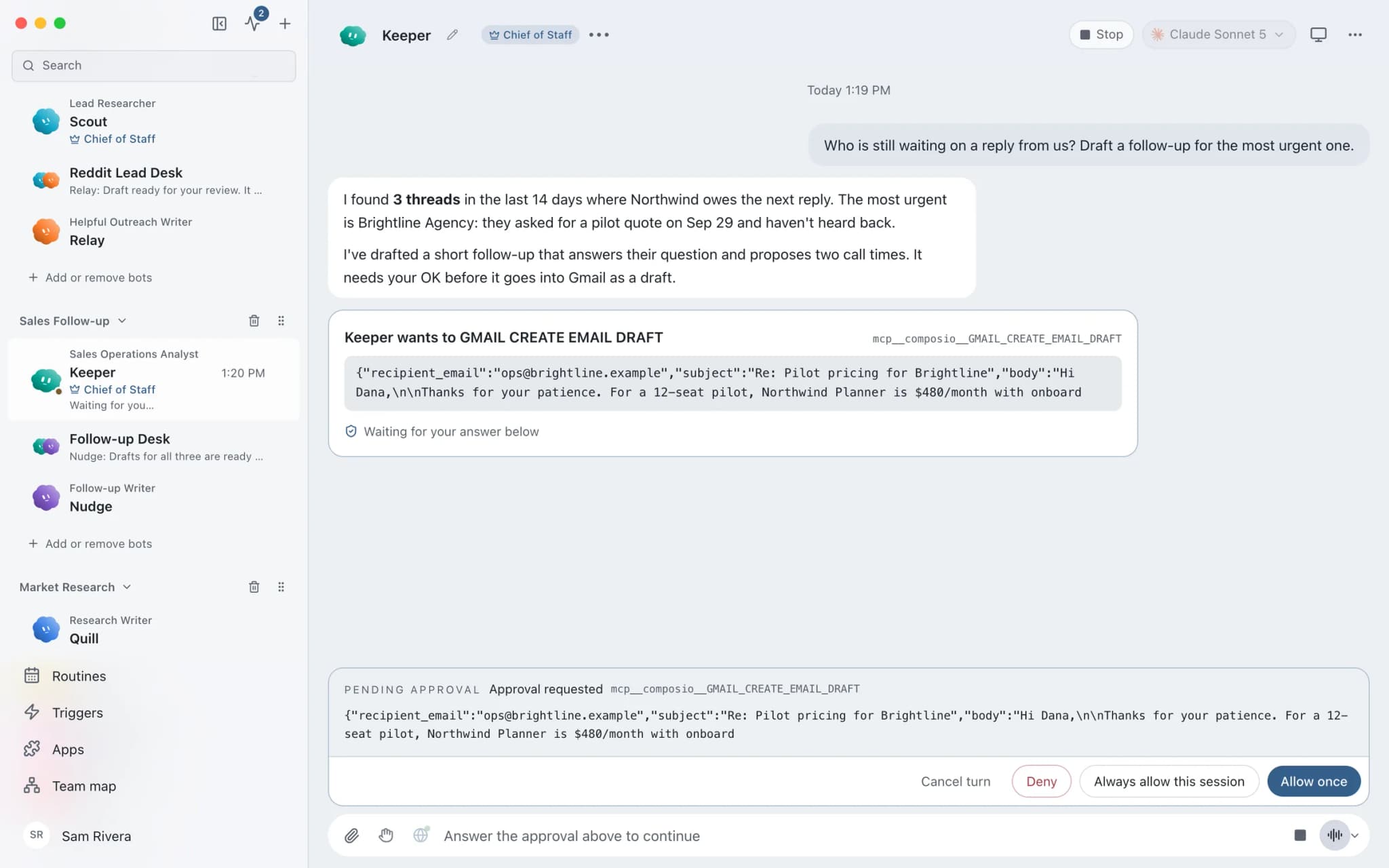
In Ask mode, risky actions such as sending an email become approval cards in the conversation.
In detail
See the jobs step by step.





See it in the app
What it looks like in Brainwrite.
A real screenshot from a demo workspace.
Start faster
Ready-made teams to start from.
Your tools
Apps your team works in.

Gmail
Bots search, label, and read Gmail threads and draft replies in place. Sending waits for your approval.

Stripe
Look up Stripe customers and payments, prepare invoices and refunds for approval, and summarise revenue every week.

Google Calendar
Bots read your Google Calendar, find free slots, and create or move events. Invites wait for your approval.

Notion
Bots search Notion, read and write pages, query databases, and add or update rows and comments.

Reddit
Search subreddits you approve, read threads and rules, and list qualified leads. Posts and comments wait for you.
FAQ
Questions about Brainwrite for solopreneurs
How can a solopreneur use AI agents?
Give them the work nobody else is there to do: sorting the inbox, following up with prospects, chasing invoices, finding leads, and keeping content going. Brainwrite runs a team of bots on your Mac, or on an always-on cloud computer, that drafts this work from the apps you connect. You approve what goes out.
What does it cost to run?
Brainwrite Cloud is $99 a month and includes the desktop app and an always-on cloud computer. AI usage is separate: you use your own Claude, Codex, or other AI account, and your provider bills you. There is no free plan or trial. Each thread shows its token use and cost.
Do I have to build the bots myself?
No. The team library at teams.brainwrite.in has ready-made teams for follow-ups, Reddit leads, blogging, SEO, and more. Each one is a single file you preview before adding. Skills arrive on, routines arrive paused, and apps stay off until you approve them. You can edit any bot afterwards.
Related
Other teams.

Founders
A Chief of Staff bot that delegates your briefs, follow-ups, meeting prep, and competitor watch to specialist bots.

Sales teams
Quiet-deal detection, grounded follow-up drafts, call prep, and CRM cleanup, with reps deciding what gets sent.

Marketing teams
Campaign planning, channel assets, repurposing, and reporting from a bot team that leaves publish and spend decisions to you.

Give your first job to Brainwrite.
Download the app, connect the AI you already pay for, and tell your Chief of Staff what needs doing.
macOS today. Windows and Linux are coming soon.