Control and security
See what each conversation actually costs
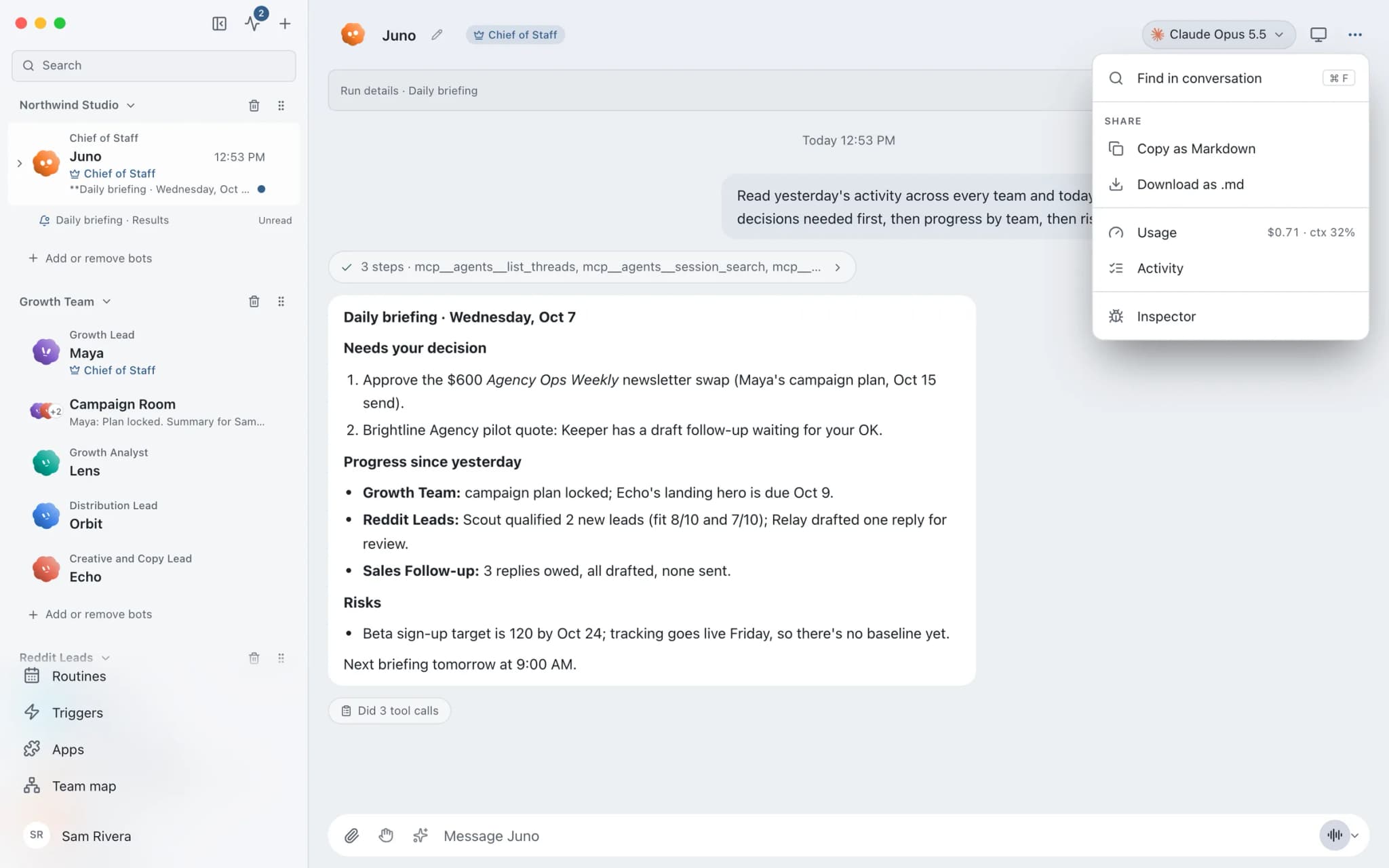
Usage and cost tracking in Brainwrite shows the tokens and spend for each thread, split into uncached input, cached input and output, as your provider reports them. Hover the usage chip in a chat header for totals and the latest message. Group chats show their own figures per thread, and the numbers survive restarting the app.


Research the five biggest Northwind Studio competitors and summarise their pricing.
Your Chief of Staff put a team on it
 Sage· Wren, Blog Writer
 Atlas· Finch, Research & Sourcing Lead
 Dash· Beacon, SEO, Schema & Site Health Auditor
 Penny· Vera, Content Quality Reviewer
- Cost reported by the provider: $1.84
- Uncached input: 182,400 tokens
- Cached input: 611,000 tokens
- Output: 24,900 tokens
DoneDone. Nothing was sent.


What did that research cost?: done. Nothing sent.
- 1Cost reported by the provider: $1.84
- 2Uncached input: 182,400 tokens
- 3Cached input: 611,000 tokens
4 bots on this jobSee it in the app
Usage and cost in Brainwrite.
How it works
How Usage and cost works.
- 01
Glance at the chip
The usage chip in the chat header shows cost when the provider reports it, or input tokens when it does not.
- 02
Hover for the split
Hover the chip for uncached input, cached input and output, for the thread and for the latest message.
- 03
Check group chats
After a participant finishes a turn, the group header shows the current thread's cost or input, plus the latest participant's turn.
- 04
Go deeper in Advanced mode
Turn on Settings → General → Advanced mode to reach Usage in Settings and in a chat's header menu.
Good to know
The details.
Splits that add up
Uncached input plus cached input equals total input. If a provider does not report a cache split, Brainwrite shows total input and output instead.
Unknown is not zero
A missing cache count is shown as an unknown split, never as zero cached input.
Output kept separate
Generated output is listed on its own and never added to an input figure.
Partial costs stay honest
If some turns omit cost, the dollar amount sums only the costs that were reported.
Scoped to the thread
Switching threads switches the figures. Other group threads and private chats are excluded, and the ledger survives restarting the app.
The edges, plainly
- Cost appears only when your provider reports it. Otherwise you see tokens.
- Brainwrite shows usage; your provider bills it. AI usage is not part of any Brainwrite plan.
- The fuller Usage views are in Advanced mode only.






FAQ
Questions about Usage and cost
How much does it cost to run AI agents with Brainwrite?
Two parts. The Brainwrite plan is $99 a month for Brainwrite Cloud or $750 a year for Organisation. AI usage is separate: your model provider bills it under your own account. Brainwrite shows per-thread token and cost figures as the provider reports them.
How can I see how many tokens my AI agent used?
Hover the usage chip in the bot's chat header. It shows the thread's totals and the latest message, split into uncached input, cached input and output. Group chats show the same figures for the current thread in the group header after each participant's turn.
What is cached input in AI token usage?
Cached input is input the provider reports as served from its prompt cache. Uncached input is the rest. Together they equal total input. Brainwrite shows them separately so you can see how much of a conversation was reused, and marks the split unknown when a provider does not report it.
Why does my thread show tokens instead of a dollar cost?
Brainwrite shows cost only when the provider reports it. When it does not, the chip shows uncached input if known, or total input. Brainwrite never estimates a price on the provider's behalf, and a dollar total sums only the turns that reported a cost.
Works well with
Related features.

Bring your own model
Claude, Codex, Grok, Cursor, local models and more, side by side. Your own logins, your own billing.

Multiple Claude accounts
Add Work and Personal Claude logins and choose one per bot. The chat header shows which is in use.

Inspector
Follow tool calls and raw engine output, then export the run with secrets removed.

Threads and groups
Up to three independent threads per bot, plus group chats where several bots share one brief.





Give your first job to Brainwrite.
Download the app, connect the AI you already pay for, and tell your Chief of Staff what needs doing.
macOS today. Windows and Linux are coming soon.