Teams and agents
Keep work and personal Claude separate, bot by bot
Multiple Claude accounts in Brainwrite let you add named Claude logins, such as Work and Personal, and choose which one each bot uses. Each account gets its own Claude configuration directory and its own sign-in, which Claude handles itself. The chat header shows which account a bot is on, and switching one bot leaves the others alone.


Summarise this week's Northwind Studio tickets for the Friday update.
Your Chief of Staff put a team on it
 Nova· Chief of Staff
 Dash· Inbox triager
 Sage· Reply drafter
- 12 tickets closed, 3 still open, 1 blocked on the client.
- Biggest item: the export bug, fixed and confirmed on Wednesday.
- Draft update is in this thread, under 150 words.
- This bot runs on the Work account; your Personal bots are unaffected.
DoneDone. Nothing was sent.


Client work on the Work account: done. Nothing sent.
- 112 tickets closed, 3 still open, 1 blocked on the client.
- 2Biggest item: the export bug, fixed and confirmed on Wednesday.
- 3Draft update is in this thread, under 150 words.
 3 bots on this job
See it in the app
Multiple Claude accounts in Brainwrite.
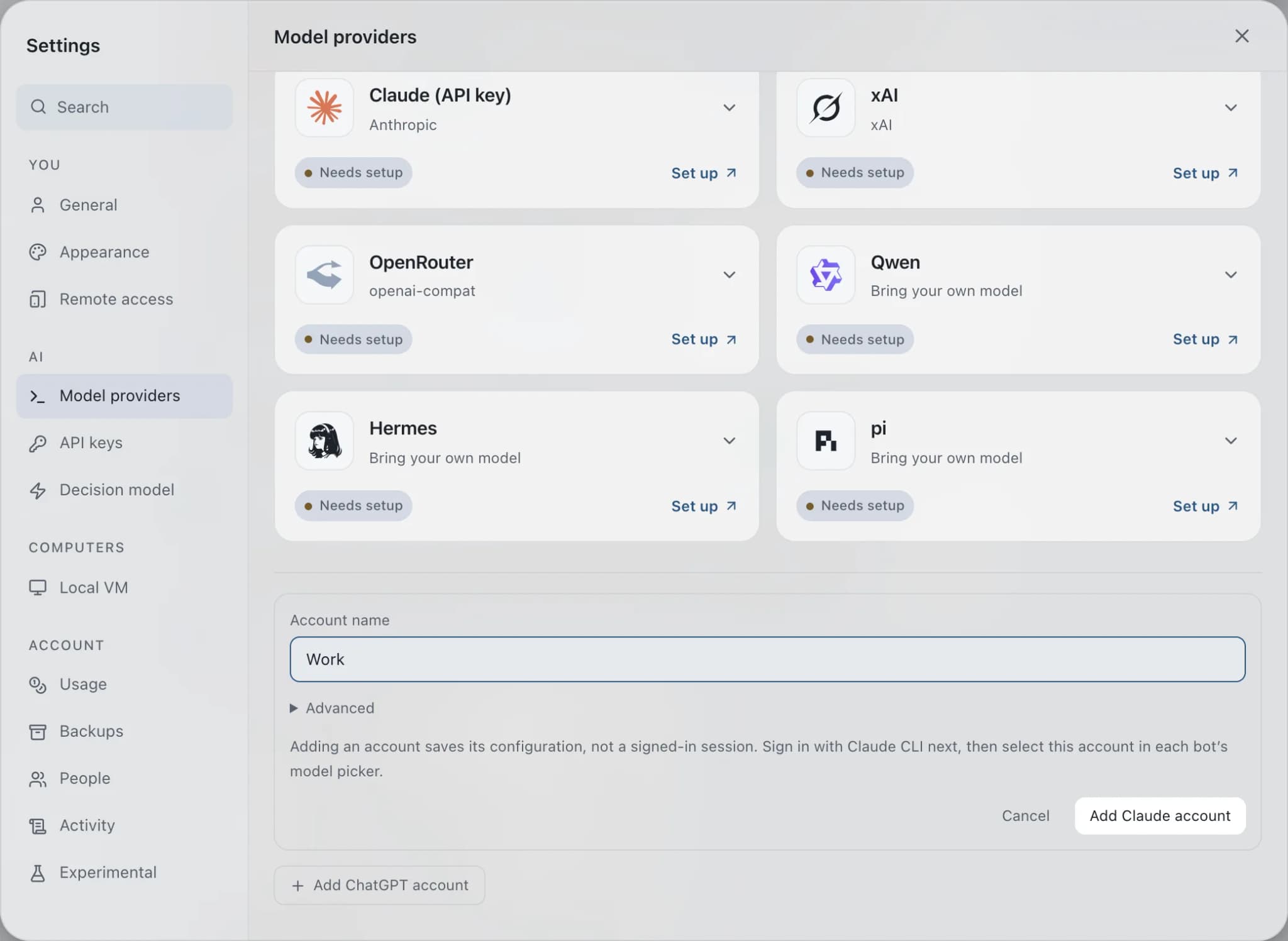
How it works
How Multiple Claude accounts works.
- 01
Add the account
Open Settings → Engines → Add Claude account and give it a name, such as Work or Personal.
- 02
Sign it in
Under Manage account and sign-in, copy the sign-in command, run it on the computer hosting Brainwrite, then choose Check account.
- 03
Assign it to a bot
In the bot's model picker, choose Claude, pick the account in the Account dropdown, then choose a model to save the selection.
- 04
Check the header
The chat header shows the account name, so you always know which login a bot is using.
Good to know
The details.
Default keeps your login
The original Default entry keeps using your existing Claude CLI login. Adding a named account does not copy it.
Claude holds the credentials
Claude handles the browser sign-in and stores its own credentials in the account's configuration directory. No CLI proxy is involved.
Changes apply to future turns
Account changes are blocked while that bot is responding and apply from the next turn. Other bots are unaffected.
History stays put
Changing a bot's account does not erase its conversation history. Claude still appears only once in the provider list.
Use an existing directory
Advanced users can point an account at an existing, separate Claude configuration directory instead of signing in fresh.
The edges, plainly
- Named account management supports Claude only.
- There is no automatic account rotation or fallback. A bot uses the account you chose until you change it.
- Removing an account from Brainwrite does not sign it out or delete its files. Move its bots to another account first.
- Once bots or history use an account, add a new account instead of repointing its directory.




Works with
Apps it's often used with.

Gmail
Bots search, label, and read Gmail threads and draft replies in place. Sending waits for your approval.

Outlook
Bots search Outlook mail, draft replies, file messages, and find meeting times. Sends wait for your approval.

GitHub
Triage GitHub issues, review pull requests, read failing workflow logs, and draft release notes. Merges wait for you.
FAQ
Questions about Multiple Claude accounts
Can I use two Claude accounts at the same time?
Yes. Add each one under Settings → Engines → Add Claude account, sign each in with its own command, then pick the account per bot in the model picker. A Work bot and a Personal bot can run side by side, each using its own Claude login.
Does Brainwrite switch Claude accounts automatically when one hits a limit?
No. There is no automatic rotation or fallback. Each bot uses the account you chose until you change it in the model picker. Changes apply to future turns, are blocked while that bot is responding, and do not affect other bots.
Does Brainwrite store my Claude password?
No. Brainwrite creates a separate configuration directory for each named account and gives you the sign-in command to run. Claude handles the browser sign-in and stores its own credentials there. Your existing login is not copied into the new account.
Can I add multiple accounts for other AI engines?
Named account management currently supports Claude only. For Google Antigravity, you can create another engine instance for each Google account. Each instance has its own private home, token and model catalog, and signing one in never replaces another.
Works well with
Related features.

Bring your own model
Claude, Codex, Grok, Cursor, local models and more, side by side. Your own logins, your own billing.

Usage and cost
Per-thread tokens and cost, split into uncached input, cached input and output.

Threads and groups
Up to three independent threads per bot, plus group chats where several bots share one brief.





Give your first job to Brainwrite.
Download the app, connect the AI you already pay for, and tell your Chief of Staff what needs doing.
macOS today. Windows and Linux are coming soon.