Apps and tools
Bring your own tools over MCP, and test them first
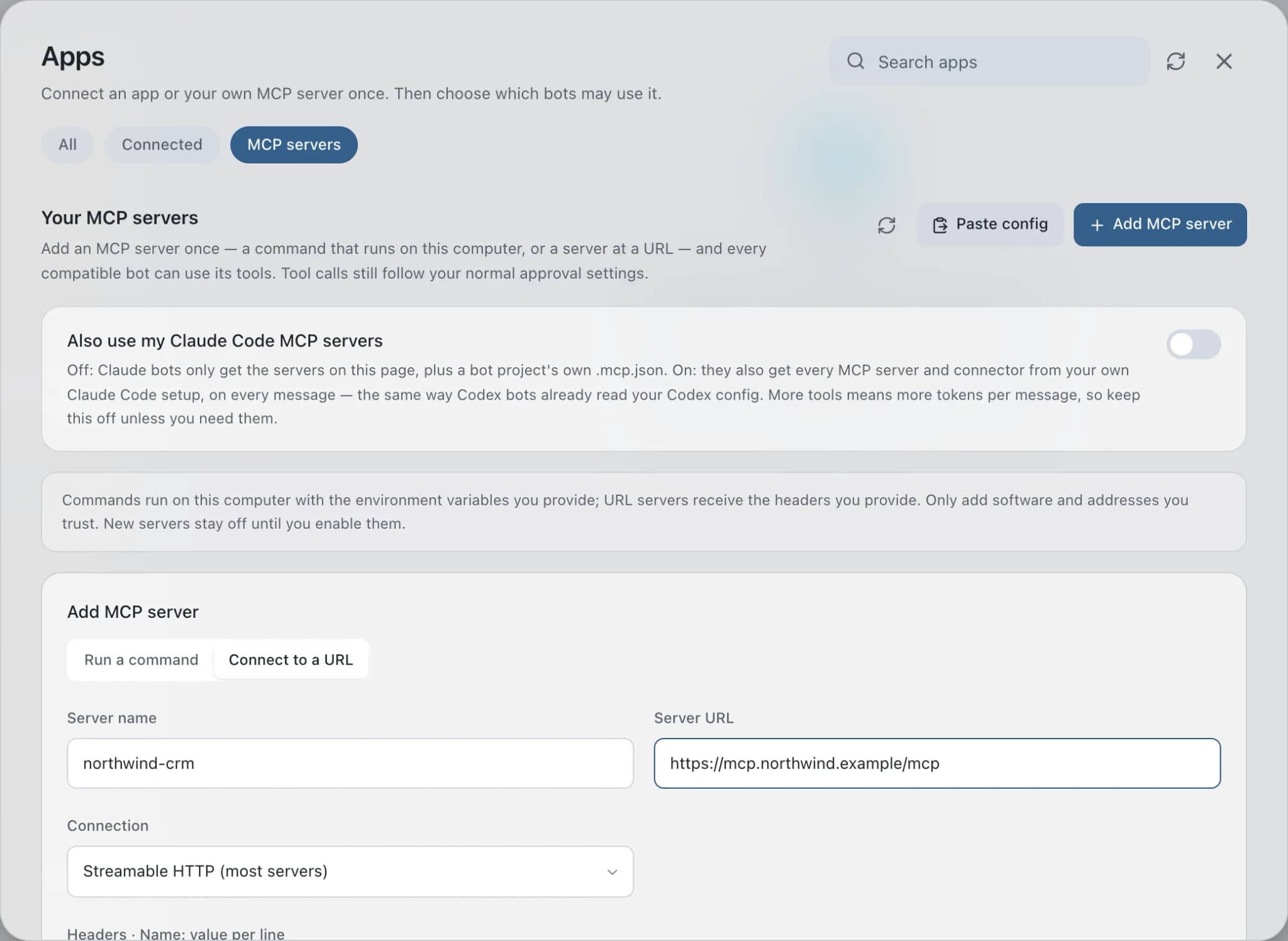
Custom MCP servers in Brainwrite add tools from Model Context Protocol servers you choose, run as a command on your Mac or reached at a URL over Streamable HTTP or SSE. Every compatible bot can then use those tools under your normal approval settings. New servers are saved switched off, so you test the connection and see the tool list before turning one on.


Using the analytics MCP server, how many sign-ups came from the October newsletter?
Your Chief of Staff put a team on it
 Nova· Chief of Staff
 Dash· Triage bot
 Atlas· Rigel, QA and Release Engineer
- Called the analytics server's query tool after your approval.
- October newsletter: 214 sign-ups, 31% of the month.
- September's newsletter brought 168.
- The tool call and result are in the Inspector.
DoneDone. Nothing was sent.


Ask your own data: done. Nothing sent.
- 1Called the analytics server's query tool after your approval.
- 2October newsletter: 214 sign-ups, 31% of the month.
- 3September's newsletter brought 168.
 3 bots on this job
See it in the app
Custom MCP servers in Brainwrite.
How it works
How Custom MCP servers works.
- 01
Open the tab
Choose Connected apps in the sidebar, then the MCP servers tab, then Add server, and give it a Server name.
- 02
Say how to reach it
Run a command: enter the Executable command, one argument per line, and KEY=value variables. Or Connect to a URL: enter the Server URL, pick Streamable HTTP or SSE, and add Headers.
- 03
Save and test
Choose Save; the server is saved switched off. Choose Test to complete the MCP handshake and list the tools it offers.
- 04
Turn it on
Choose Turn on when you are happy with it. New threads pick up the change.
Good to know
The details.
Paste a config
Paste config accepts the mcpServers block from Claude Code, Cursor or Claude Desktop. Each server arrives switched off; test it, then turn it on.
Values are write-only
Brainwrite never shows a saved environment variable or header value again, only its name. Leave a value blank when editing to keep it.
Predictable Claude bots
Claude bots get only these servers plus a project's own .mcp.json, not your personal Claude Code setup. Loading that setup cost one measured desktop about 407 extra tools and 10k tokens per call.
Opt in to your Claude Code servers
Turn on Also use my Claude Code MCP servers to give Claude bots those servers too, on every turn.
Off without deleting
Turn off keeps a server saved without offering its tools. Remove it with its remove button when you are done.
The edges, plainly
- Command servers run on your Mac with the variables you provide, and URL servers receive the headers you provide. Only add software and addresses you trust.
- Changes apply to new threads, not to ones already running.



Works with
Apps it's often used with.

GitHub
Triage GitHub issues, review pull requests, read failing workflow logs, and draft release notes. Merges wait for you.

Linear
File clean Linear issues from bug reports, catch duplicates, review the current cycle, and draft project updates.

Supabase
Answer questions with read-only Supabase SQL, read schemas and logs, and keep migrations to bots you choose.

Sentry
Triage new Sentry errors, read events and tags, check release health, and resolve or assign issues.
FAQ
Questions about Custom MCP servers
What is an MCP server?
An MCP server offers tools to AI agents over the Model Context Protocol. It can be a program that runs on your computer or a service at a URL. In Brainwrite, once you add and turn on a server, every compatible bot can call its tools, subject to your approval settings.
Can I use my Claude Code MCP servers in Brainwrite?
Yes, two ways. Paste the mcpServers block from Claude Code, Cursor or Claude Desktop with Paste config, then test and turn each server on. Or turn on Also use my Claude Code MCP servers to give Claude bots your existing servers on every turn. It is off by default to save tokens.
Does Brainwrite support remote MCP servers?
Yes. Choose Connect to a URL, enter the Server URL, and pick Streamable HTTP for most servers or SSE for older ones. Put tokens in Headers, one Name: value per line. Brainwrite never shows a saved header value again.
Do MCP tool calls need approval?
MCP tool calls follow your normal approval settings, the same as any other tool. Adding a server makes its tools available to compatible bots; it does not pre-approve them. Test each server before turning it on so you know exactly which tools it offers.
Works well with
Related features.

Connected apps
Gmail, GitHub, Slack, Notion and hundreds more via OAuth, with per-bot tool grants.

Secrets
Bots use API tokens by name. The value goes only to one https site and never reaches the chat.

Approvals
Risky actions become cards you approve or deny in the conversation. Ask or Full Access per thread.

Bring your own model
Claude, Codex, Grok, Cursor, local models and more, side by side. Your own logins, your own billing.





Give your first job to Brainwrite.
Download the app, connect the AI you already pay for, and tell your Chief of Staff what needs doing.
macOS today. Windows and Linux are coming soon.